Back Tab Key. The Back Tab key moves the cursor back
to
the first character
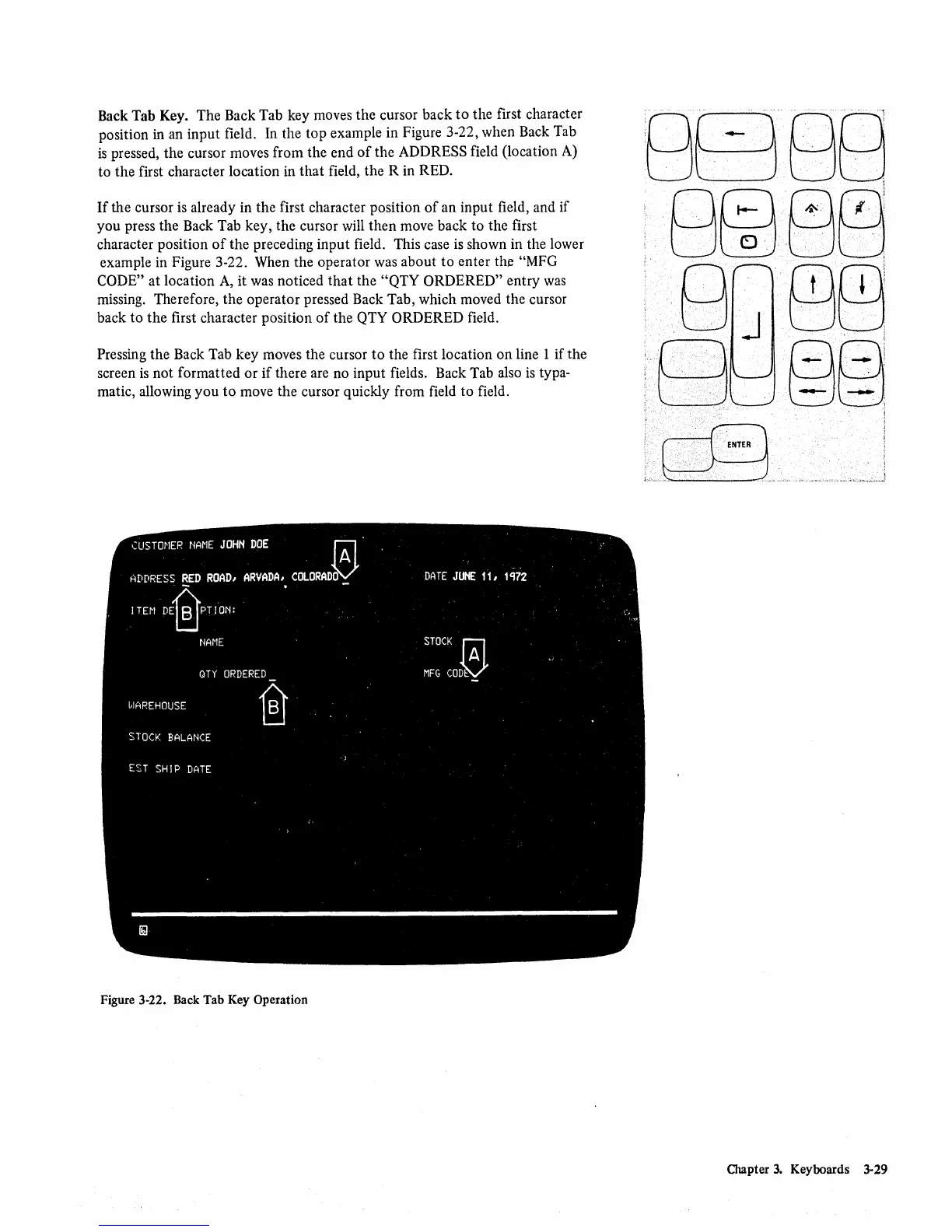
position in an input field. In the
top
example in Figure 3-22, when Back Tab
is
pressed, the cursor moves from the end
of
the ADDRESS field (location A)
to
the
first character location
in
that
field, the R in RED.
If
the cursor
is
already in the first character position
of
an input field, and if
you press the Back Tab key, the cursor will then move back to the first
character position
of
the preceding input field. This case
is
shown in the lower
example in Figure 3-22. When the operator was about
to
enter the "MFG
CODE"
at location
A,
it was noticed
that
the
"QTY
ORDERED" entry
was
missing. Therefore, the operator pressed Back Tab, which moved the cursor
back to
the
first character position
of
the QTY ORDERED field.
Pressing the Back Tab key moves the cursor to the first location
on
line 1 if the
screen
is
not formatted
or
if
there are no input fields. Back Tab also
is
typa-
matic, allowing
you
to
move the cursor quickly from field
to
field.
Figure 3-22. Back Tab
Key
Operation
Chapter
3.
Keyboards 3-29









 To Next Page