15
REMOTE CONTROL
Remote control (CI-V) information
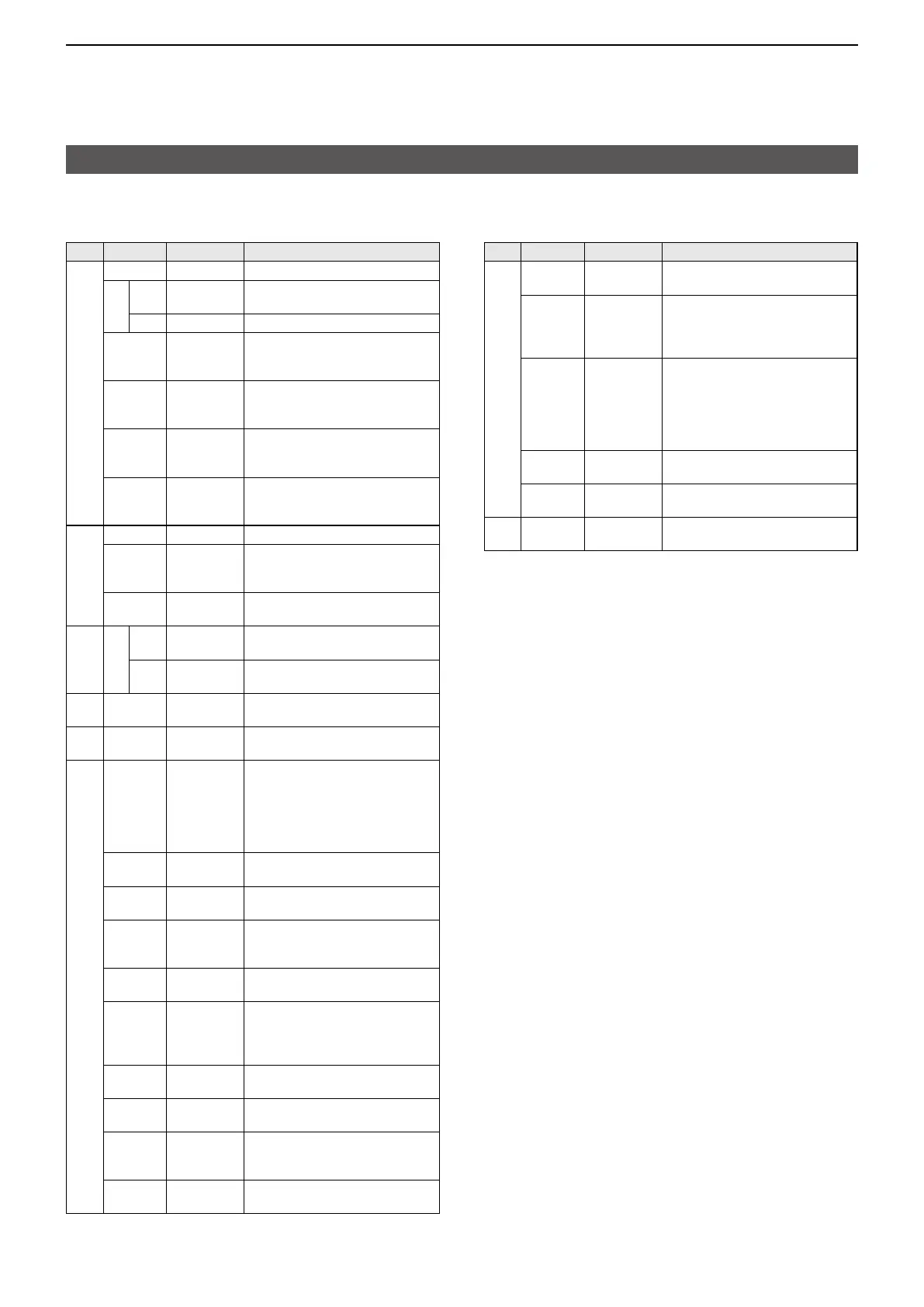
D Command table
Cmd�
Sub cmd� Data Description
22 00 See p� 25� Set the DV TX data (Up to 30 byte)
01 00* 00/01 Set the Auto DV RX data output
(00=OFF, 01=ON)
01 See p� 25� Set the DV RX data for transceive
02* 00/01 SET > DV Set >
Send/read the DV Data TX setting
(00=PTT, 01=Auto)
03* 00/01 SET > DV Set >
DV Fast Data >
Send/read the
Fast Data setting
(00=OFF, 01=ON)
04* 00/01 SET > DV Set >
DV Fast Data >
Send/read the GPS Data Speed setting
(00=Slow, 01=Fast)
05* 00 ~ 10 SET > DV Set >
DV Fast Data >
Send/read the TX Delay (PTT) setting
( 00=OFF, 01=1sec ~ 10=10sec)
23 00*
1
See p� 25� Read the position status
01*
00/01/03
GPS > GPS Set >
Send/read the GPS Select setting
(00=OFF, 01=ON, 03=Manual)
02* See p� 21� GPS > GPS Set >
Send/read the Manual Position setting
24 00 00* 00/01 Send/read TX output power setting
(00=OFF, 01=ON)
01 00/01
Set the TX output power for transceive
(00=OFF, 01=ON)
25* See p� 26� Send/read the selected or
unselected VFO frequency
26* See p� 26�
Send/read the selected or unselected
VFO’s operating mode and filter
27* 00 See p� 26� Read the Scope waveform data
( Only when “Scope ON/OFF status”
(Command: 27 10) and “Scope
data output” (Command: 27 11) are
set to “ON,” outputs the waveform
data to the controller�)
10 00/01
Send/read the Scope ON/OFF status
(00=OFF, 01=ON)
11 00/01
Send/read the Scope wave data output
(00=OFF, 01=ON)
12 00 Send/read the Main or Sub scope
setting
(00=Main (fixed))
13 00
Send/read the Single/Dual scope setting
(00=Single (fixed))
14 0000/
0001
Send/read the Scope Center mode
or Fixed mode setting
( 0000=CENTER mode,
0001=FIX mode)
15 See p� 27� Send/read the Span setting in the
Center mode Scope
16 0001 ~ 0003 Send/read the Edge number setting
in the Fixed mode Scope
17 0000/
0001
Send/read the Scope hold function
ON/OFF status
(0000=OFF, 0001=ON)
19 See p� 27� Send/read the Scope Reference
level setting
Cmd�
Sub cmd� Data Description
27* 1A 0000 ~ 0002 Send/read the Sweep speed setting
(0000=FAST, 0001=MID, 0002=SLOW)
1B 00/01 SCOPE > SCOPE SET >
Send/read the Scope during Tx
(CENTER TYPE) setting
(00=OFF, 01=ON)
1C 00 ~ 02 SCOPE > SCOPE SET >
Send/read the CENTER Type
Display setting
( 00=Filter Center,
01=
Carrier Point Center,
02=
Carrier Point Center (Abs� Freq�))
1D 0000/
0001
Send/read the Scope VBW setting
(0000=NAR, 0001=WIDE)
1E See p� 27� Send/read the Scope Fixed edge
frequencies
28 00 00 ~ 08 Transmit the Voice TX Memory
( 00=Stop, 01=T1 ~ 08=T8)
*(Asterisk) Send/read data
*
1
Read only data
*
2
Send only data
*
3
In the CW mode, if the [PTT] or an external TX switch is ON, or the
Break-in function is ON, a message will be transmitted as CW code
when you send it from your PC�
*
4
Sending the power ON command (18 01) turns ON the transceiver
when the transceiver is OFF (Standby/Shutdown)�
*
5
To insert a counter, first clear the other channel’s counter�
*
6
Set at least 1 GPS sentence to ON�
Up to 4 GPS sentences can be set to ON at the same time�
*
7
Output setting is automatically set to OFF after turning OFF the
transceiver�





 To Next Page