61
7
SCANS
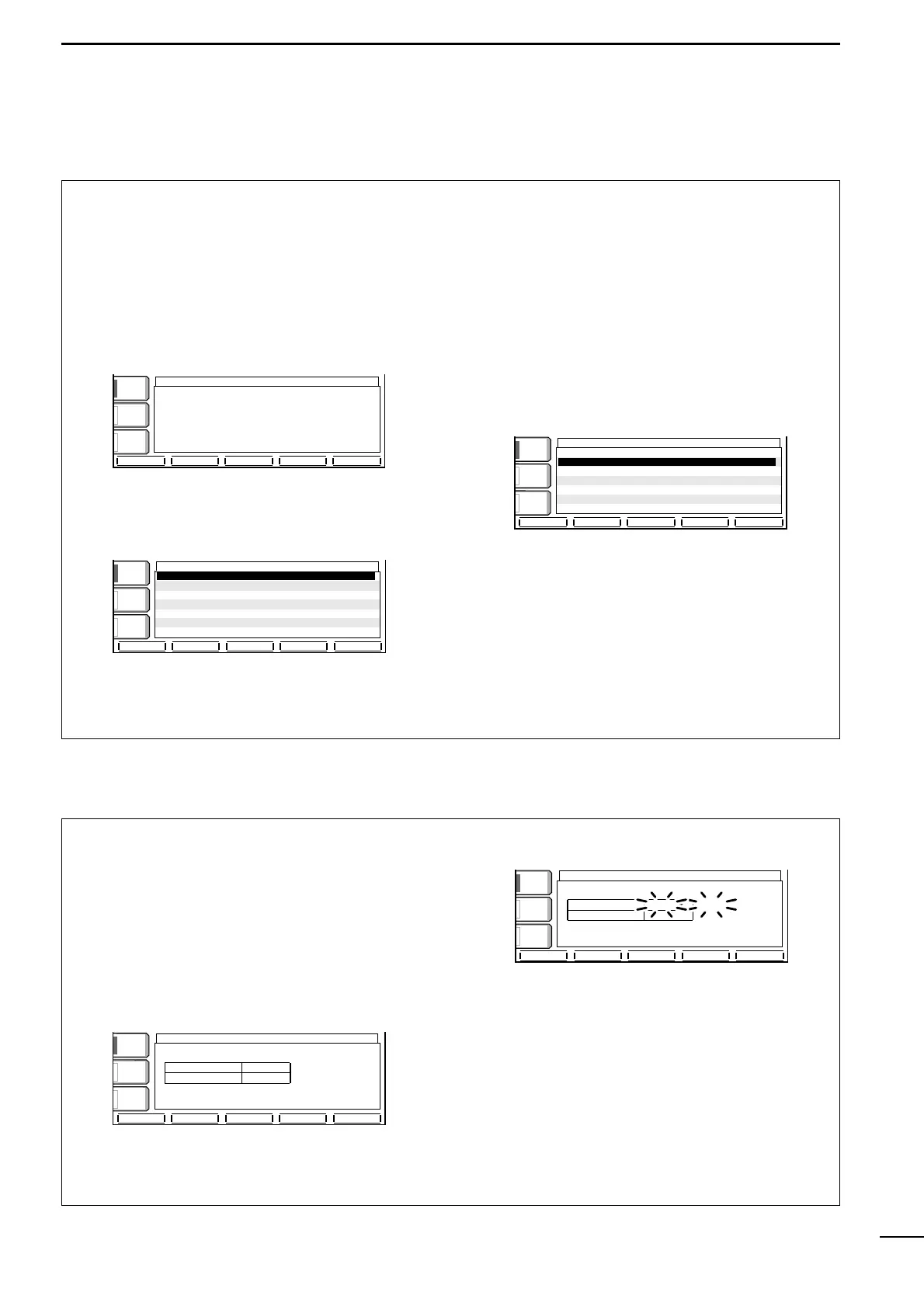
■ Scan set mode
Scan set mode is used for programming scanning
speed and scan resume condition.
•Scan speed
The transceiver has 2 speeds for scanning, high and
low.
q Push [EXIT/SET] several times to close a multi-
function screen, if necessary.
w Push [(F-5)SCAN] to select the scan screen.
e Push [(F-5)SET] to select the scan set mode
screen.
r Push [(F-1)Y] to select the scan speed item.
t Rotate the tuning dial to select the scan speed.
•Push [(F-3)DEF] to select the default condition.
y Push [EXIT/SET] to exit the scan set mode.
•Scan resume condition
This item sets the scan resume function ON or OFF.
ON: scan resumes 10 sec. after stopping on a signal
(or 1 sec. after a signal disappears); OFF: scan does
not resume after stopping on a signal.
q Push [EXIT/SET] several times to close a multi-
function screen, if necessary.
w Push [(F-5)SCAN] to select the scan screen.
e Push [(F-5)SET] to select the scan set mode
screen.
r Push [(F-2)Z] to select the scan resume condition
item.
t Rotate the tuning dial to turn the scan resume
function ON or OFF.
•Push [(F-3)DEF] to select the default condition.
y Push [EXIT/SET] to exit the scan set mode.
é
è
DEF
SCAN SET
COMPCOMP
OFFOFF
WIDEWIDE
AGCAGC
MIDMID
VOXVOX
OFFOFF
SCAN SpeedSCAN Speed HIGHHIGH
SCAN ResumeSCAN Resume ONON
é
è
DEF
SCAN SET
COMPCOMP
OFFOFF
WIDEWIDE
AGCAGC
MIDMID
VOXVOX
OFFOFF
SCAN SpeedSCAN Speed HIGHHIGH
SCAN ResumeSCAN Resume ONON
PROGPROG
∂
F FINEFINE
∂
F SPANF SPAN
SETSET
SCANSCAN
COMPCOMP
OFFOFF
WIDEWIDE
AGCAGC
MIDMID
VOXVOX
OFFOFF
∂ F SpanSpan: ±±10kHz10kHz
ProgrammedProgrammed P1:P1:0.500.00MHz0.500.00MHz
scanscan edgesedges P2:P2: 29.999.99MHz29.999.99MHz
■ Tone scan
The transceiver can detect the subaudible tone fre-
quency in a received signal. By monitoring a signal
that is being transmitted on a repeater input fre-
quency, you can determine the tone frequency re-
quired to access the repeater.
q Set the desired frequency or memory channel to
be checked for a tone frequency.
w Push [AM/FM] several times to select FM mode.
e Push [TONE] for 1 sec. to enter the tone frequency
screen.
r Push [(F-1)Y] or [(F-2)Z] to check the repeater
tone frequency or tone squelch frequency, respec-
tively. (pgs. 47, 48)
t Push [(F-5)T-SCAN] to start the tone scan.
•“SCAN” flashes while scanning.
y When the tone frequency is detected, the tone
scan pauses.
•The tone frequency is set temporarily on a memory
channel. Program into the memory channel to store the
tone frequency permanently.
•The decoded tone frequency is used for the repeater
tone frequency or tone squelch frequency.
u To stop the scan, push [(F-5)T-SCAN].
i Push [EXIT/SET] to exit the tone frequency
screen.
TONE FREQUENCYTONE FREQUENCY
188.8Hz188.8Hz SCANSCAN
88.5Hz88.5HzT-SQL TONET-SQL TONE
REPEATER TONEREPEATER TONE
TONETONE
AGCAGC
FASTFAST
VOXVOX
OFFOFF
T-SCANT-SCAN
T-SCANT-SCAN
é
è
DEFDEF
TONE FREQUENCYTONE FREQUENCY
88.5Hz88.5Hz
88.5Hz88.5HzT-SQL TONET-SQL TONE
REPEATER TONEREPEATER TONE
TONETONE
AGCAGC
FASTFAST
VOXVOX
OFFOFF



 To Next Page