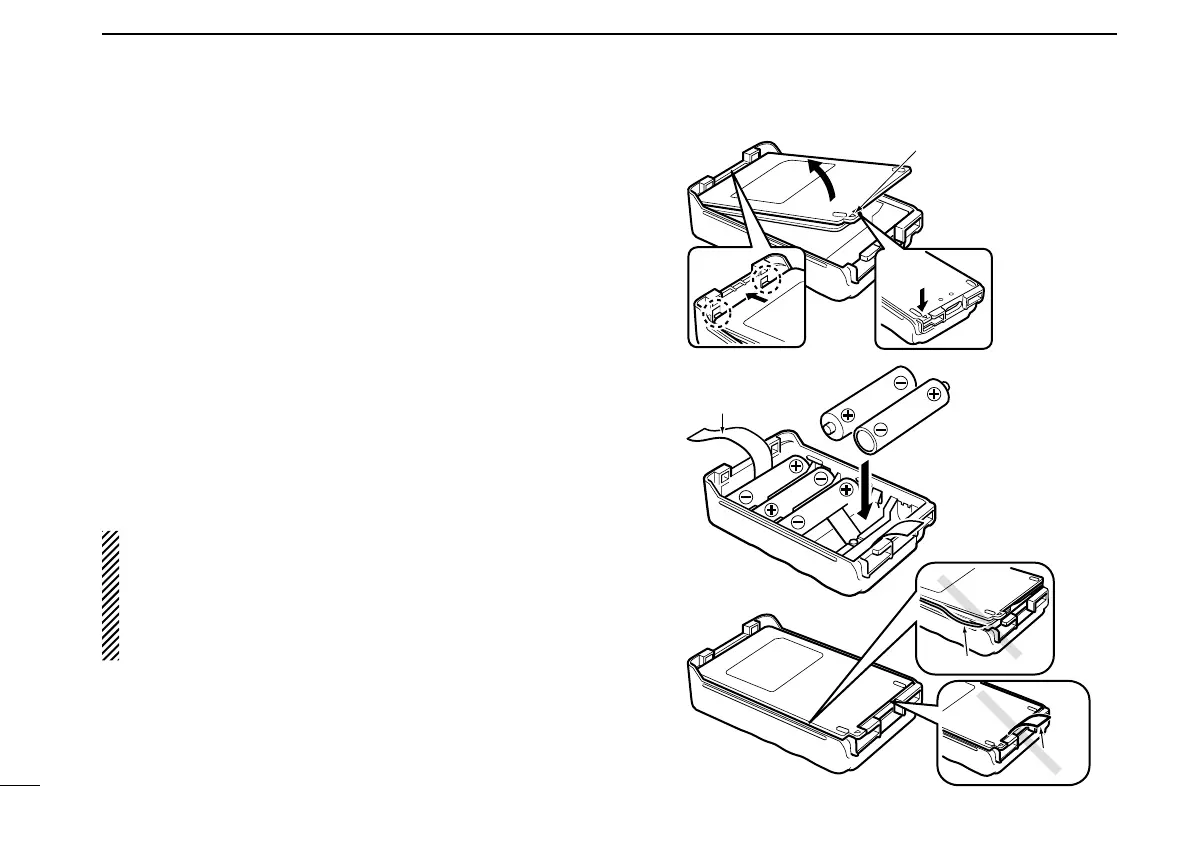
■ Optional BP-226 battery case
Whenusingtheoptionalbatterycaseattachedtothetrans-
ceiver, install 5 × AA (LR6) size alkaline batteries as il-
lustrated at right. TheBP-226 is constructedto the IPX4
waterproofstandard(IEC60529,2001).
q Hook your finger under the latch, and open the cover in the
directionofthearrow(q).(Fig.1)
wThen,install5×AA(R6)sizealkalinebatteries.(Fig.2)
•Installthealkalinebatteriesonly.
•Besuretoobservethecorrectpolarity.
•Besuretopintheribbonunderthebatteries.Leaveenoughof
the ribbon ends extended, to pull when removing the batteries.
eClosethecoverwithttinginthedirectionofthearrow(w)
rst,thenrmthelatchinplace(e). (Fig.1)
•Besuretothegasketandtheribbonaresetcorrectly,anddo
not protrude out of the battery case. (Fig.3)
CAUTION:
•When installing batteries, make surethey are all the
same brand,typeandcapacity.Also,donotmix new
and old batteries together.
•Keepbatterycontactsclean.It’sagoodideatoocca-
sionally clean them.
q
w
e
BP-226
Latch
Fig.1
Fig.2
Ribbon
Fig.3
Gasket
Ribbon
24
9
BATTERYCHARGING



 To Next Page