存储操作 5
24
1
7
4
10
15
18
2
8
13
5
11
16
3
9
14
6
12
17
基础手册
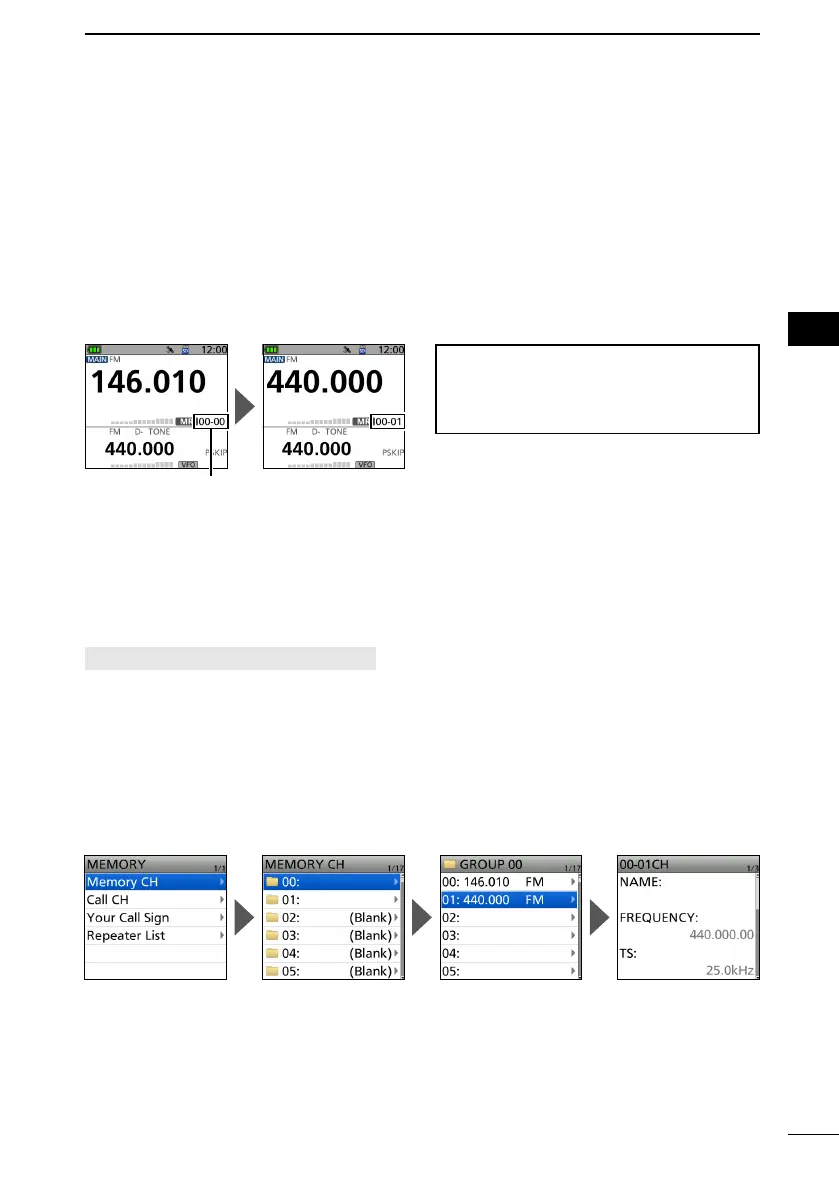
■ 选择存储频道
在存储模式下,您可以通过旋转
[DIAL] 来选择存储频道。
1. Push [MR] to enter the Memory mode.
L For only the ID-52A, pushing [MR] alternately selects the Memory and Weather
Channel modes.
2. Rotate [DIAL].
• Selects a Memory channel.
L To select the Memory group, push [QUICK], and then select “Group Select.”
L Blank channels are not selected.
提示
:依次选择不同组中的频道
在快捷菜单窗口中将“频道选择组范
围”设置为“所有组”。
■ 查看存储频道内容
您可以在
MEMORY 屏幕上查看存储频道内容。
例如: 查看00组01频道的内容。
[MENU] > MEMORY > Memory CH
1. Push [MENU].
2. Select “MEMORY” on page 2 of the MENU screen.
3. Select “Memory CH.”
4. Select Group “00.”
5. Select Channel “01.”
• Channel contents are displayed.
L Rotate [DIAL] to scroll the screen.
L To exit the MENU screen, push [MENU].
存储组号和频道号



 To Next Page