D-STAR 操作
51
D-STAR GUIDE
■ 访问中继器
本节介绍如何检查您是否可以访问您的本地中继器(访问中继器),以及您的信号是否成
功发送到目标中继器。
TIP: If your call sign (MY) has not been set, or your call sign and D-STAR equipment
have not been registered at a D-STAR repeater, see pages 45 ~ 48.
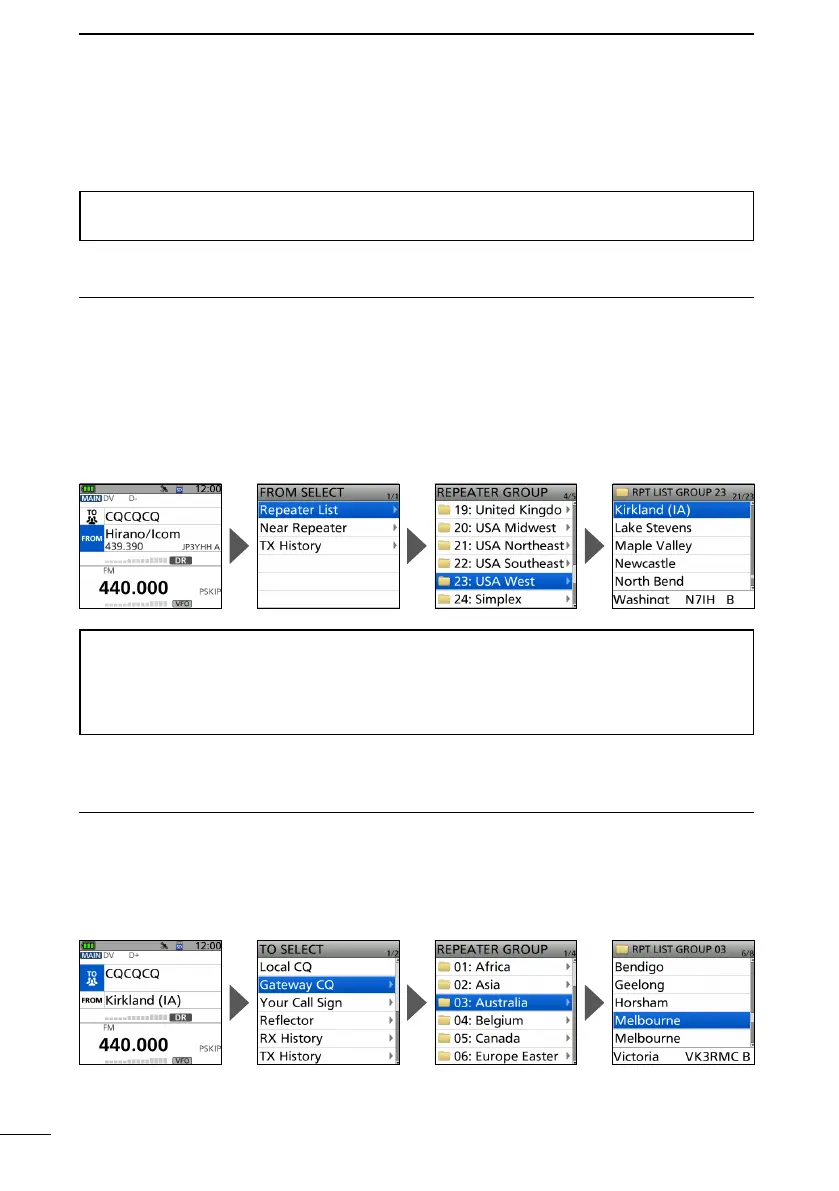
Step 1: Set “FROM” (Access repeater).
1. Push D-pad() to select “FROM,” and then push [ENT].
2. Select “Repeater List.”
3. Select the repeater group where your access repeater is listed.
4. Select your access repeater.
• Returns to the DR screen, and the selected repeater name is displayed in “FROM.”
By just selecting the repeater name, the repeater call sign, its frequency, duplex
setting, and frequency oset are automatically set.
A repeater list here is just an example.
Step 2: Set “TO” (Destination).
1. Push D-pad() to select “TO,” and then push [ENT].
2. Select “Gateway CQ.”
3. Select the repeater group where your destination repeater is listed.
4. Select your destination repeater.
• Returns to the DR screen, and the selected repeater name is displayed in “FROM.”
TIP: There are several ways to set your access repeater. (p. 63)
• Setting by [DIAL]
• Searching for a repeater using the DR scan
• Searching for the nearest repeater
• Setting from the TX History


 To Next Page