RECHARGE THE INTERNAL BATTERIES of the 75 mm POM and TITANIUM HOUSING
To gain access to the internal battery holder, loosen the four hexagonal screws on the CTD top cover.
Gently pull out the top cover from the CTD housing. During this operation, remove any water
droplets around the top cover to prevent them from seeping into the housing. The battery holder
contains 3xAlkaline type AA cell, assembled in series, to create a unique 4.5VDC battery pack.
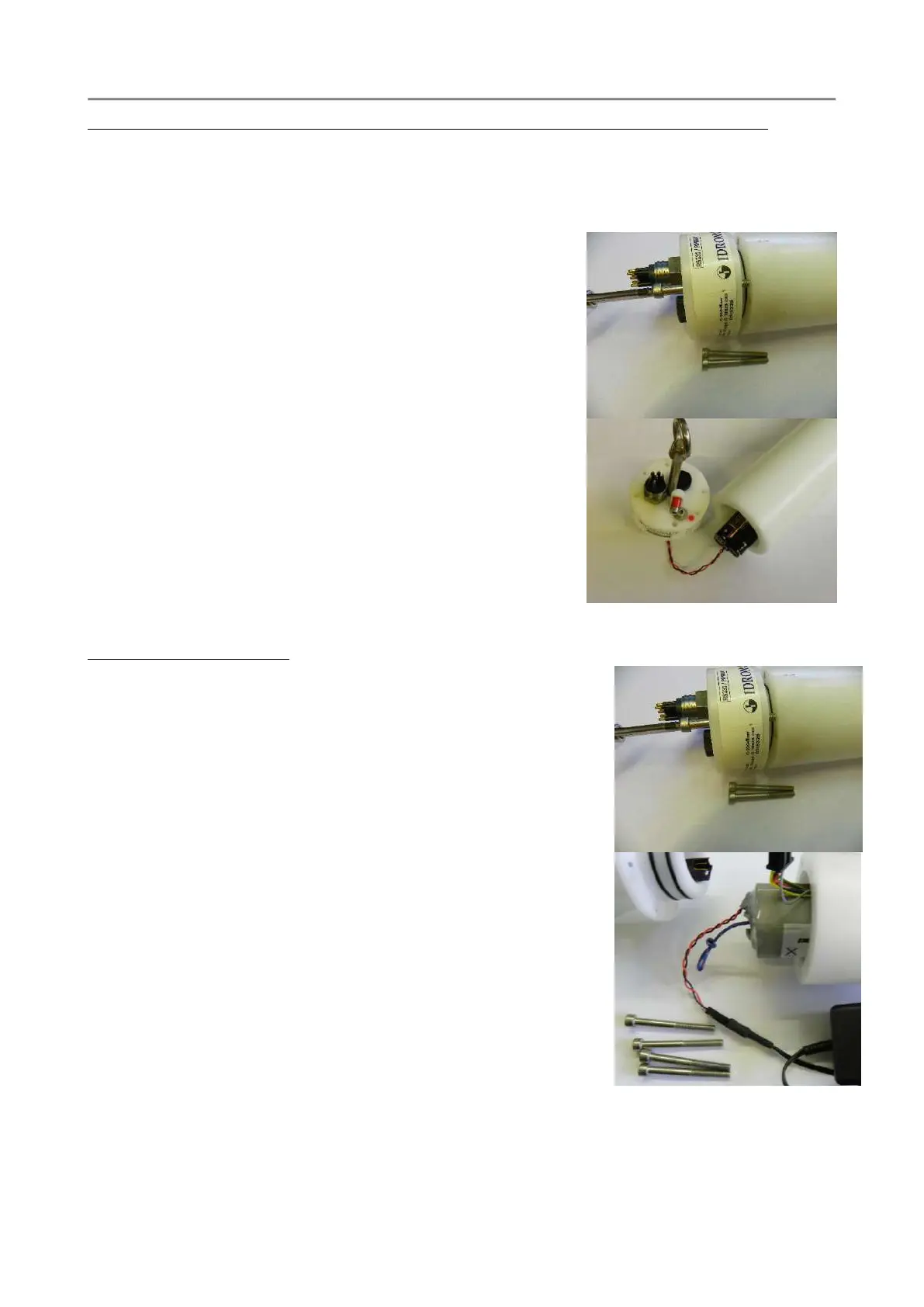
1. Dry the probe and lay it down on a table.
2. Remove the four screws on the probe cover with the
hexagonal wrench included in the CTD accessories.
3. In order to safely remove the top cover use two of the
screw to gently pull-out the cover as per the picture.
4. When extracting the cover, dry the fissure between the
cover and the body of probe with a strip of paper inserted
edgewise and dry any trace of water in proximity of the
external side of the o-ring.
5. Pull the battery holder out and remove the dead batteries.
6. Install the new batteries.
7. Insert the battery pack in the CTD housing
8. Lifting the CTD vertically helps to properly insert and
mount the top cover.
9. Check the correct position of the o-ring and close the CTD
with the four screws. Gradually tighten the four screws
in sequence such as to close the cover uniformly
Rechargeable battery pack
1. Dry the probe and lay it down on a table.
2. Remove the four screws on the probe cover with the
hexagonal wrench included in the CTD accessories.
3. In order to safely remove the top cover use two of the screw
to gently pull-out the cover as per the picture.
4. When extracting the cover, dry the fissure between the cover
and the body of probe with a strip of paper inserted edgewise
and dry any trace of water in proximity of the external side
of the o-ring.
5. Pull the battery pack off and remove the cable
connector.After connecting the battery pack, the charger
immediately checks the nominal voltage thus automatically
selecting the most appropriate action to carry out. Detailed
information is available on the battery charger
documentation.
6. At the end of the battery charging, insert the battery pack in
the CTD housing, connect the wiring to the top cover and
mount it on the CTD. Lifting the CTD vertically helps to
properly insert and mount the top cover.
7. Check the correct position of the o-ring and close the CTD with the four screws. Gradually
tighten the four screws in sequence such as to close the cover uniformly



 To Next Page