101-091 11
FGR006 – Version 3.0
–
FGR006 FINGERPRINT & PROXIMITY READER
4.6.2 Reader connection
If you install the reader in a long distance between the ACU and the reader, you have to remind that there
will be a voltage drop between both ends of GND wire. For example, if you connect a reader with 100mA
current consumption at 100m distance (assume to using DC resistance of cable of 100Ω/100m) and the
reader power is supplied from the ACU, the voltage drop of the GND wire will be 1V. In this case, the
Wiegand data signal cannot be measured lower than 1V.
The most of ACU is capturing the signal by the voltage level of data input and 1V is the critical point
whether the ACU read the data logic “1” or logic “0” therefore the reader output can not be read correctly
from the ACU.
You have to think about how you reduce the voltage drop between both ends of GND wire. There will be
two methods to reduce the voltage drop and ACU can read data correctly.
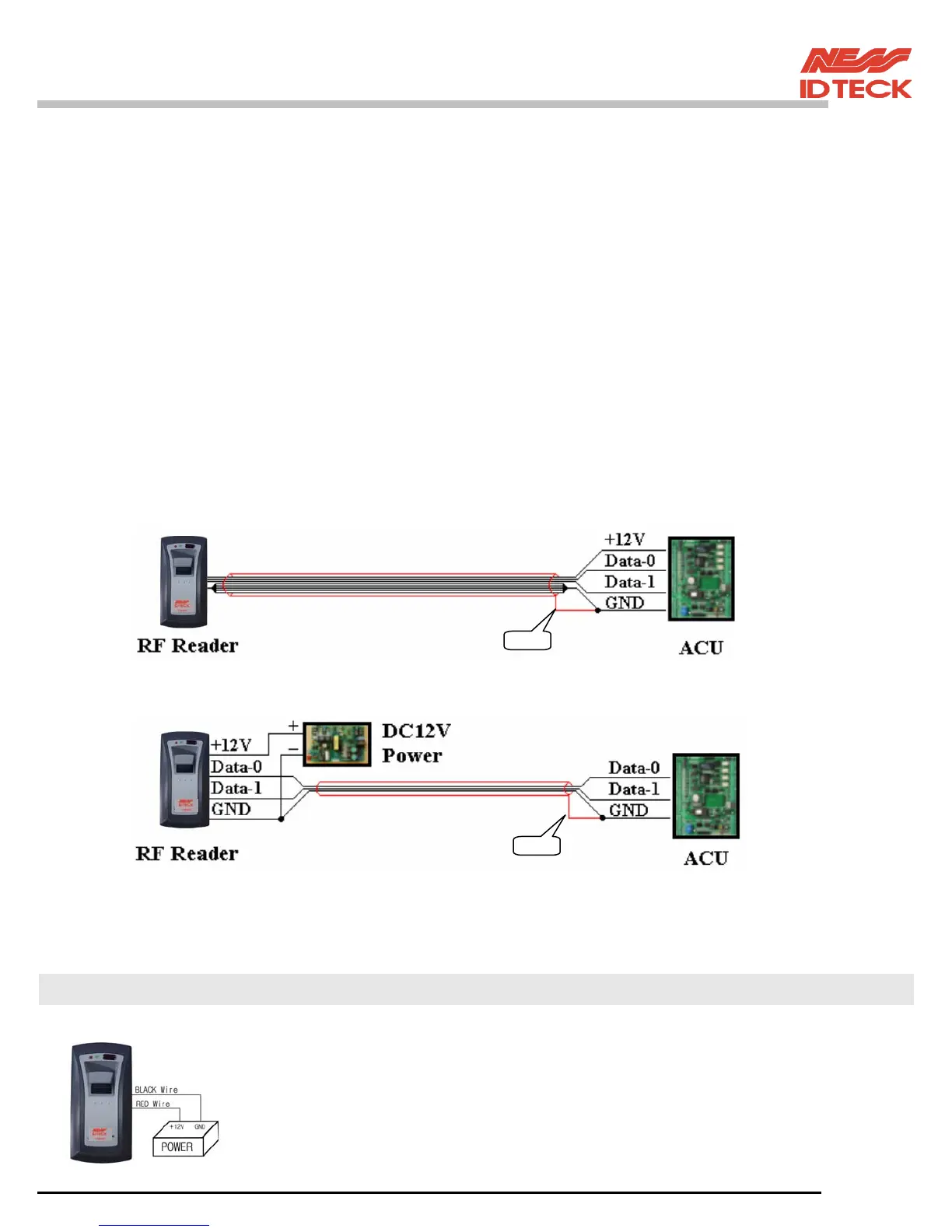
Reduce the DC resistance of GND wire; Using thick cable or add more wires to GND wire in parallel.
If you connect 4 wires in parallel for GND, the DC resistance of GND wire will be reduced to 1/4 of
single wire.
Use separate power for the reader; Disconnect +12V wire from the ACU and connect external power
supply to the reader nearby then there will be no current flow through the GND wire and no voltage
drop between both ends of GND wire.
< Reader connection using additional wires >
< Reader connection using external power supply >
4.7 For Example of Wiring
4.7.1 Power
- Connect (+) wire of DC 12V power to Red wire
- Connect Power GND (-) wire of DC 12V to Black wire
Shield
Shield


 To Next Page