GB
6 - USE AND OPERATION MASTER 880MP E-volution
6 - Pag. 4 / 17
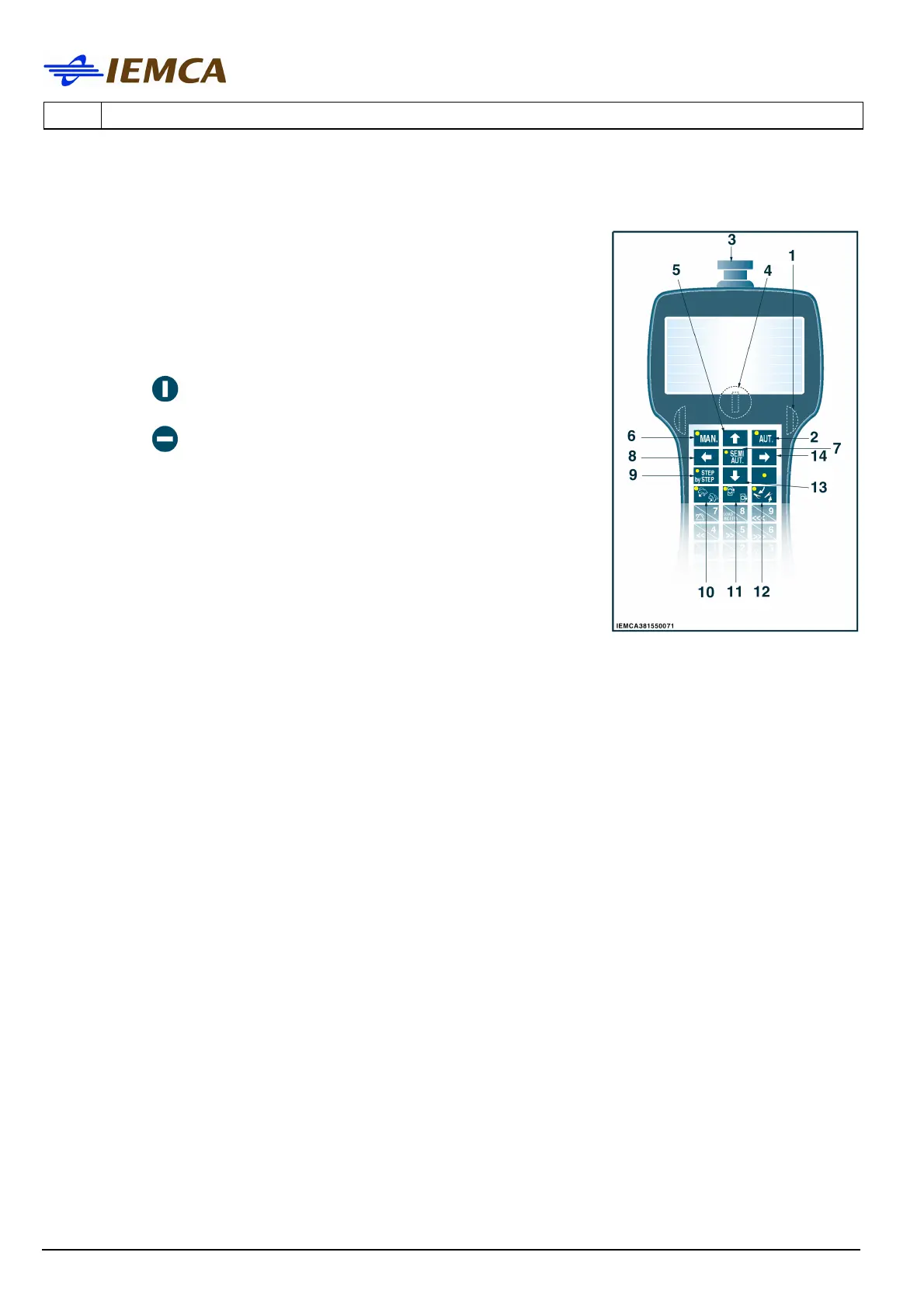
6.2 DESCRIPTION OF KEYBOARD CONTROLS
1 Start buttons: opposite buttons that when pushed together
will start some procedures. Press the two buttons, and at the
same time, the key corresponding to the required function.
2 Selects the automatic mode.
3 Stops the bar feeder: to restart you must manually un-lock
the button.
4 Selects the keyboard modes:
-in the
position; the "messages display" mode is
selected.
-in the
position the "parameters display" mode is
selected.
5 Multifunction
- Allows you to scroll the page upwards.
- Moves the cursor upwards.
- Increases the preset data programming of date and time,
by one unit.
6 Selects the manual mode.
7 Selects the semi-automatic mode.
Push to select, press again to unselect.
8 Multifunction
- Selects the previous parameter.
- Moves the cursor towards the left.
9 Starts "step-by-step" movement of an operation cycle: every push of the key initiates a step
in the cycle.
10 Lifts and lowers the bar selectors (LED illuminated when selectors are at their "down"
position).
11 Opens/Closes the clamps (LED illuminated when clamps are open).
12 Lift and lower the pneumatic bar drop controls device (led on when this device is low).
13 Multifunction
- Allows the downwards scrolling of the page.
- Moves the cursor downwards.
- Decreases the programming mode of date and time by one unit
14 Multifunction
- Selects the next parameter
- Moves the cursor towards the right.
16 Multifunction
- Number setting.
- Moves the bar pusher to a high speed.
- Press the two running push-buttons and then the key.






 To Next Page