10
Changingfrommenulevel1tomenulevel2:•
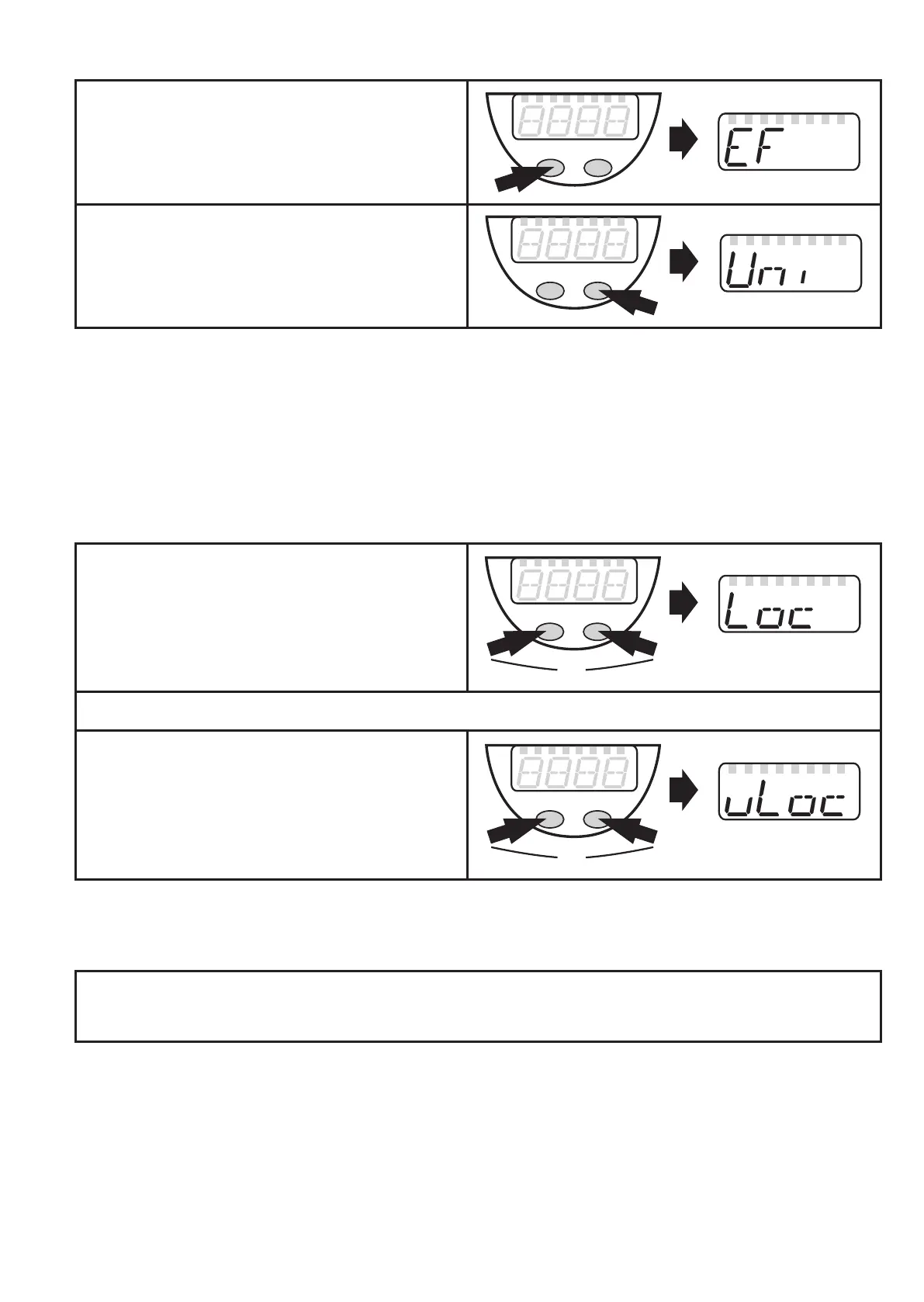
Press [Mode/Enter] until [EF] is ►
displayed�
Press [Set] briefly� ►
The first parameter of the submenu is >
displayed (here: [Uni])�
Ifthesubmenuisprotectedwithanaccesscode,“Cod1“flashesinthedisplay.
Press the „Set“ button and hold it pressed until the valid code no� is shown� ►
Then briefly press the „Mode/Enter“ button� ►
Delivery by ifm electronic: no access restriction�
Locking/unlocking•
Theunitcanbelockedelectronicallytopreventunintentionalwrongsettings.
Ensure that the unit is in the normal ►
operating mode�
Press [Mode/Enter] + [Set] for 10 s� ►
[Loc] is displayed� >
During operation: > [Loc] is displayed briefly when you try to change parameter values�
Forunlocking:
Press [Mode/Enter] + [Set] for 10 s� ►
[uLoc] is displayed�� >
Ondelivery:Unlocked.
Timeout:•
If no button is pressed for 15 s while the parameters are being set, the unit returns to
the operating mode with unchanged values�



 To Next Page