5
YOUR IGLOO
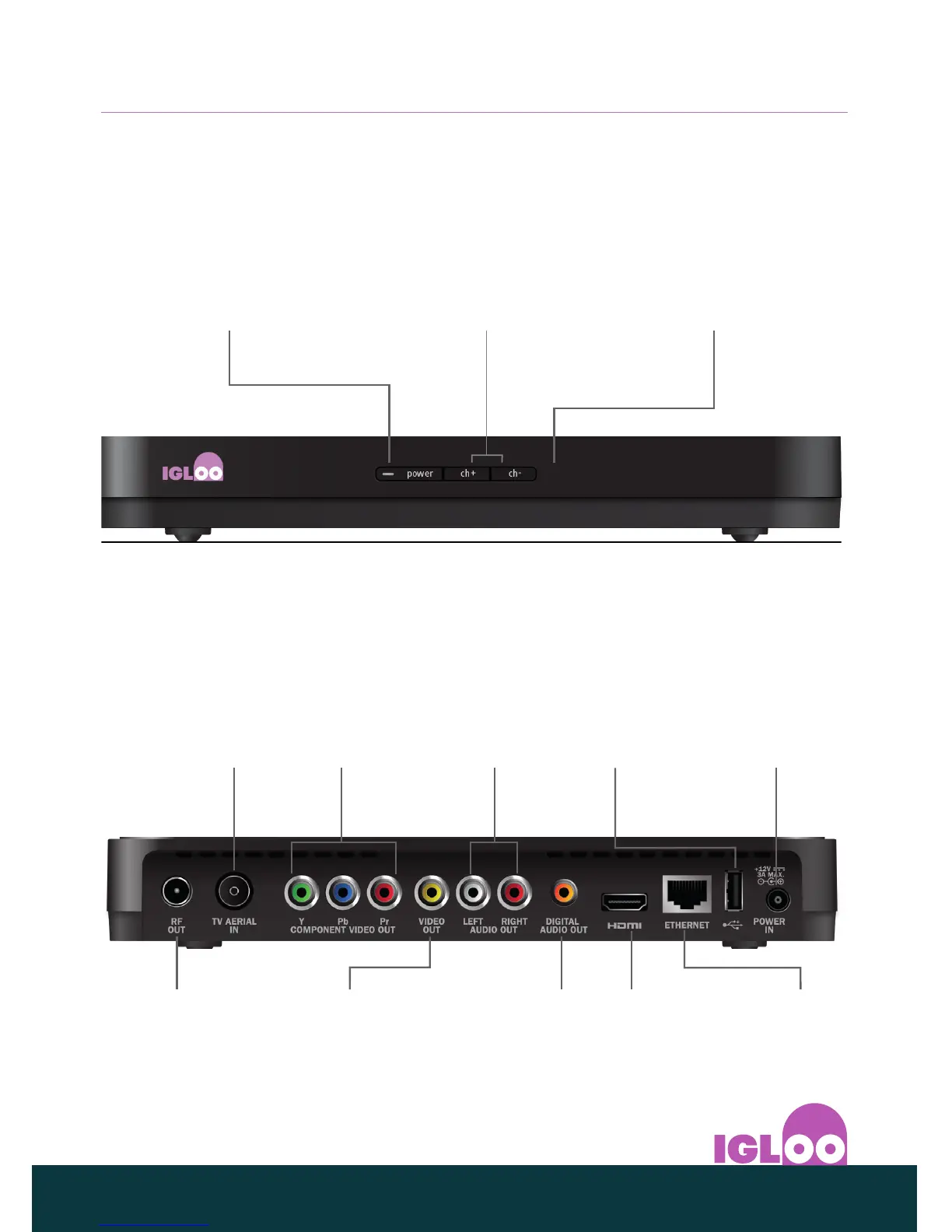
❖ Front panel
S BUTTON & LIGHT
To switch your IGLOO into
or out of standby
Lights up red when it is in
standby
Lights up green when it is
out of standby (switched on)
CH+ AND CH BUTTONS
To change channel by
stepping through them
IR RECEIVE LIGHT
Flashes red when your
IGLOO receives a signal
from your remote control
❖ Rear panel
POWER IN
To connect to the 12V power
supply
Always disconnect the
plug from the power supply
before you remove the
power connector from your
IGLOO
USB 2.0
connector
COMPONENT
VIDEO OUT
To connect to your
HD TV’s component
video (Y Pb Pr) inputs
(not recommended)
ETHERNET
To connect to your
Internet router
HDMI
To connect to your
HD TV’s HDMI
®
input
(recommended)
DIGITAL AUDIO OUT
To connect to a digital-
audio (S/PDIF) input
on your home cinema,
TV or stereo sound
equipment
AUDIO OUT
LEFT + RIGHT
To connect to the
left and right audio
phono (RCA) inputs
on your home
cinema, TV or stereo
sound equipment
VIDEO OUT
To connect to the
‘video in’ phono
(RCA) connector
on your TV or
home cinema
RF OUT
Connect RF cable
to your TV (or VCR)
TV AERIAL IN
Connect the cable
from the wall-
socket



 To Next Page