19
2. Limits:
Under the option "External (ext)", the maximum and minimum temperature for external temperature control can be
set�
Under "l Δ T (int - ext) l", the maximum difference between the internal and external temperature can be set�
Under "Power Output", the maximum heating output can be set as a percentage�
3. Temperature sensor
1) Calibration:
The internal and the external temperature measurement can be calibrated and adjusted�
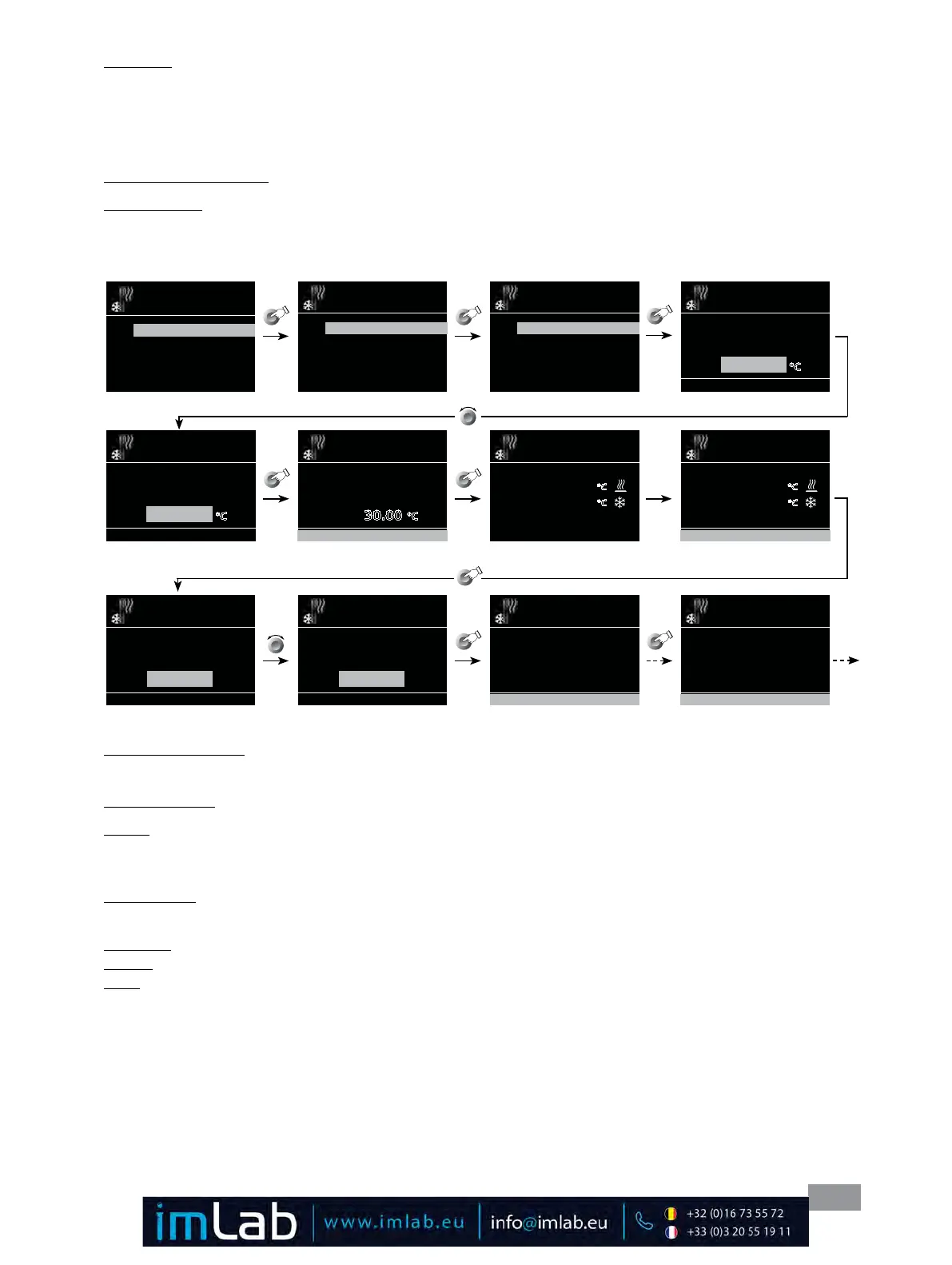
You can select 2-point calibration or 3-point calibration for internal and external measurement�
Calibration proceeding (example: 2-point calibration):
> Tempering
Temperature Sensor
Calibration
Reset Calibration
> Temperature Sensor
Calibration
Internal
External
> Calibration
Internal
2 Point Calibration
3 Point Calibration
> Calibration > Internal
2 Point Calibration
Temperature sensor calibration
at
Step: 1 / 2
5.00 C
OK
> Calibration > Internal
2 Point Calibration
Temperature sensor calibration
at
Step: 1 / 2
30.00 C
OK
> Calibration > Internal
2 Point Calibration
Temperature sensor calibration
at
Step: 1 / 2
30.00 C
OK
> Calibration > Internal
2 Point Calibration
Target Temp: 30.00 C
Actual Temp: 25.00 C
Please wait...
Step: 1 / 2
> Calibration > Internal
2 Point Calibration
Target Temp: 30.00 C
Actual Temp: 30.00 C
Step: 1 / 2
OK
> Calibration > Internal
2 Point Calibration
Step: 1 / 2
Enter the temperature from the
measuring device
5.00 C
OK
> Calibration > Internal
2 Point Calibration
Step: 1 / 2
Enter the temperature from the
measuring device
32.00 C
OK
> Calibration > Internal
2 Point Calibration
Step: 1 / 2
Enter the temperature from the
measuring device
32.00 C
OK
> Calibration > Internal
2 Point Calibration
Sensor calibrated successfully
OK
Fig. 28
2) Reset Calibration:
By “Reset Calibration”, the calibration value for the internal or the external temperature sensor will be deleted�
4. Notification:
1) ON:
This menu option allows you to activate/deactivate the “Notification“ function� A green check mark and a beep in-
forming when the target value (hysteresis) has been reached�
2) Hysteresis:
This menu option allows you to set the hysteresis from 0 to ± 2�0 K�
3) Sound:
Infinite: Beep until you press the “Back” button�
Beep: Single beep�








 To Next Page