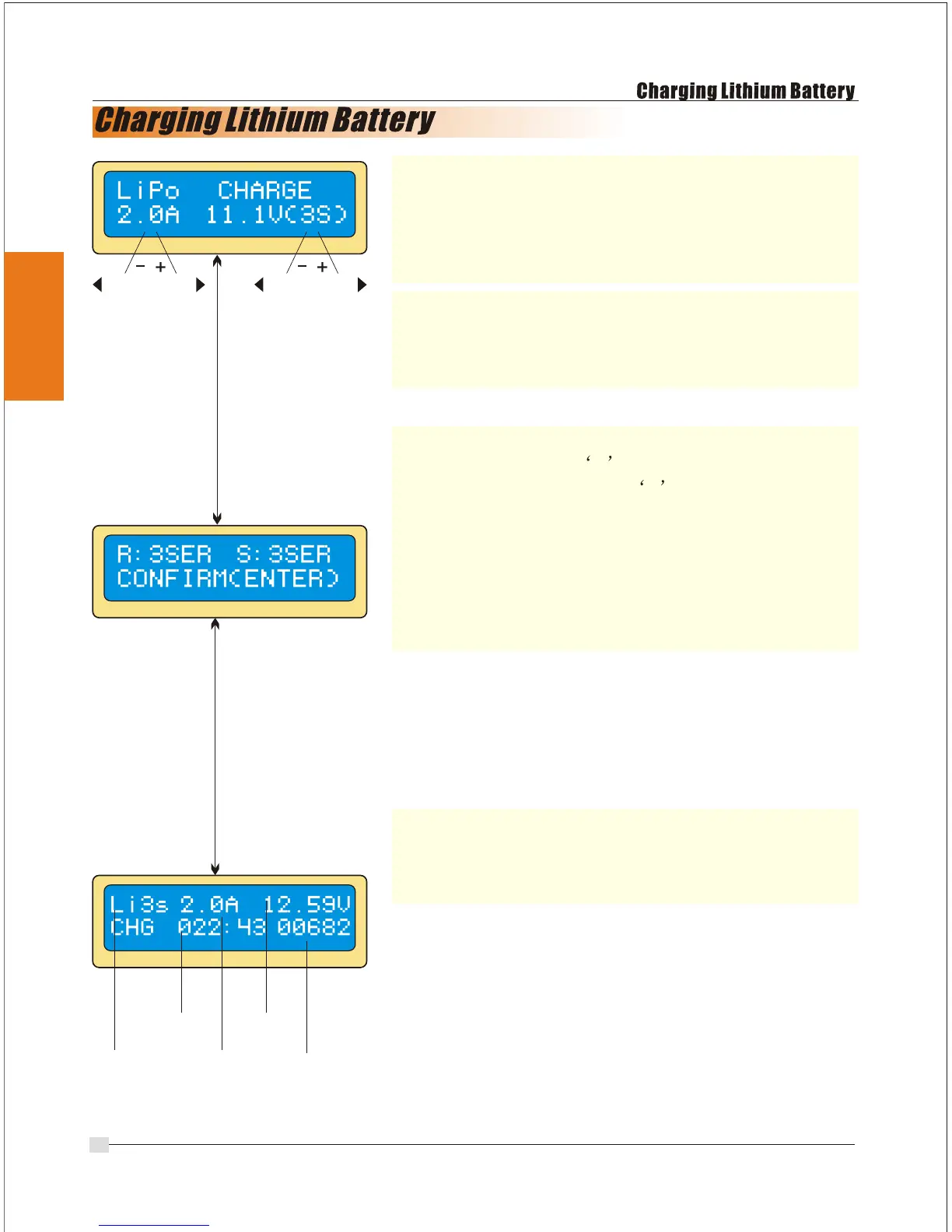
The left side of the first line shows the type of
battery you select at the users setting. The value on
the left side of second line sets a charge current
and the value on the right side of second line sets
the voltage of the battery pack.
After setting the current and voltage press
Start/Enter key for more than 3 seconds to start the
process. (Charge current: 0.1~0.7A, Voltage: 1~8
series)
This shows the number of cells you set up and the
processor detects. R shows the number of cells
found by the charger and S is the number of
cells selected by you at the previous screen. If both
numbers are identical you can start charging by
pressing Start/Enter button. If not press Batt
type/Stop button to go back to previous screen.
Then carefully check the number of cells of the
battery pack to charge again.
The screen shows the present situation during
charge process. To stop charging press Batt
type/Stop key once.
Display
DEC
INC
DEC
INC
Batt type
stop
Start
Enter
`>3seconds`
Start
Enter
number
of
cells
charging
time
charge
current
battery
voltage
charged
capacity
13


 To Next Page