30
INSTALLERUSER
MAINTENANCE TECHNICIAN
Block function.
To prevent errors aer installation, all
the critical parameters (system and Ex-
tra function) cannot be accessed when
over 4 hours have elapsed aer start-up.
If you wish to edit them, disconnect
and reconnect the control unit. No
settings are lost during disconnection
or aer a blackout.
Aer 4 hours it is possible to change
all the other settings to optimise the
system.
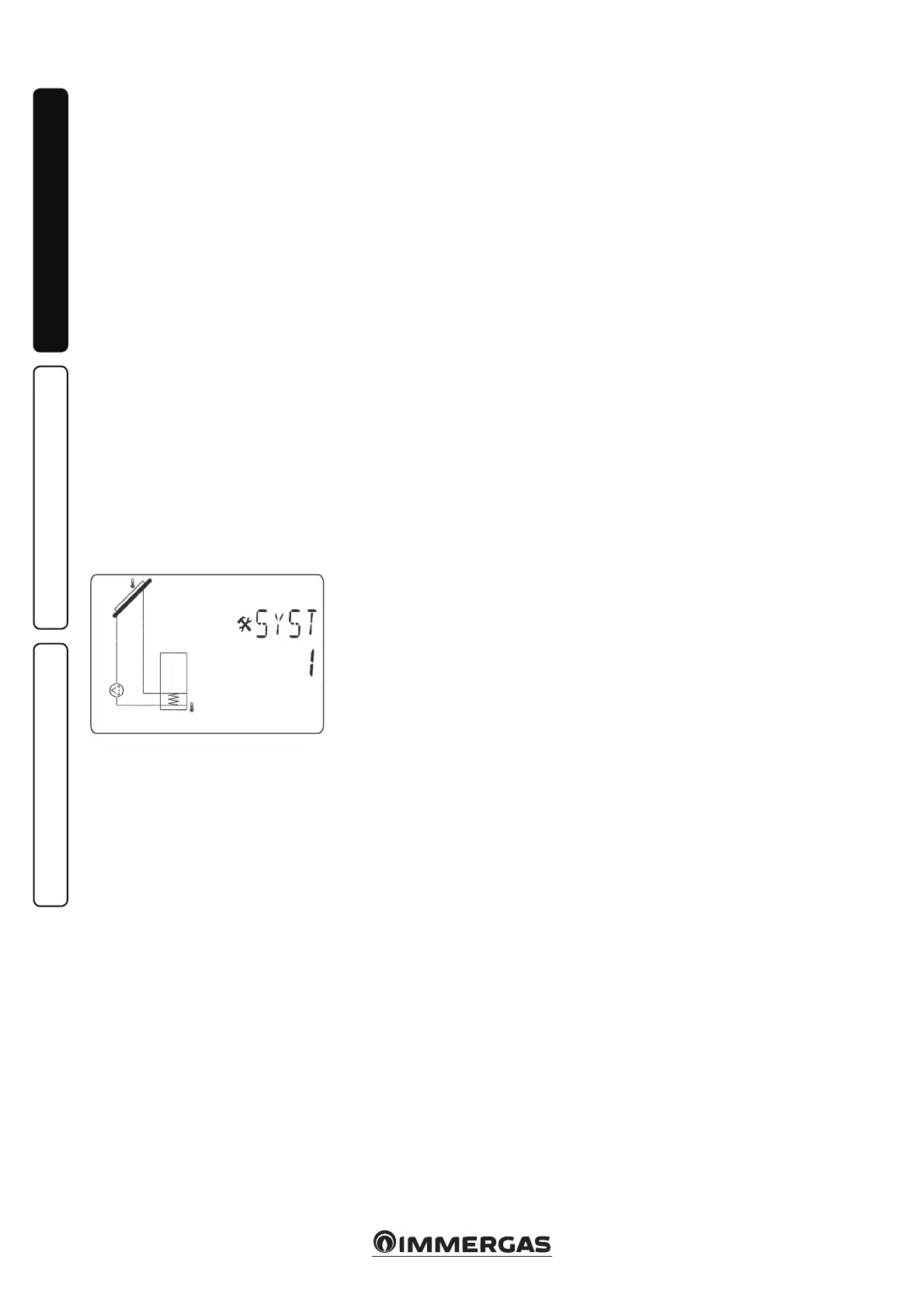
System selection.
“SySt” parameter (Default value “1”
not editable).
System 1.
Base system with 1 tank, 1 pump /
circulator, 1 series of manifolds and
2 sensors. It can be enriched by extra
functions with 1 or 2 T3 (NTC) or T4
(PT1000) sensors (ermostat, Cool-
ing, Anti-stagnation or Diff control
function).
P1
T1
T2
37
Tank 1 can be loaded if the temperature
dierence “dt” between manifold (T1)
and tank 1 (T2) is sucient.
Manifold selection.
“TubE” parameter (Default value
“o”).
Aer selecting the “Tub E” parameter,
press the navigation key to the right
(▶+) to select the type of manifold
installed.
- Now select “on” if your system uses
a manifold with vacuum pipes. (is
function can also be used with a at
manifold if the sensor is mounted
on the outside of the manifold). is
function works as follows. Every 30
minutes the pump is activated for 40
seconds to measure the correct value
on the manifold and prevent a short
charging cycle.
- Select “o” if the system works with
a at manifold in normal operating
conditions.
Maximum manifold temperature.
“ColM” parameter (default value “120”).
- Set the level to start the overheating
protection for the manifold. (Adjust-
able between 110 and 150°C, with
default value 120°C)
Overheating protection.
“OvrH” parameter (default value “on”).
This function will stop the circula-
tion of all the manifolds (P1 and P2)
when the temperature of the manifold
increases above “ColM” plus a com-
pensation value (default value +10°C,
modiable). is function is used to
protect the system elements (pipes,
ttings, ring-shaped rubber gaskets).
- To activate the function, press (▶+)
selecting “on“.
- Now you can adjust the compensation
level.
“Ovrt” parameter (default value
“20°C”).
is compensation is normally used
to prevent an excessively fast reaction
of the overheating protection function
(particularly useful with vacuum pipe
manifolds).
(Adjustable between +10°C and +30°C
with default value +10°C).
N.B.: For safety reasons, the overheat-
ing protection function must always be
set at (“on”).
Cooling.
“Cool” parameter (default value “On”).
is option is used to protect the man-
ifold liquid and operates as described
below. Activate solar pump P1 or P2 if
the temperature of the set of manifolds
T1 or T4 exceeds the “Max temp” val-
ue, even if the maximum temperature
set in the tank is exceeded. Circula-
tion stops when the temperature has
dropped by 10°C. (e pumps stop if
the temperature of the water in the tank
reaches 90°C).
“Rcoo” parameter (default value “On”).
When the temperature of the water in
the tank exceeds the level set in “Max-
temp tank1” and the temperature of
the manifold has gone down by 10°C,
the pump starts-up to cool down the
tank via the manifolds. e pump will
switch off when the temperature of
the water drops below the level set in
“tkM1” or when the dierence between
the temperature of the set of manifolds
and of the tank is below 2°C.
Antifreeze protection.
“FrEZ” parameter (default value “o”)
is option maintains the temperature
of solar panel T1 or T4 above the level
set for freezing with the “Frzt” param-
eter, activating pump P1 or P2.
is option can be used to reduce the
build-up of snow on the panel and to
increase the eciency during the day
or prevent damage to the solar liquid.
N.B.: it is preferable not to use this
function in very cold places to prevent
using too much energy accumulated
in the tank.
- To activate the function, press (▶+)
and select “on“.
- Now you can adjust the Freezing
setting.
“FrZt
” parameter (default value “10°C”
(Adjustable between -20°C and + 7°C
with recommended value 3°C).
Display.
“DiSP” parameter (default value
“OFF”).
Back-lighting function.
- To enable or disable the back-lighting
function press (▶+) or (-◀).
- If it is “O” the back-lighting will
switch o automatically 3 minutes
aer having pressed the key.
- If it is “On” the back-lighting will
always be active.
Factory setting.
“Fact” parameter.
- If you want to reload all the param-
eters with factory settings, press and
hold the (▶+) key for a few seconds.
N.B.: For safety and error prevention
purposes, the system selected will not
be reset.
Setting menu.
is menu features all the adjustable
parameters for your system. e var-
ious parameters are not available on
all systems.
To access the Setting menu, press the
(-◀) and (▶+) keys at the same time.
When you access the Installation
menu (the rst parameter “TkM1” is
displayed), it is possible to select an-
other parameter by pressing the (OK)
navigation key.
Once the desired parameter is dis-
played, it is possible to change the value
using the (▶+) or (-◀) keys.



 To Next Page