(A)
(B)
(C)
51
INSTALLERUSER
MAINTENANCE TECHNICIAN
50
3.12 PASSWORDPROTECTED SPECIAL FUNCTIONS.
Attention: the boiler is equipped with some special functions, access
to which is granted if this is in stand-by ( ) .
IMPORTANT NOTE: if the boiler is connected to the CAR
V2
the
“stand-by” function can only be activated via the remote control
panel.
48
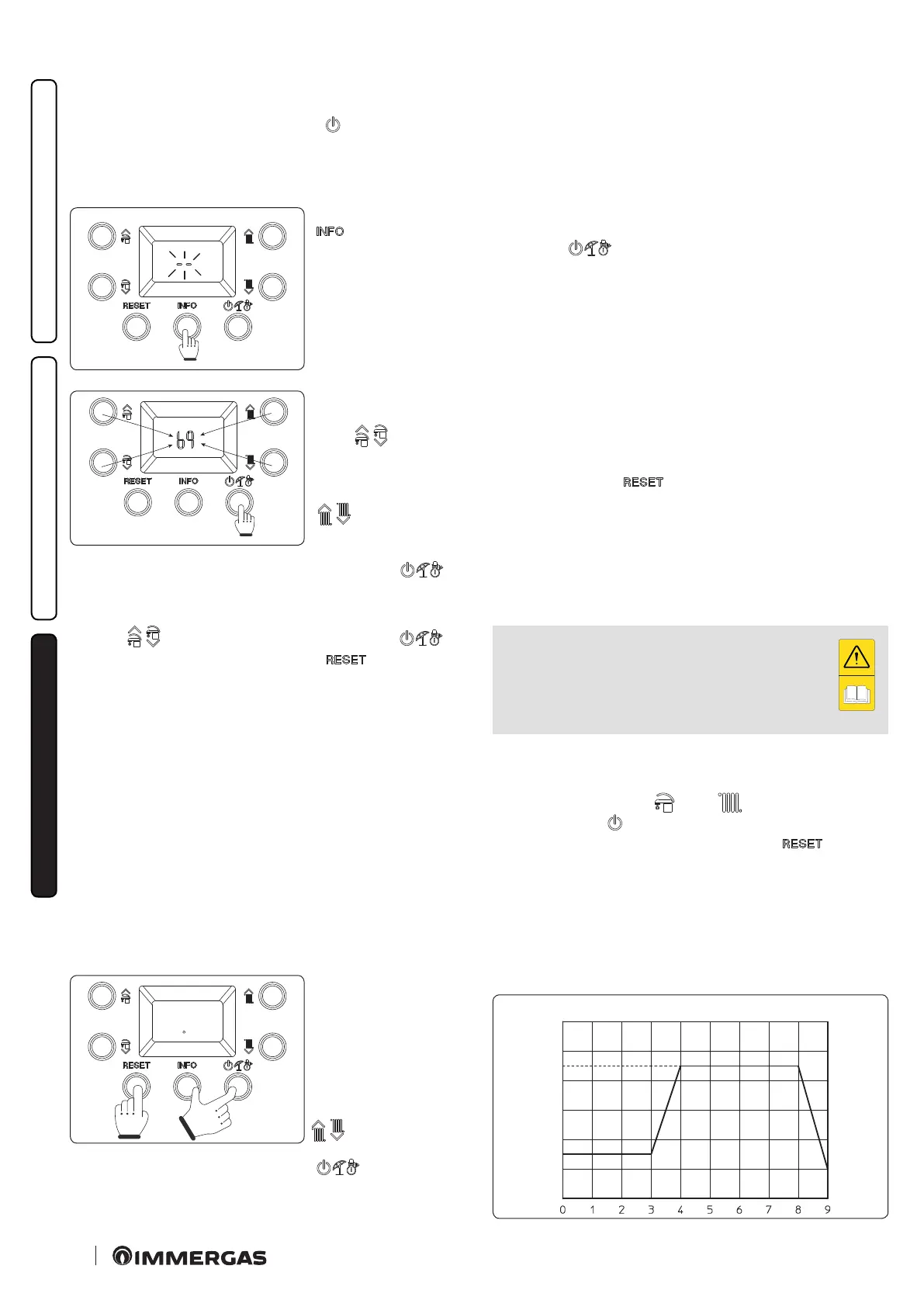
Press and hold the
“ ” button for more
than 5 seconds. e dis-
play will show two dashes
“--” ashing. Now enter
the password to access the
programming menus.
49
To enter the rst digit, use
the buttons to adjust the
DHW “ ”; to enter the
second digit, use the but-
tons to adjust the central
heating temperature
“ ”. To confirm the
password and access the
menu, press the operating
mode button “ ”.
Once the menu has been accessed, it is possible to cyclically scroll
the three available functions (dl, MA, FU) by pressing the DHW
buttons “ ”, to access the menu press the button “ ” to
exit wait 15 minutes or press the button “ ”.
3.13 SCREED HEATER FUNCTION.
e boiler is equipped with a function to perform the thermal
shock on new radiant panel systems, as required by the applicable
standard.
Attention: contact the manufacturer of the radiant panels for the
thermal shock characteristics and its correct execution.
N.B.: to be able to activate the function there must be no remote
control connected, while in case of system divided into zones it
must be properly connected, both hydraulically and electrically.
e function is activated from boiler in OFF mode by pressing
and holding the buttons “Reset”, “Info” and “Stand-by” for more
tan 5 seconds.
e function lasts in total 7 days, 3 days at the lower temperature
set and 4 days at the higher temperature set (Fig. 50).
50
Aer activating the func-
tion, the lower set (range
20 - 45 °C default = 25 °C)
and the higher set (range
25 - 55 °C default = 45 °C)
appear in sequence. e
temperature is selected by
means of the buttons “
” and conrmed by
pressing the button
“ ”.
e display now shows the countdown of days alternated with
the current ow temperature, as well as the normal operating
symbols of the boiler.
In case of failure or lack of supply voltage, the function is sus-
pended and will resume when the normal operating conditions
are reset from the point where it was interrupted.
When the time expires, the boiler automatically goes back to
“Stand-by” mode, the function can also be stopped by pressing
the button “ ”.
3.14 AUTOMATIC VENT FUNCTION dL.
In the case of new central heating systems and in particular mode
for oor systems, it is very important that deaeration is performed
correctly. e function consists of the cyclic activation of the
pump (100 s ON, 20 s OFF) and the 3-way valve (120 s D.H.W.,
120 s C.H.).
e function is activated by accessing the special “dl” function as
described in Paragraph 3.12.
e function lasts for 16.5 hours and it can be stopped by simply
pressing the button “ ”.
Activation of the function is signalled by the countdown shown
on the indicator (20).
3.15 FLUE INSTALLATION FU.
To activate the “Flue” function access the special functions as
described in Paragraph 3.12 and select the “FU” function.
N.B.: before performing the test, ensure that the
condensate drain trap has been lled correctly and
check that there are no obstructions in the air intake
circuit and ue exhaust and that the sealed chamber is
perfectly closed and the ue has already been installed.
Using this function activates the fan at a xed speed (6000 rpm)
for 15 minutes.
In this phase the symbols ( ) and ( ) are displayed ashing,
while the symbol ( ) is displayed permanently on, the function
can be stopped by simply pressing the button “ ”.
TM (°C)
UPPER SET
LOWER SET
DAYS





 To Next Page