26
Advanced > Setup menu
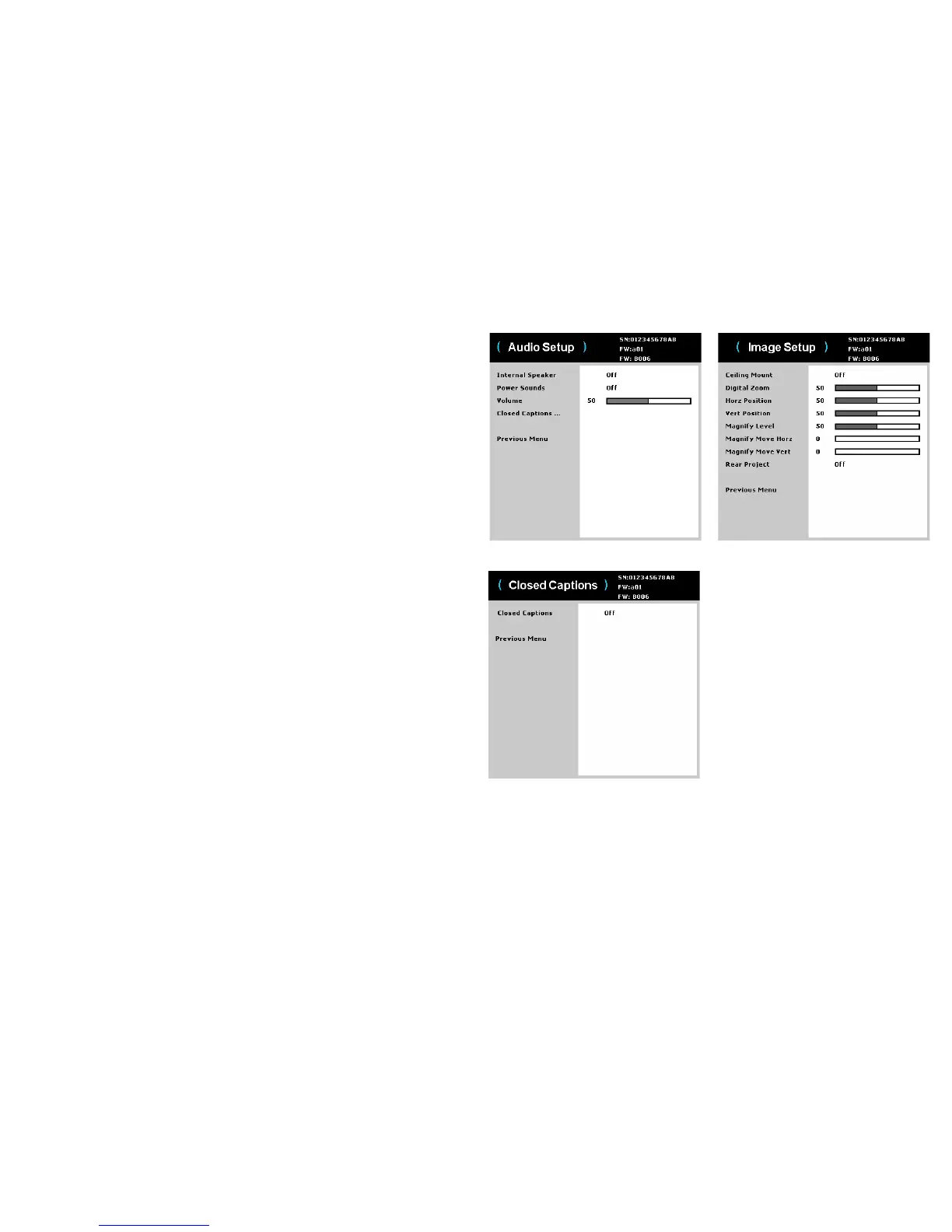
Audio Setup:
• Internal Speaker:
allows the user to turn on and off the internal speaker.
• Power Sound: controls whether the projector makes a sound
when powered
on and off.
• Volume: adjusts the volume level.
• Closed Captions: controls closed
caption display while audio is not muted.
Closed Captions:
• Clos
ed Captions: controls closed
caption display while audio is not muted. If
this setting is not off, and audio is not muted, and the source is NTSC and
contains captions on the selected channel, then the projector must display
caption text overlaid on the image.
Image Setup:
• C
eiling Mount: turns th
e image upside down for ceiling-mounted projection.
• Digital Zoom: changes the
size of projector’s display area.
• Horz Position: adjusts
the position horizontally of a computer source.
• Vert Position:
adjusts the position vertically of a computer source.
• Magnify Leve
l: adjusts the magnify level setting of the image.
• Magnify Move Horz:
adjusts the magnify setting in horizontal direction.
• Magnify Move V
ert: adjusts the magnify setting in vertical direction.
• Rear Project: reverses th
e image so you can project from behind a translucent
screen.
Advanced > Setup > Audio Setup menu
Advanced > Setup > Image Setup menu
Advanced > Setup > Closed Captions menu



 To Next Page