Chapter 3 Basic Operation 22
Important: Make sure that the bare ber and its cleaved section are clean.
• Avoid putting the bers on a dusty working surface.
• Avoid swaying the bers in the air.
• Check if the V-grooves are clean. If not, must clean it with pure alcohol-soaked
cotton swabs.
• Check if the ber holders are clean. If not, must clean it with pure alcohol-soaked
cotton swabs.
How to make a splice
Placing the bers
•
Open the windproof cover.
•
Raise the ber holders.
•
Place the ber into V-grooves and make sure that the ber ends are placed
between the edge of V-grooves and the electrode ends.
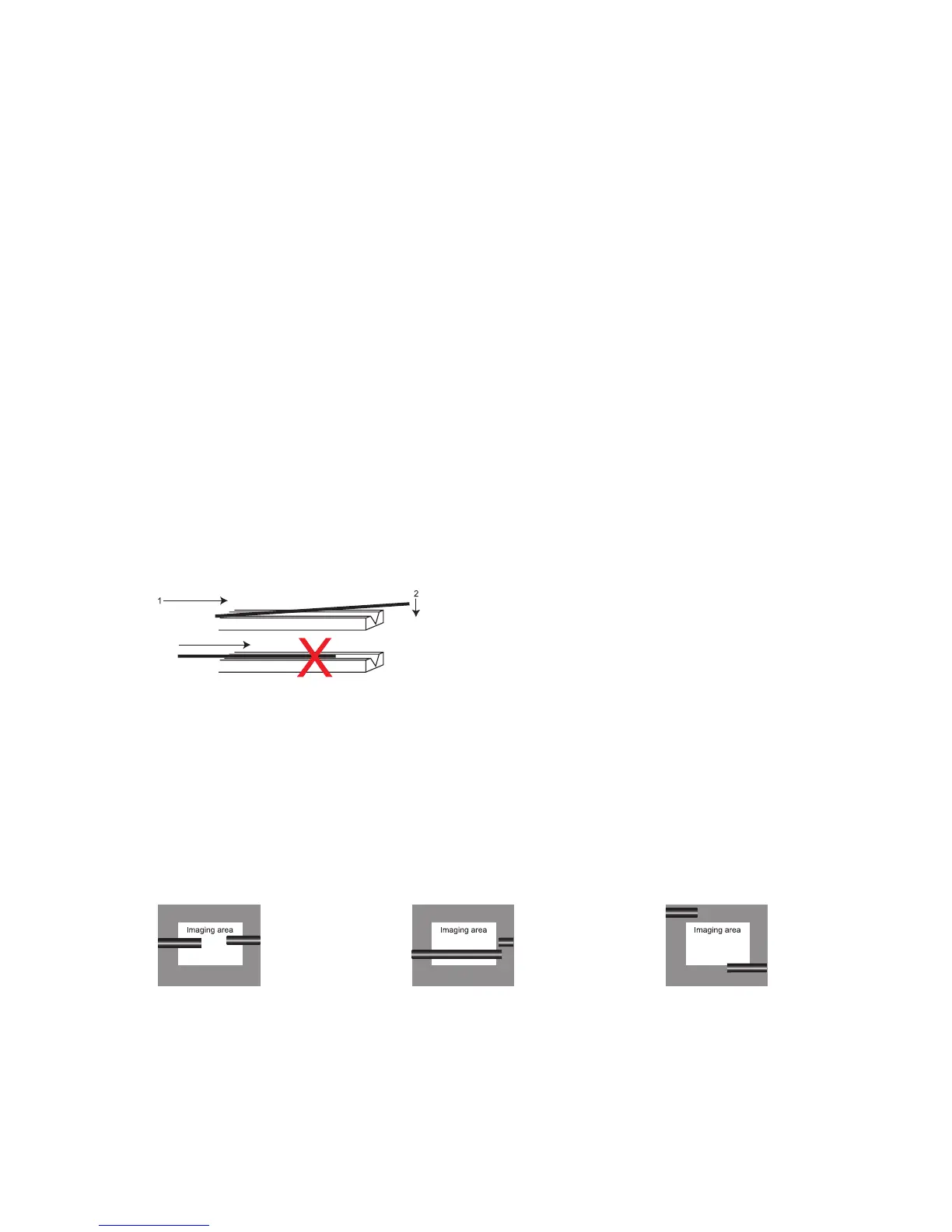
Note: Make sure to avoid sliding the bers along V-grooves, but rather position
them over V-grooves and tilt them down into place (as shown below).
•
Clamp the ber in position by lowering both sets of ber holders.
•
Close the windproof cover.
Inspecting the bers
Before continuing with splicing, inspect the bers whether they are clean and
well-cleaved. If any defects are found, please remove the bers and prepare again.
Fiber ends visible
on the monitor.
Fiber ends
outside monitor.
Fiber ends above
and below monitor,
not possible to nd
automatically.
a. b. c.


 To Next Page