En-45
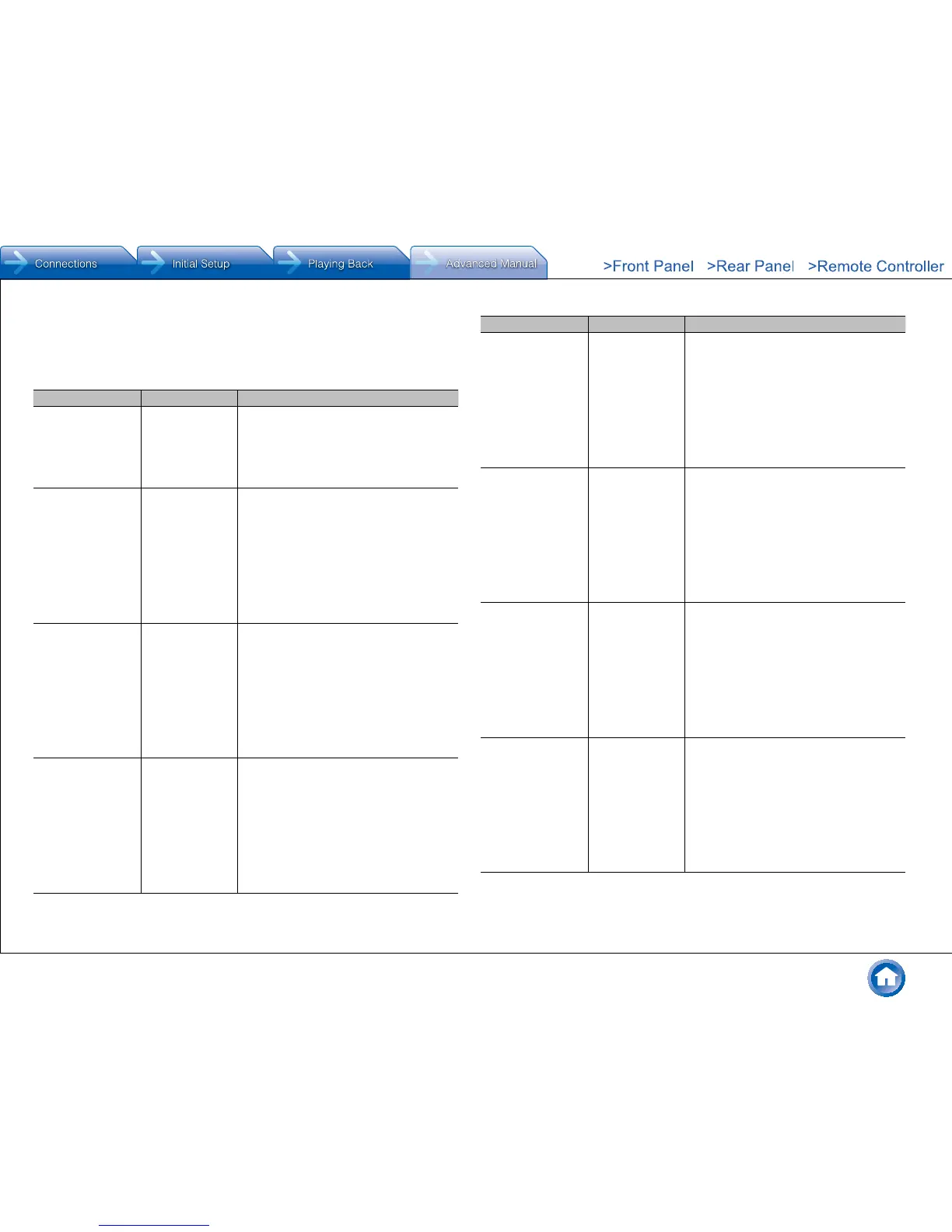
12V Trigger C
Set when outputting the control signal (maximum 12 V/25 mA) through the 12V TRIGGER
OUT C jack� Different settings can be set for each input selector� You can enable power link
operation when you connect the unit and the external devices equipped with 12V trigger
input jack�
Setting Item Default Value Setting Details
Delay 2 sec Set after how many seconds the 12V trigger
output will occur in response to the unit's
operation� As some devices cause a large
current when they turn on, delay the output if
such devices are connected� Select a value
between "0 sec" to "3 sec"�
BD/DVD Main/Zone2 Set the 12V trigger output setting to each
input�
"Off": No output
"Main": Output when "BD/DVD" is selected as
input for main room�
"Zone2": Output when "BD/DVD" is selected
as input for ZONE2�
"Main/Zone2": Output when "BD/DVD" is
selected as input for main room or ZONE2�
CBL/SAT Main/Zone2 Set the 12V trigger output setting to each
input�
"Off": No output
"Main": Output when "CBL/SAT" is selected
as input for main room�
"Zone2": Output when "CBL/SAT" is selected
as input for ZONE2�
"Main/Zone2": Output when "CBL/SAT" is
selected as input for main room or ZONE2�
STRM BOX Main/Zone2 Set the 12V trigger output setting to each
input�
"Off": No output
"Main": Output when "STRM BOX" is selected
as input for main room�
"Zone2": Output when "STRM BOX" is
selected as input for ZONE2�
"Main/Zone2": Output when "STRM BOX" is
selected as input for main room or ZONE2�
Setting Item Default Value Setting Details
PC Main/Zone2 Set the 12V trigger output setting to each
input�
"Off": No output
"Main": Output when "PC" is selected as input
for main room�
"Zone2": Output when "PC" is selected as
input for ZONE2�
"Main/Zone2": Output when "PC" is selected
as input for main room or ZONE2�
GAME Main/Zone2 Set the 12V trigger output setting to each
input�
"Off": No output
"Main": Output when "GAME" is selected as
input for main room�
"Zone2": Output when "GAME" is selected as
input for ZONE2�
"Main/Zone2": Output when "GAME" is
selected as input for main room or ZONE2�
AUX Main/Zone2 Set the 12V trigger output setting to each
input�
"Off": No output
"Main": Output when "AUX" is selected as
input for main room�
"Zone2": Output when "AUX" is selected as
input for ZONE2�
"Main/Zone2": Output when "AUX" is selected
as input for main room or ZONE2�
CD Main/Zone2 Set the 12V trigger output setting to each
input�
"Off": No output
"Main": Output when "CD" is selected as input
for main room�
"Zone2": Output when "CD" is selected as
input for ZONE2�
"Main/Zone2": Output when "CD" is selected
as input for main room or ZONE2�



 To Next Page