131
Multi Zone—Continued
Zone 2 Video Output
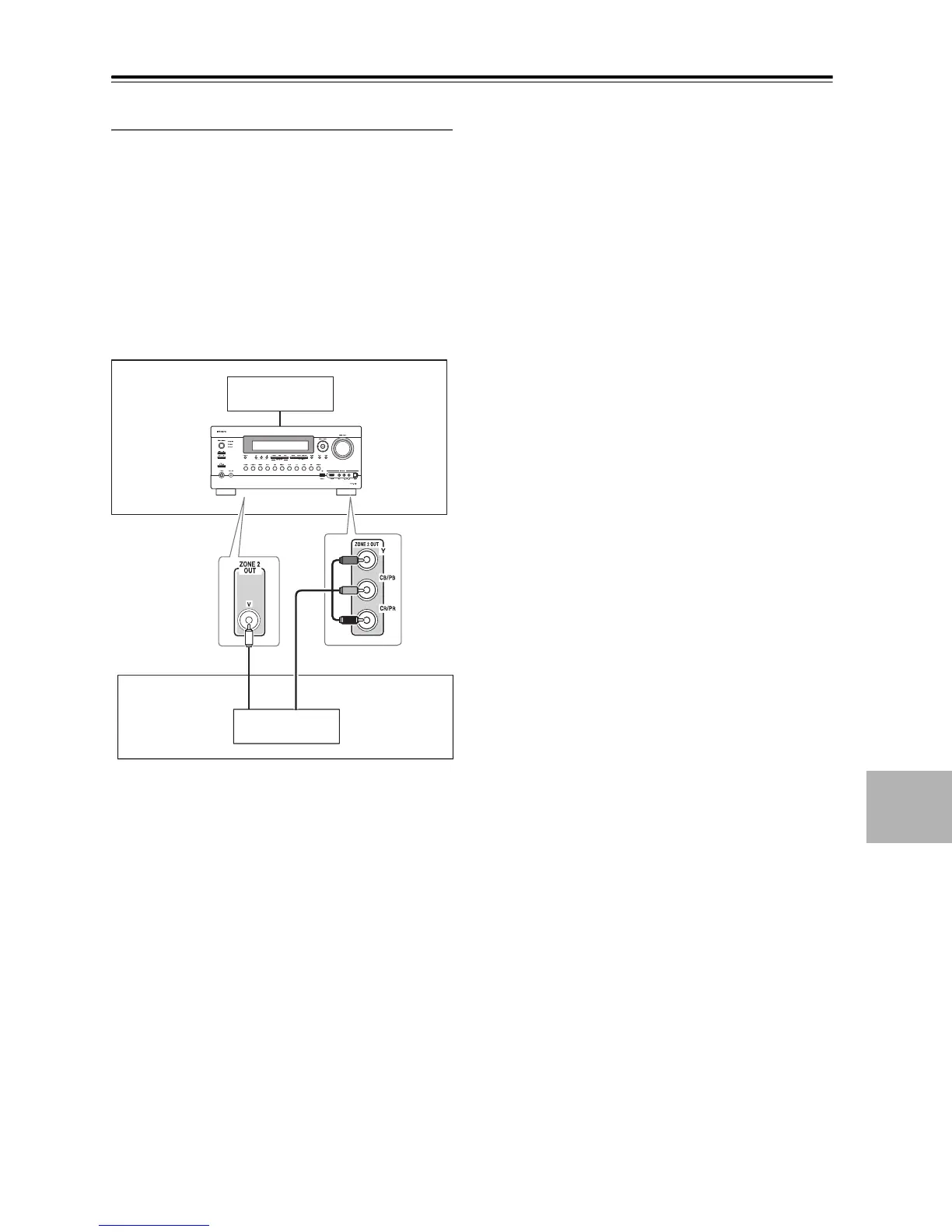
The AV receiver features a composite video output for
connection to a TV in Zone 2, so you can enjoy both
audio and video in that zone.
Hookup
• Use a composite video cable to connect the AV
receiver’s ZONE 2 OUT V jack to a composite video
input on your Zone 2 TV.
• Alternatively, use a component video cable to connect
the AV receiver’s COMPONENT VIDEO ZONE 2
OUT jacks to a component video input on your Zone 2
TV.
• If you use the COMPONENT VIDEO ZONE 2 OUT,
you must set the “Zone2 Component Out” setting to
“Use” (see page 134).
Notes:
• The ZONE 2 OUT V jack outputs video from compo-
nents connected to composite video inputs.
• The COMPONENT VIDEO ZONE 2 OUT outputs
video only from components connected to component
video inputs.
Main room
TV
Zone 2
AV receiver
TV
or



 To Next Page