150
Controlling Other Components—Continued
Via onscreen menu, you can specify what actions will be
taken by the Easy macro command in the Easy macro
mode.
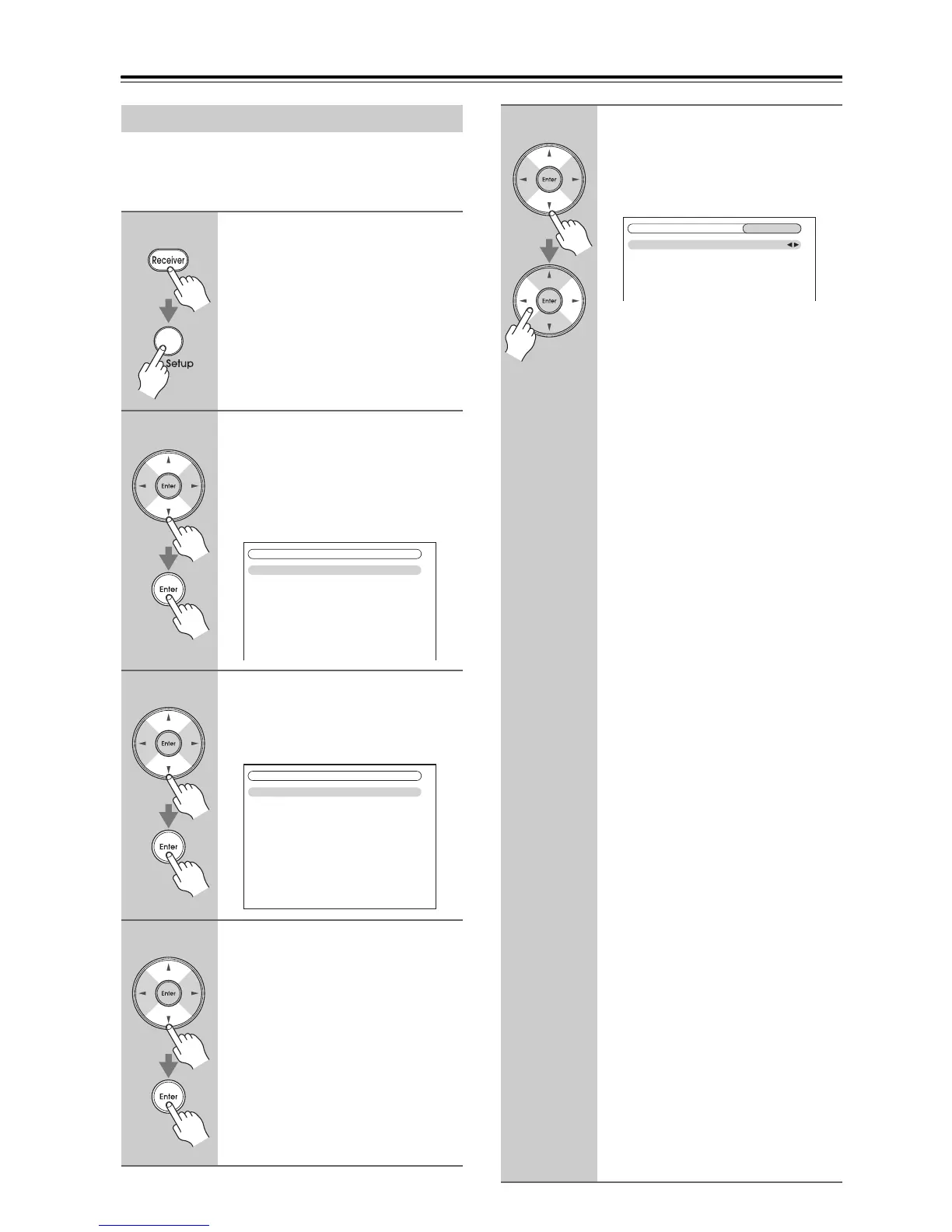
Activities Setup
1
Press the [Receiver] button fol-
lowed by the [Setup] button.
The main menu appears onscreen.
If the main menu doesn’t appear, make
sure the appropriate external input is
selected on your TV.
2
Use the Up and Down [q]/[w] but-
tons to select “8. Remote Con-
troller Setup”, and then press
[Enter].
The “Remote Controller Setup” menu
appears.
3
Use the Up and Down [q]/[w] but-
tons to select “2. Activities
Setup”, and then press [Enter].
The “Activities Setup” menu appears.
4
Use the Up and Down [q]/[w] but-
tons to select “My Movie”, “My
TV”, or “My Music”, and then
press [Enter].
My Movie: Actions for the
My Movie button is
changed.
My TV: Actions for the My TV
button is changed.
My Music: Actions for the
My Music button is
changed.
1. Remote Mode Setup
2. Activities Setup
8. Remote Controller Setup
My Movie
My TV
My Music
8–2. Activities Setup
5
Use the Up and Down [q]/[w] but-
tons to select an item, and use
the Left and Right [e]/[r] but-
tons to change the settings.
The items are explained below.
Source
With this setting, you can choose the
input source.
DVD/BD, VCR/DVR, CBL/SAT,
Game, AUX, TV/Tape, Tuner,
CD, Phono, Port, Net/USB
TV Power ON
This option enables the TV to turn on
when the Activities button is pressed.
Enable: TV to turn on “Enable”.
Disable: TV to turn on “Disable”.
Source Power ON
This option enables the Source to turn
on when the Activities button is
pressed.
Enable: Source to turn on
“Enable”.
Disable: Source to turn on
“Disable”.
Receiver Power ON
This option enables the AV receiver to
turn on when the Activities button is
pressed.
Enable: AV receiver to turn on
“Enable”.
Disable: AV receiver to turn on
“Disable”.
Receiver Source Change
This option enables the AV receiver
input selector to change when the
Activities button is pressed.
Enable: AV receiver input
selector is change.
Disable: AV receiver input
selector is not change.
Source Play
This option enables the Source to start
playback when the Activities button is
pressed.
Enable: Start playback the source
of “Enable”.
Disable: Start playback the source
of “Disable”.
8–2. Activities Setup
MY Movie
Source
TV Power ON
Source Power ON
Receiver Power ON
Receiver Source Change
Source Play
DVD/BD
Enable
Enable
Enable
Enable
Enable



 To Next Page