Turning On & Basic Operations
En-39
1
Turn on the AV receiver and the connected TV.
On the TV, select the input to which the AV receiver
is connected.
2
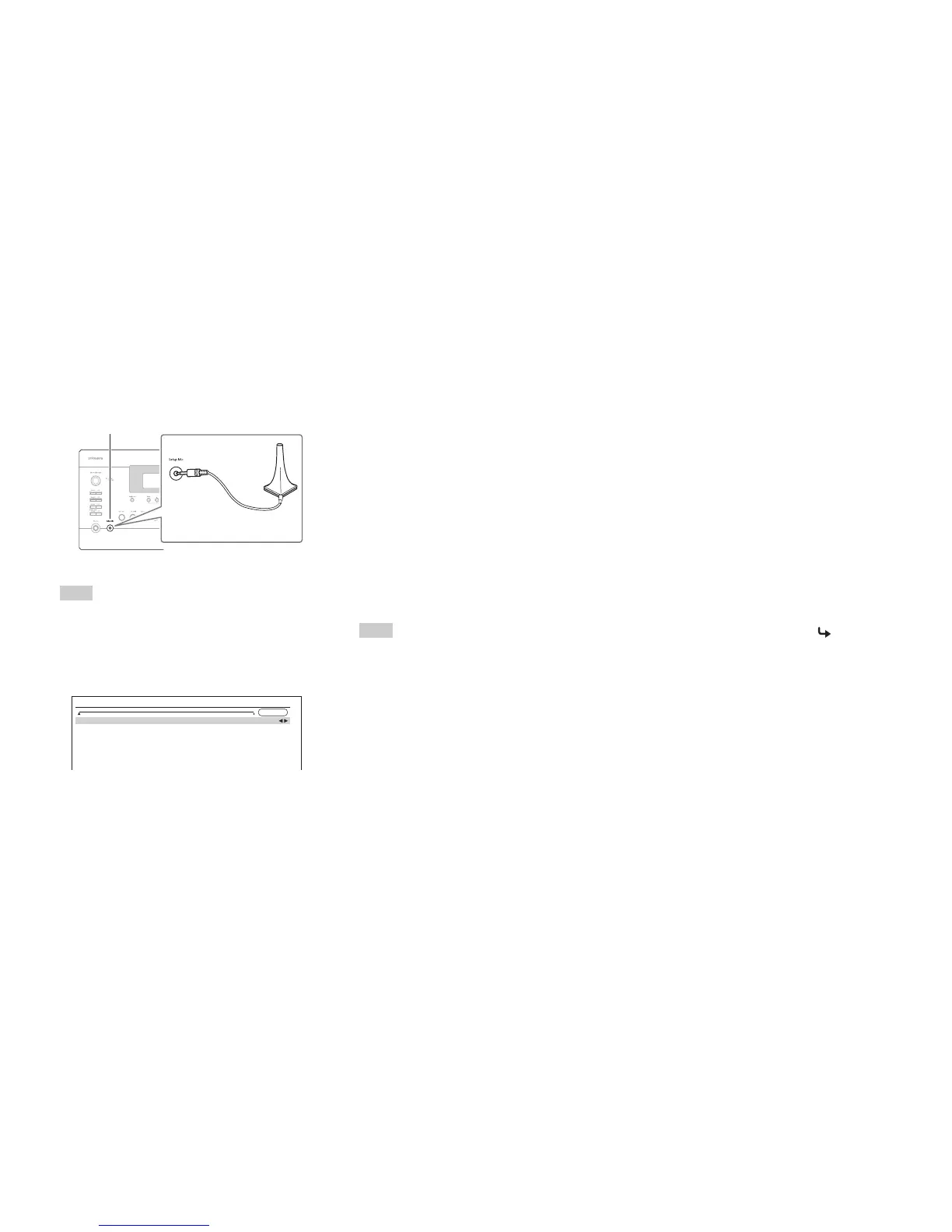
Set the speaker setup microphone at the Main
Listening Position a, and connect it to the Setup
Mic jack.
The speaker setting menu appears.
Note
• The on-screen menus appear only on a TV that is connected
to HDMI OUT MAIN. If your TV is connected to other
video outputs, use the AV receiver’s display when changing
settings.
3
When you’ve finished making the settings, press
Enter.
Perform the “Speaker Setup” according to your
speaker configuration:
– Speakers Type(Front) (➔ page 63)
– Passive Subwoofer (➔ page 63)
– Powered Zone 2 (➔ page 63)
– Powered Zone 3 (➔ page 63)
– Powered Zone 4 (➔ page 63)
– 11ch Playback (➔ page 63)
– Subwoofer (➔ page 64)
Speaker setup microphone
Setup Mic jack
MultEQ XT32: Auto Setup
AUDYSSEY
Speakers Type(Front)
Passive Subwoofer
Powered Zone 2
Powered Zone 3
Powered Zone 4
11ch Playback
Normal
No
No
No
No
No
If you use a powered subwoofer(s), go to step 4. If not,
go to step 5.
If “Speakers Type(Front)” is set to “Digital
Crossover”, a confirmation screen appears. Select
“Next (2-7. Digital Processing Crossover Network)”
to display the screen for Digital Processing Crossover
Network (➔ page 67). Continue with the settings.
4
Adjust the subwoofer volume level to 75 dB, and
then press Enter.
Test tones are played through the subwoofer. Use the
volume control on the subwoofer.
When the “Subwoofer” setting is set to “1ch” only,
the left-hand subwoofer (SW1) will be measured.
When the “Subwoofer” setting is set to “1ch” with
two subwoofers connected, the right-hand subwoofer
(SW2) will not be measured and no sound will be
output.
An error will occur if you set “Subwoofer” to “2ch”
without connecting any subwoofers, or with only one
subwoofer connected.
Note
• If your subwoofer does not have a volume control, disregard
the displayed level and press Enter to proceed to the next
step.
• If you set the subwoofer’s volume control to its maximum
and the level displayed is lower than 75 dB, leave the
subwoofer’s volume control at its maximum and press
Enter to proceed to the next step.
• If you use two subwoofers, perform this step twice.
5
Use q/w to select “Audyssey Quick Start” or
“Audyssey MultEQ XT32 Full Calibration”, and
then press Enter.
6
Press Enter.
Audyssey MultEQ
®
XT32 Room Correction and
Speaker Setup starts.
Test tones are played through each speaker as
Audyssey MultEQ XT32 Room Correction and
Speaker Setup runs. This process takes a few minutes.
Please refrain from talking during measurements
and do not stand between speakers and the
microphone.
Do not disconnect the speaker setup microphone
during Audyssey MultEQ XT32 Room Correction and
Speaker Setup, unless you want to cancel the setup.
If you select “Audyssey Quick Start”, you will go to
step 9.
7
Place the speaker setup microphone at the next
position, and then press Enter.
Audyssey MultEQ XT32 performs more
measurements. This takes a few minutes.
8
When prompted, repeat step 7.
To be continued



 To Next Page