Advanced Operations
En-87
Muting Zones
■ Operating on the remote controller
Tip
• To unmute, press Zone followed by Muting again. Zones can
also be unmuted by adjusting the volume.
Adjusting the Tone and Balance of Zone 2/3
Note
• ZONE 2 PRE/LINE OUT and FRONT WIDE/ZONE 2 L/R
output 2ch PCM and analog input sources. To listen to the PCM
source, you need to make an HDMI connection (➔ page 17). If
no sound is heard when an input source is selected, check if the
source is connected to an analog input and HDMI input.
• Only analog input sources are output by the ZONE 3/4
PRE/LINE OUT, FRONT HIGH/ZONE 3 L/R, and SURR
BACK/ZONE 4 L/R terminals. Digital input sources are not
output. If no sound is heard when an input source is selected,
verify that the source is connected to an analog input.
• (North American models) You can select different radio
stations for the main room and Zone 2 by connecting the supplied
antennas respectively (➔ page 20).
• (North American models) When the main room and Zone 2
share the same input source, if the input selector of the main room
is Tuner, you cannot select different radio stations for the main
room and Zone 2 respectively.
• (Australian models) You cannot select different AM or FM
radio stations for your main room and Zone 2/3/4. The same
AM/FM radio station will be heard in each room. Namely, if you
have selected an FM station for the main room, that station will
also be output in Zone 2/3/4.
• You cannot select different radio stations for Zone 2, Zone 3, and
Zone 4 respectively.
• If Zone 2 and the main room share the same input source, only an
analog input signal is output.
• If an HDMI component selected in Zone 2 outputs the sound
other than PCM, the sound is not output from FRONT
WIDE/ZONE 2 and ZONE 2 PRE/LINE OUT.
• Both audio and video outputs from an HDMI component may
interrupt when the main room and Zone 2 are set to share the
same source or not.
• When you have selected NET or USB as input selector, the last
selector selected will be set for Main room and Zone 2/3/4.
• When Zone 2/3/4 is activated and its input selector is selected, the
power consumption of standby mode slightly increases.
• While Zone 2/3/4 is on, u functions will not work.
• The component connected to HDMI input other than HDMI IN
1/2/3/AUX Input is selected as an input source for Zone 2, the
linked operations of p may not work properly. In this
case, set the linked operations to Off on the source component.
• When setting the AV receiver to standby mode while Zone 2/3/4
is active, the Z2, Z3, or Z4 indicator is dimly lit.
• Even if you repeatedly press the remote controller’s Zone to
select zones, the last zone selection will be retained once you
have switched to other components by pressing other Remote
Mode after pressing Zone.
• The Zone 2/3 level, balance, and tone functions have no effect on
the ZONE 2/3 PRE/LINE OUT jacks when the “Zone 2 Out”
or “Zone 3 Out” setting is set to “Fixed” (➔ page 79).
• The Zone 4 volume function has no effect on ZONE 4
PRE/LINE OUT when the “Zone 4 Out” setting is set to
“Fixed” (➔ page 79).
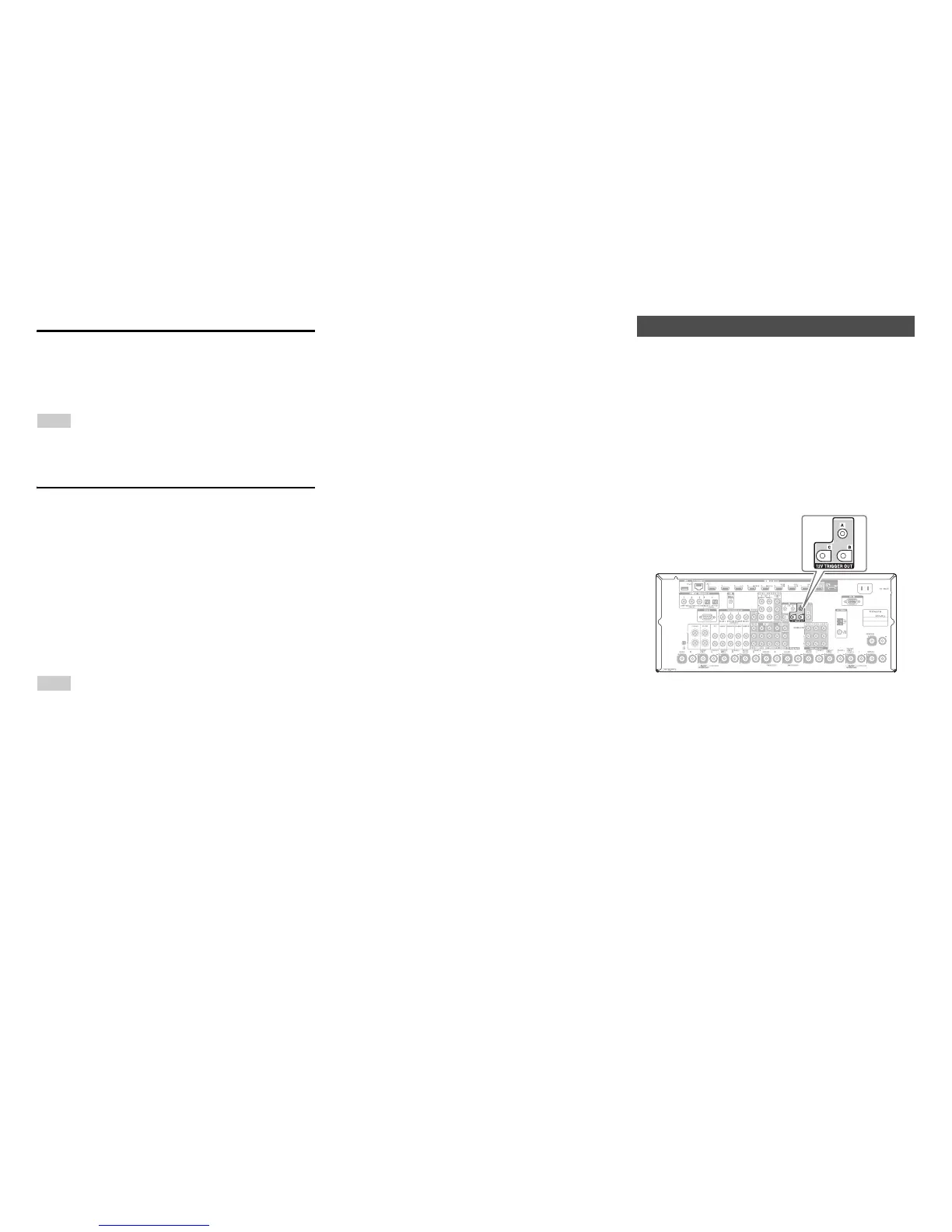
The 12V triggers A, B, and C can be used to turn on 12V
trigger-capable components automatically when they are
selected as the input source. The triggers can be set so that
they activate themselves once a connected component is
selected as the input source for the main room, Zone 2,
Zone 3, Zone 4, or any combination of rooms. When
triggered, the output from a 12V TRIGGER OUT goes
high (+12 volts and 150 milliamperes max. at 12V
TRIGGER OUT A; +12 volts and 25 milliamperes max.
at 12V TRIGGER OUT B and C).
See “12V Trigger A/B/C Setup” (➔ page 79).
Hookup
• Use a miniplug cable to connect the AV receiver’s 12V
TRIGGER OUT A, B, or C jack to the 12 V trigger
input of a connected component.
1
Press Zone repeatedly, and then press Muting.
1
On the AV receiver, press Zone 2 or Zone 3.
2
Press the AV receiver’s Tone repeatedly to select
“Bass”, “Treble” or “Balance”.
3
Use – or + to adjust the bass, treble or balance.
• You can boost or cut the bass or treble from –10 dB
to +10 dB in 2 dB steps.
• You can adjust the balance from 0 in the center to
+10 dB to the right or +10 dB to the left in 2 dB
steps.
Using the 12V Triggers



 To Next Page