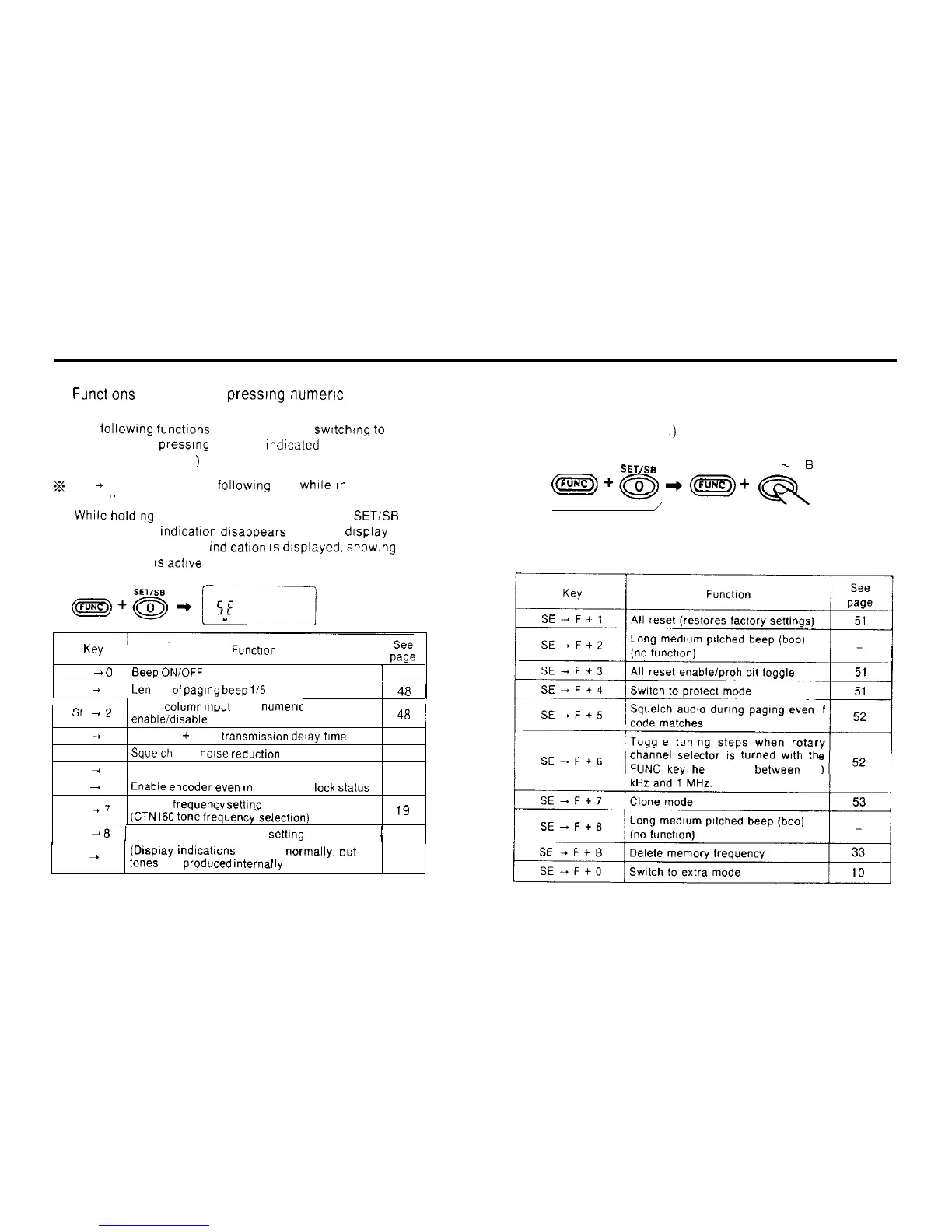
3) Functions accessed by
presslng
numeric
keys in the
set mode.
The following functions are accessed by switching
to
the
set mode and presslng the keys Indlcated
(See pages 48-50
)
z
SE
+
means “press the following key while
an
the set
mode
”
n
While
holding down the FUNC key. press the 0
SET/%
key
The frequency
Indicatton
dlsappears from the display
The [SE] (SET MODE) indication
IS
displayed. showing that
the set mode
1s
actlve
K~Y
, v-Y*
SE
+
0
Beep
ONIOFF
1
48
SE
+
1
Leil
gth
of
paglng
beep
li5 toggle
l
48
1
cc
1
/
1 kHz
column
input
from
nuneric
YL
-
L
: keys
enableidisable
toggle
48
j
SE
+
3
Repeater
+
PAG
transmissmn
delay
time
49
SE -4
Squelch
pop
no~se
reductlon
49
SE
+
5
APO (Auto Power Off) ONIOFF
49
SE
-
6
Enabie
encoder
even
,n
frequency
leck
status
50
SE
+7
CTCSS
frequencv
settIna
mode
(CTN160
tone
frequency-selectlon)
.n
IY
SE
+
8
1
Repeater offset frequency
settlng
/
19
SE
+
9
(Display
mdlcations
appear
normally.
but
no
tones
are
produced
Internally
)
4) Functions accessed in the set mode by holding
down the FUNC key and pressing another key.
(See pages 51-53
.)
SETISB
0. 1. 3
-
9
EJ
keys
~+~+~+Qq
\
/
Set mode
channel
sele lurned
wlth
th
Id down
between
100
9



 To Next Page