Additional Functions
(F
unc rons Accessed by Holding Down the FUNC Key and Pressing Another Key)
t
m
A number
of
functions
are available in addition to
those described in the preceding pages. They
tan
be
accessed by pressing special key
combinations.
a The followrng functrons
tan
be accessed by pressrng
numeric keys while holding down the FUNC key
(Refer to the
basrc
operatron instructrons on page 8.)
2)
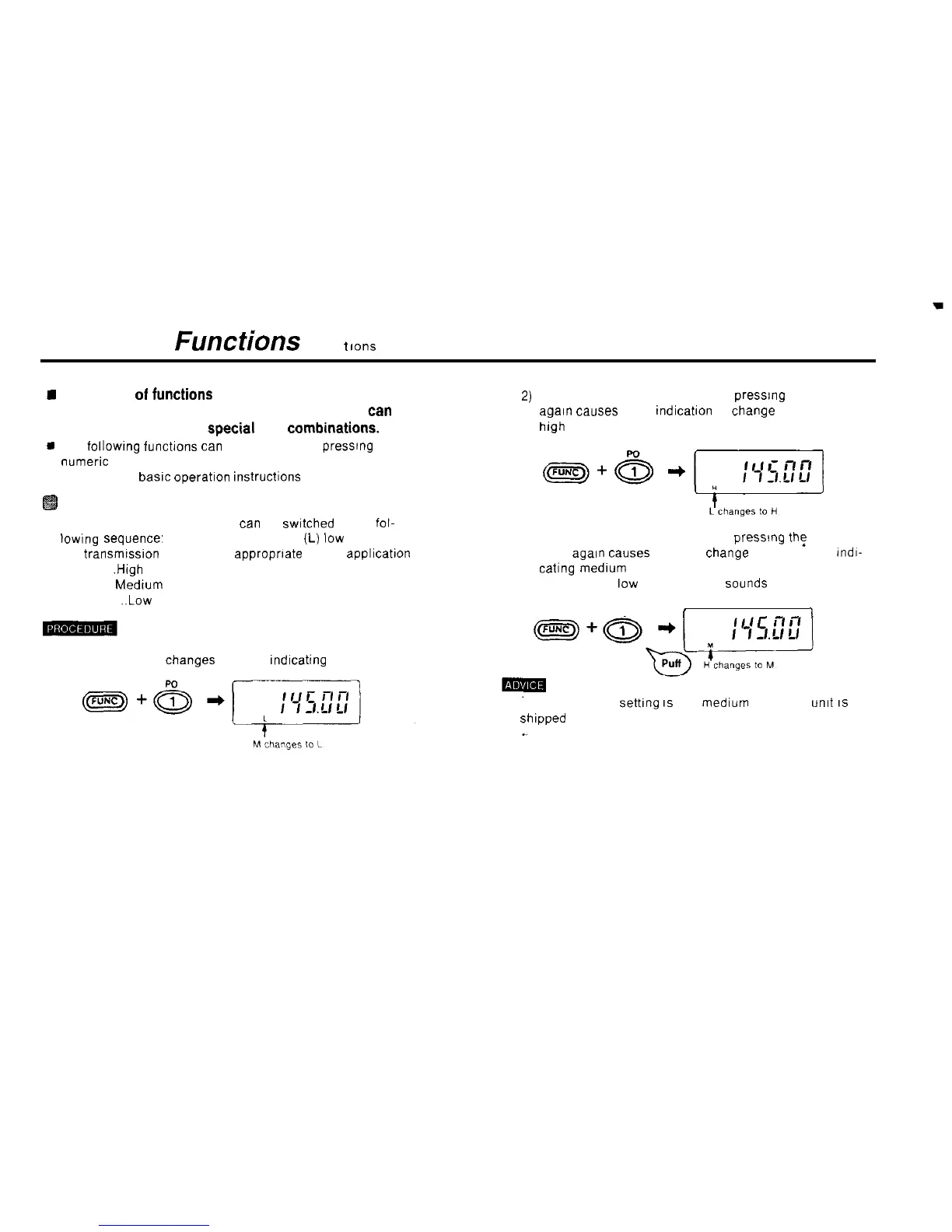
Transmission power switching
l The transmission power level
tan
be
swrtched
in the fol-
lowrng
sequence’ (H) high, (M) medium.
(L)
low Choose
the transmission power level approprrate to the applicatron
High
,High
output power
Medium Medrum output power
Low . . ..Low output power
3)
Holding down the FUNC key and pressrng the 1 PO key
again causes the L indicatron to
Change
to an H, for
high power.
Holding down the FUNC key and pressmg
th:
1 PO key
once
agarn
Causes
the H to
Change
back to an M.
rndr-
cating
medrum
power
A puff (short
low
pitched beep)
Sounds
PO
f
1
1) Hold down the FUNC key and press the 1 PO key The M
on the display changes to an L.
rndrcating
low power
The power level
settrng
IS
(M)
medrum
when the
umt
IS
shipped from the factory
45



 To Next Page