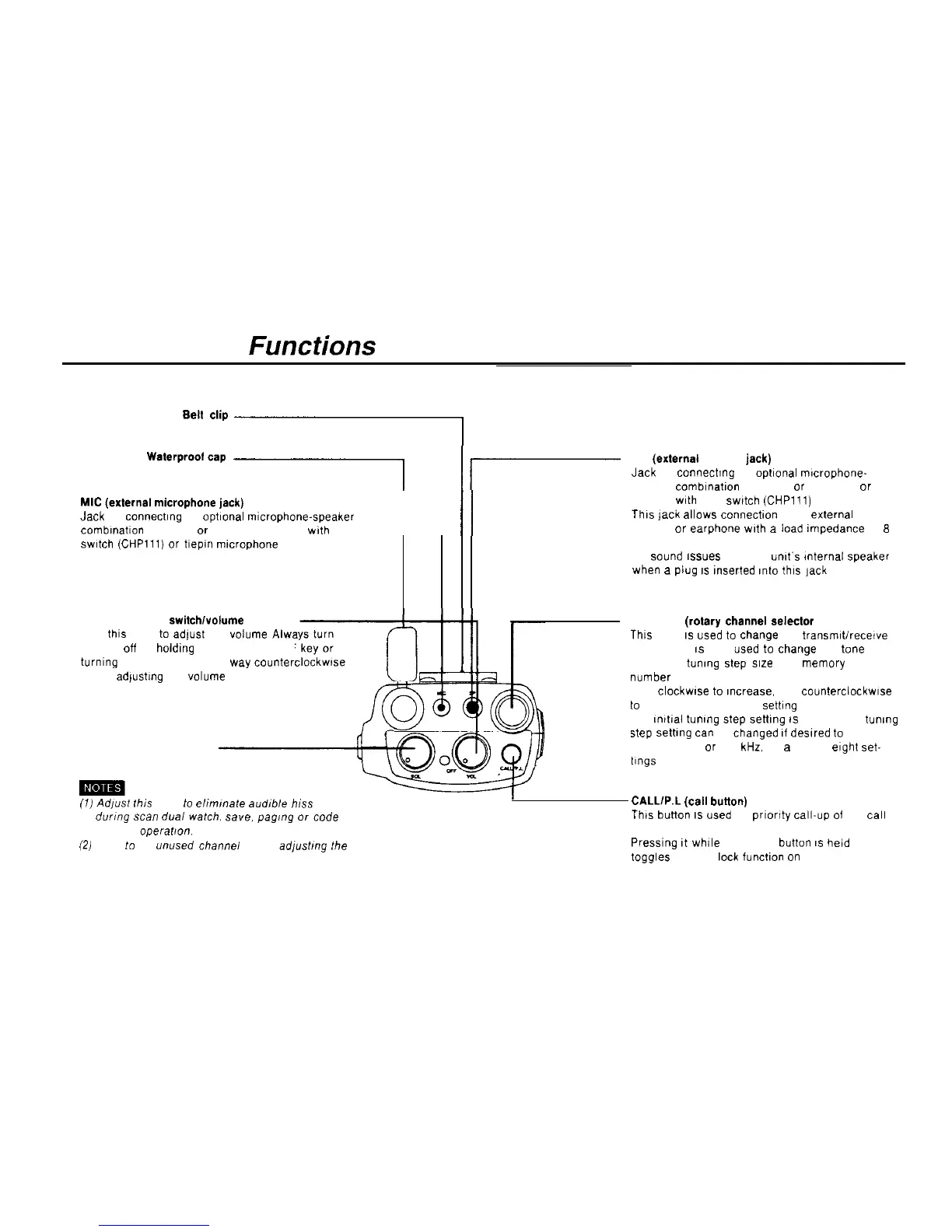
Operation and Functions of Parts
Top View
Be”
c’ip
I
Waterproolcap
.I
MIC
(extemal
microphone jack)
Jack for connectlng an Optional
mlcrophone-speaker
1
//
combmatlon
(CMP111 or CMP115). headset
wth
PTT
swltch
(CHPlll)
or
tlepm mtcrophone (CMP113)
SP
(extemal
speaker
jack)
Jack for connectmg an
optional
rmcrophone-
speaker
comblnatlon
(CMP111
or
CMP115)
or
headset with PTT
swtch
(CHPlll)
This
jack
allows
connectlon
of an
extemal
speaker
or
earphone
wth
a
Load
impedance
of
8
ohms
No
wund
6s”es
from the
“nlt’s
mternal
speaket
when a plug
IS
inserted
into this ]ack
VOLUME (power
switch/volume
knob)
Turn this knob
to
adlust the
volume
Alwa
squelch off by holdlng down the SQL OFF
turning the SQL knob all the
way
counterc
before adfustmg the
volume
SQL (squelch knob)
CHANNEL
(rotary
channel
selector
knob)
Thls knob
IS
used
to
Change
the
transmrt/recewe
frequency It
IS
also used
to
Change
the tone
frequency, tunmg
Step
size
and
memory
address
number
Turn
clockwse
to
~ncrease, and
counterciockwse
to
reduce, the frequency settlng
The
mitial
tunmg step settlng
IS
10 kHz The tunmg
step setbng
tan
be changed
11
deslred
to
5. 12 5.
20. 25. 50, 75
or
100
kHz,
for
a
total of
eight
set-
t1ngs
(7)
Adpsf
fhis hnob
to
ellmmate
audlble
h1.w
durmg
scan
dual
watch.
SBYB,
pag,ng
or
Code
squelch
operafron.
(2)
Tune
IO
an
unused
channei
before
ad/usfmg
fhe
squelch
CALL/P.L
(cal1
buiton)
This button
IS
used for
prlortty
call-up of the
cal1
frequency
Presslng It while the FUNC button
IS
held down
toggles the PTT leck functlon on and off
11



 To Next Page