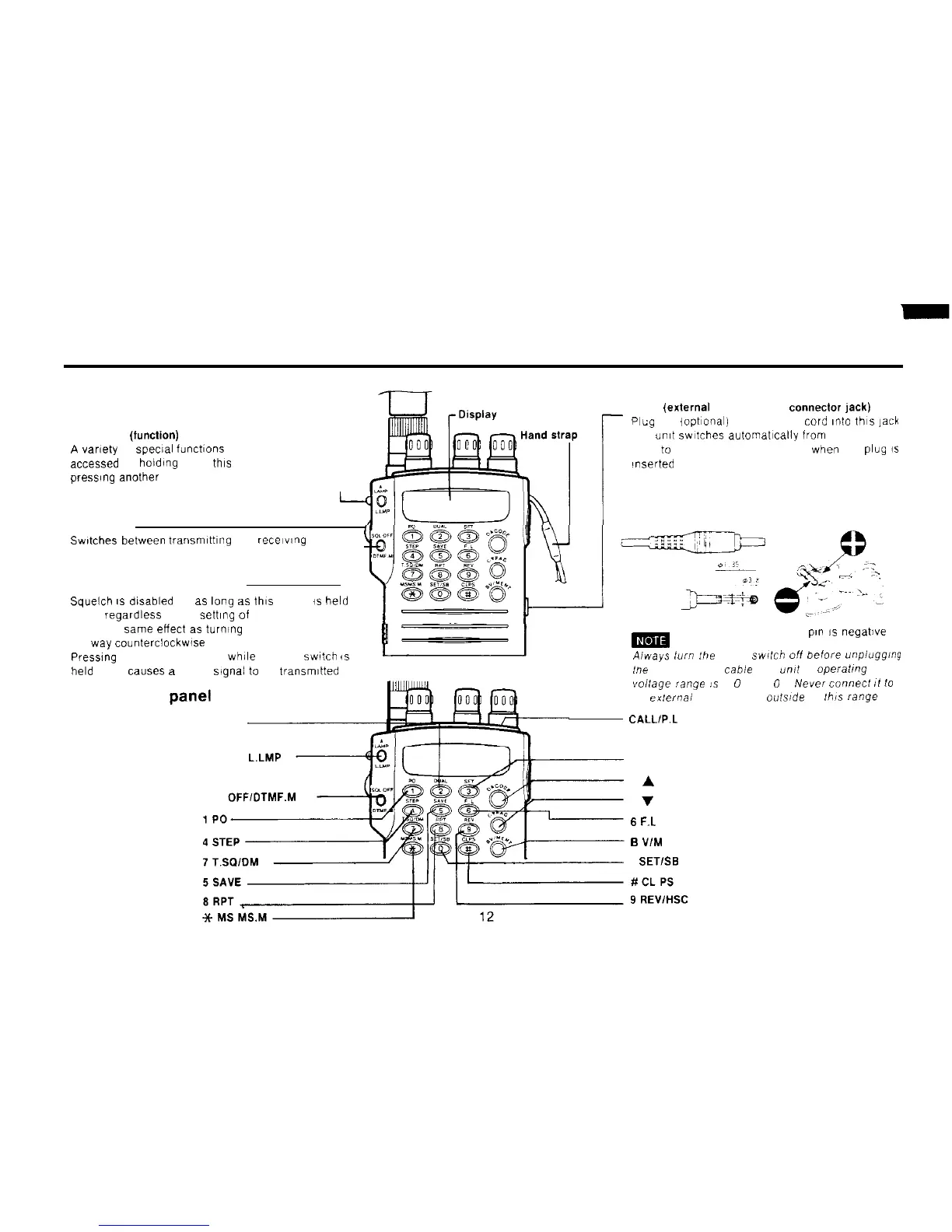
Front View
FUNCTION (function)
A
vamty
of
special
functlons ca” be
accessed by holding down this key and
press,ng another key
1
PTT switch
Swtches
between
transmlttlng
and
recelwng
SQL OFF (squelch oll button)
Squelch
IS
dlsabled for as lang
as
this button is held
down,
regardless
of the sett,ng of the squelch knob
lt has the same effect as turning the squelch knob all
the way
counterclockwise
Presslng the SQL OFF button while the PTT
switch
is
held down causes
a
DTMF
signal
to
be
transmltted
Front control
Panel
(keys)
2 DUAL
A LAMP L.LMP
SQL
0FFIDTMF.M
_
DC IN
(extemal
power supply connector jack)
Plug
the lopt~onal) power supply
Cord
~nto
thls
jack
The umt swltches automat~cally fram the battery
pack
to
the extern.3 power supply when the
plug
is
‘nserted
m
Center
pl”
is
negative
Aiways
turn :he power
swltch
off
before
unpiugging
he
power supply cable Jhe
unit
s
operaling
Vollage
range
:.5
6
0
,
16
0
V
Neer
connect
11
10
an
exlernai
power supply
oufside
of Ibis
range
CALL1P.L
3 SFT
D
A
CODE
C
V
PAG
6
F.L
B
V/M ENT
0 SETISB



 To Next Page