EasyManua.ls Logo

Intek KT-355EE - Key Operation Method Guide

Intek KT-355EE
66 pages
Print Icon
To Next Page IconTo Next Page
To Previous Page IconTo Previous Page
Loading...
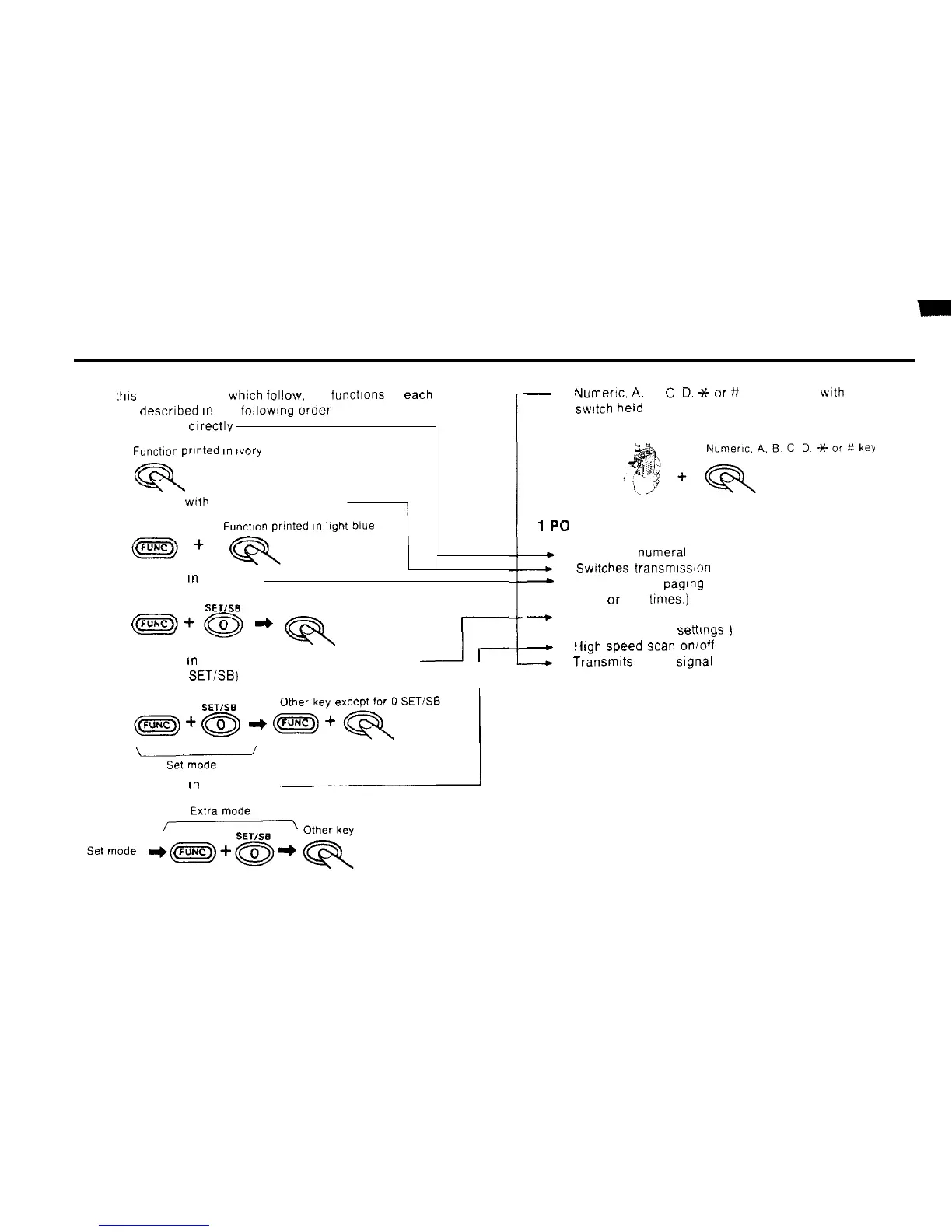
n On
thts
and the pages
which
follow, the functions of
each
key are descrrbed
rn
the foilowtng
Order
1) Key pressed drrectly
Function
printed
I”
~vory
2) Key pressed
wrth
FUNC key held down
Function prlnted
,n
3) Key pressed
rn
set mode
SET/SB
Other key
m+@*q
4) Key pressed
tn
set mode with FUNC key held down
J-
(except for 0
SETISB)
r
w
5) Key pressed
fn
extra mode
:
-
6)
Numeric,
A.
B,
C.
D.
Jt-
or
# key pressed
wth
PTT
swdch
held
down
1PO
+
1) Inputs the numeral 1
-
2) Swttches transmrssron output
+
3) Sets length of pagtng beep
(one or five
trmes.)
--.
4) All reset.
(restores factory settmgs
)
4
5)
High
Speed
scan
on/off
-.-.+
6) Transmtts DTMF
Signal
1
14

Related product manuals