722960-002 69
Intel
®
Ethernet Network Adapter E810-CQDA2T
User Guide
6.0 Initial Test Setup
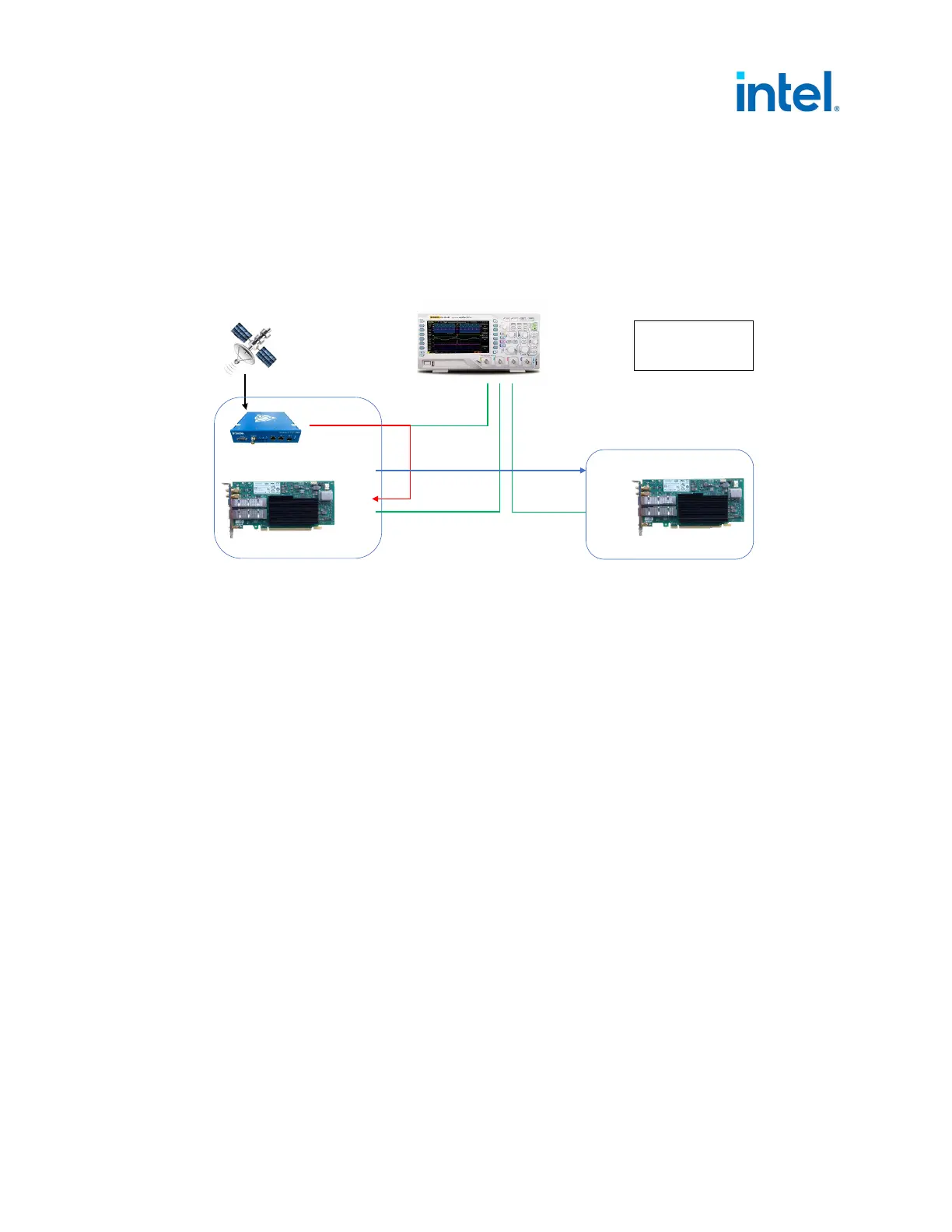
Two E810-CQDA2T adapters on two systems with a Trimble GM200 used as a timeserver.
6.1 Test Diagram
6.2 Software Configuration
Note: Before proceeding, configure a 1PPS signal on the grand leader output.
6.2.1 Leader Adapter
Before proceeding, configure the GNSS to the output 1PPS signal and connect it to the SMA1 connector
(or to U.FL2). Set all SMA and U.FL connectors to off (see Section 4.0).
1. Set interface device:
# export ETH=`grep 000f /sys/class/net/*/device/subsystem_device | awk -F"/"
'{print $5}' | head -n 1`
2. SMA1 as input and SMA2 as output:
# echo 1 1 > /sys/class/net/$ETH/device/ptp/ptp*/pins/SMA1
# echo 2 2 > /sys/class/net/$ETH/device/ptp/ptp*/pins/SMA2
Note: As a side effect of having a very accurate DPLL, synchronization between the two
E810-CQDA2T adapters can take up to several hours to change to a locked state.
3. Run ts2phc:
Running on Port 0:
# ./ts2phc -f configs/ts2phc-generic.cfg -s generic -m
4. Run ptp4l:
# ifconfig $ETH 192.168.2.1
# ./ptp4l -i $ETH -m
Figure 26. Test Setup
Port 0
Port 1
SMA1
SMA2
U.FL1
U.FL2
Red = 1pps
Blue = ptp4l
Green = Scope 1pps
External 1pps
Follower
Leader
Oscilloscope
Port 0
Port 1
SMA1
SMA2
U.FL1
U.FL2
E810- CQDA2T
E810- CQDA2T














 To Next Page