Chapter 2: Installation
TruVision DVR 12 User Manual 7
Connecting a PTZ dome camera
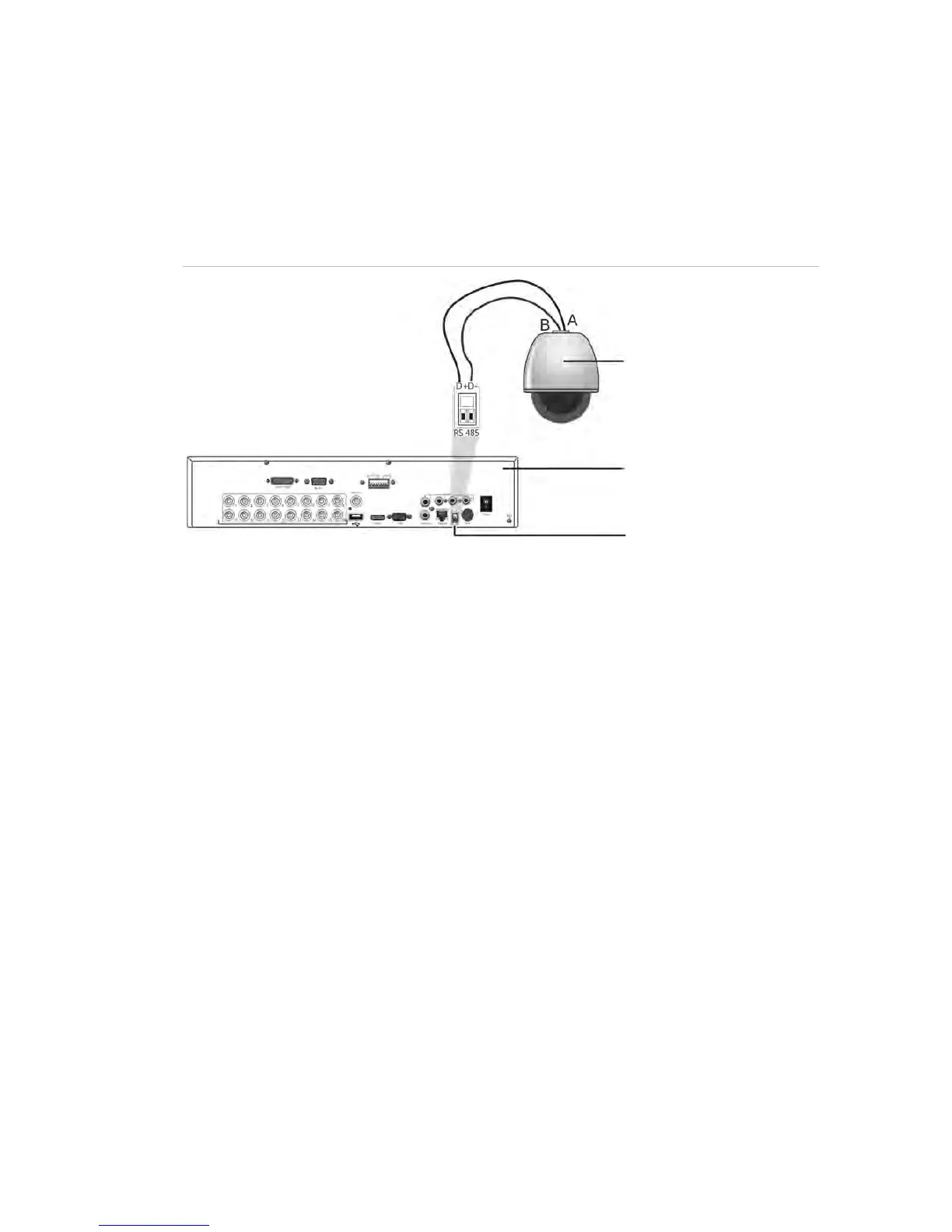
See Figure 4 below for how to connect a PTZ camera to the DVR. Any PTZ
dome camera can be controlled as the DVR is doing the PTZ protocol translation.
However, this setup provides only limited dome configuration (see Appendix B on
page 125 for the list of approved PTZ protocols).
Figure 3: Connecting a PTZ dome camera to the DVR for control over the network
Dome camera
DVR back panel
RS-485 port
Configuring the PTZ protocols for Interlogix cameras
Before the PTZ dome cameras are assembled in their housings, set their
protocol and address DIP switches for the DVR. See Table 3 on page 8 for
different Interlogix PTZ dome camera settings.
If you are using PTZ dome cameras from another company, please refer to their
configuration instructions.



 To Next Page