EasyManua.ls Logo

Interlogix TruVision DVR 12 - Using the setup wizard

Interlogix TruVision DVR 12
160 pages
Print Icon
To Next Page IconTo Next Page
To Previous Page IconTo Previous Page
Loading...
Chapter 2: Installation
8 TruVision DVR 12 User Manual
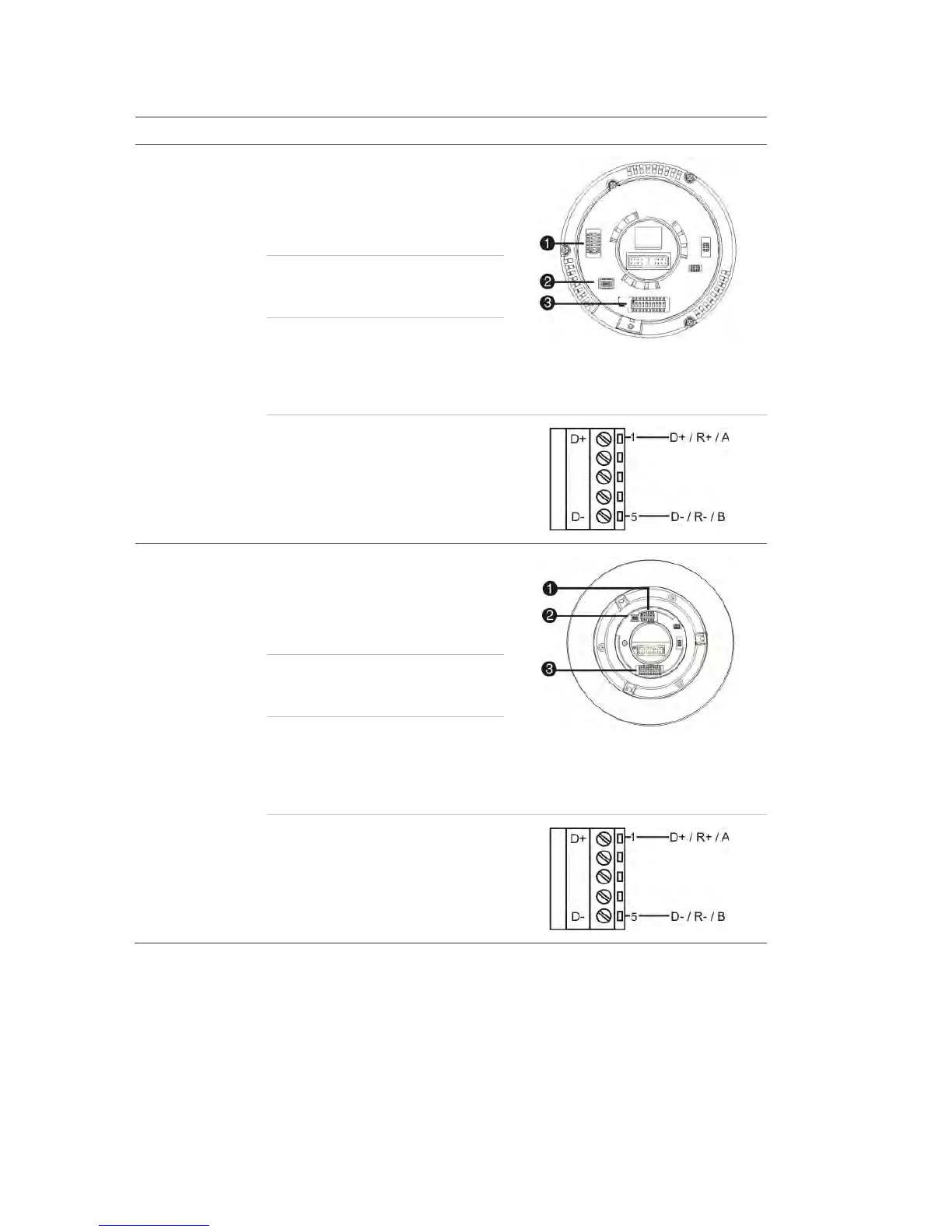
Table 2: PTZ protocols for Interlogix cameras
Camera
Switch setting
TruVision Mini PTZ
12X: Indoor Dome
Protocol DIP
switches:
RS-485 (on DVR): 000000
1. Protocol DIP switches
2. RS-
485 communication DIP switches
3. Camera ID DIP switches
RS-422 (on I/O
box):
100000
RS-485
communication DIP
switches:
110000
Camera ID DIP
switches:
Select the
camera ID
DIP switch
address as
required
RS-422/RS-485 data connector:
TruVision Mini PTZ
12X: Outdoor
Dome
Protocol DIP
switches:
RS-485 (on DVR): 000000
1. Protocol DIP switches
2. RS-
485 communication DIP switches
3. Camera ID DIP switches
RS-422 (on I/O
box):
100000
RS-485
communication DIP
switches:
110000
Camera ID DIP
switches:
Select the
camera ID
DIP switch
address as
required.
RS-422/RS-485 data connector:

Table of Contents

Related product manuals