Chapter 1 — Using the CK31 Handheld Computer
CK31 Handheld Computer User’s Manual 31
Decoded Serial Adapter or AA2 and Required Cables
Supported
Scanner
Decoded
Serial Adapter
Required Cable
1400
225-715-001
or AA2
3-604032-15,
3-604032-06*, or 3-606032-03*
1551E*
225-715-001
or AA2
3-604032-15,
3-604032-06*, or 3-606032-03*
1553E*
225-715-001
or AA2
3-604032-15,
3-604032-06*, or 3-606032-03*
1800
225-715-001
or AA2
3-366032-01*
SR60
225-715-001
or AA2
321-639-002
* These products are not RoHS compliant and are discontinued. This
information is included here only for customers who have already
purchased these products.
To attach a scanner to the serial port
1 Connect a scanner to the DB9 connector on the serial adapter
or cable.
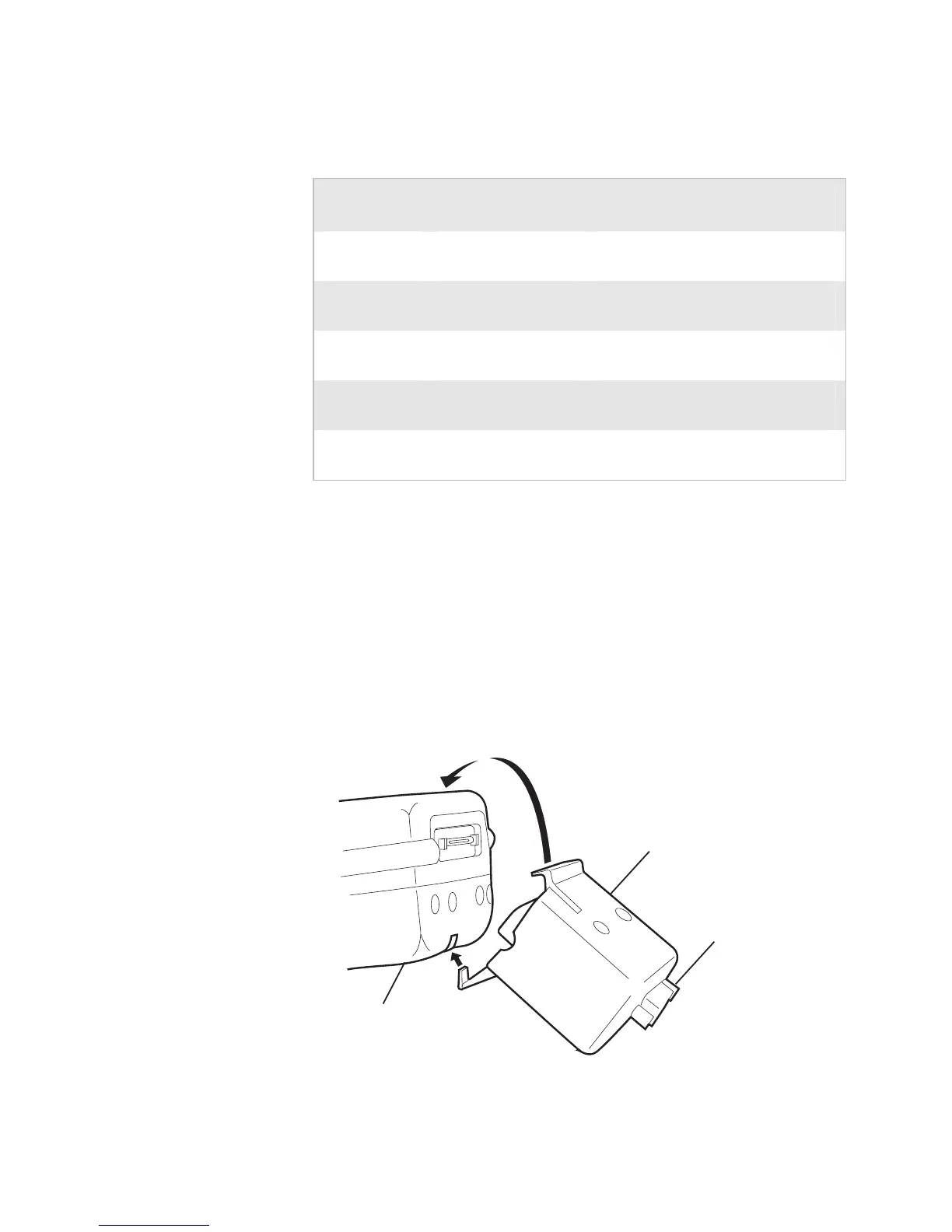
2 Hook the serial adapter onto the battery on the CK31 and
then snap it into place, or connect the AA2 serial cable
adapter to the serial adapter.
Serial adapter
Battery
DB9 connector



 To Next Page