Outdoor Software Defined Radio (OSDR) platform
Installation & Cabling Manual - Edition 3.0
105
Outdoor AC PoNE
Introduction
Apply this procedure for installing the outdoor AC PoNE onto the pole and
wall.
Equipment
overview
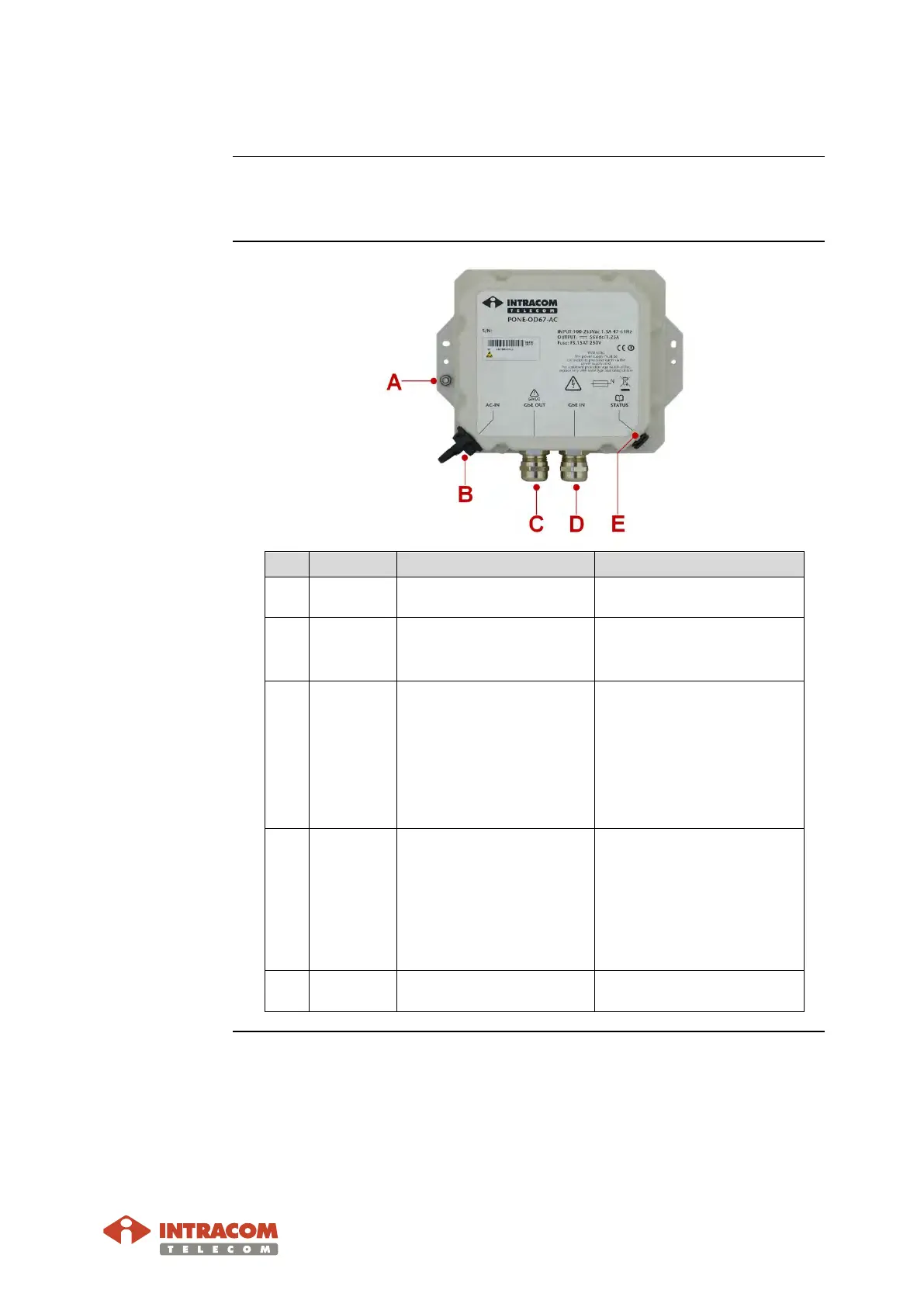
# Marking Details Use
A
GRD
Grounding point.
To connect the grounding
B
3-pins AC receptacle.
To connect the AC power
supply cable (with AC
connector).
C
Gigabit Ethernet
10/100/1000 Base-T,
Electrical (RJ-45).
To connect the Gigabit
Ethernet (S-FTP) cable for
carrying:
• traffic
• inband management
• superimposed DC power
towards to radio unit.
D
GbE IN
Gigabit Ethernet
10/100/1000 Base-T,
Electrical (RJ-45).
To connect the Gigabit
Ethernet (S-FTP) cable for
carrying:
• traffic
• inband management
towards to customer
network.
E
STATUS
Multi-functioning LED.
To provide radio unit status
Continued on next page


 To Next Page