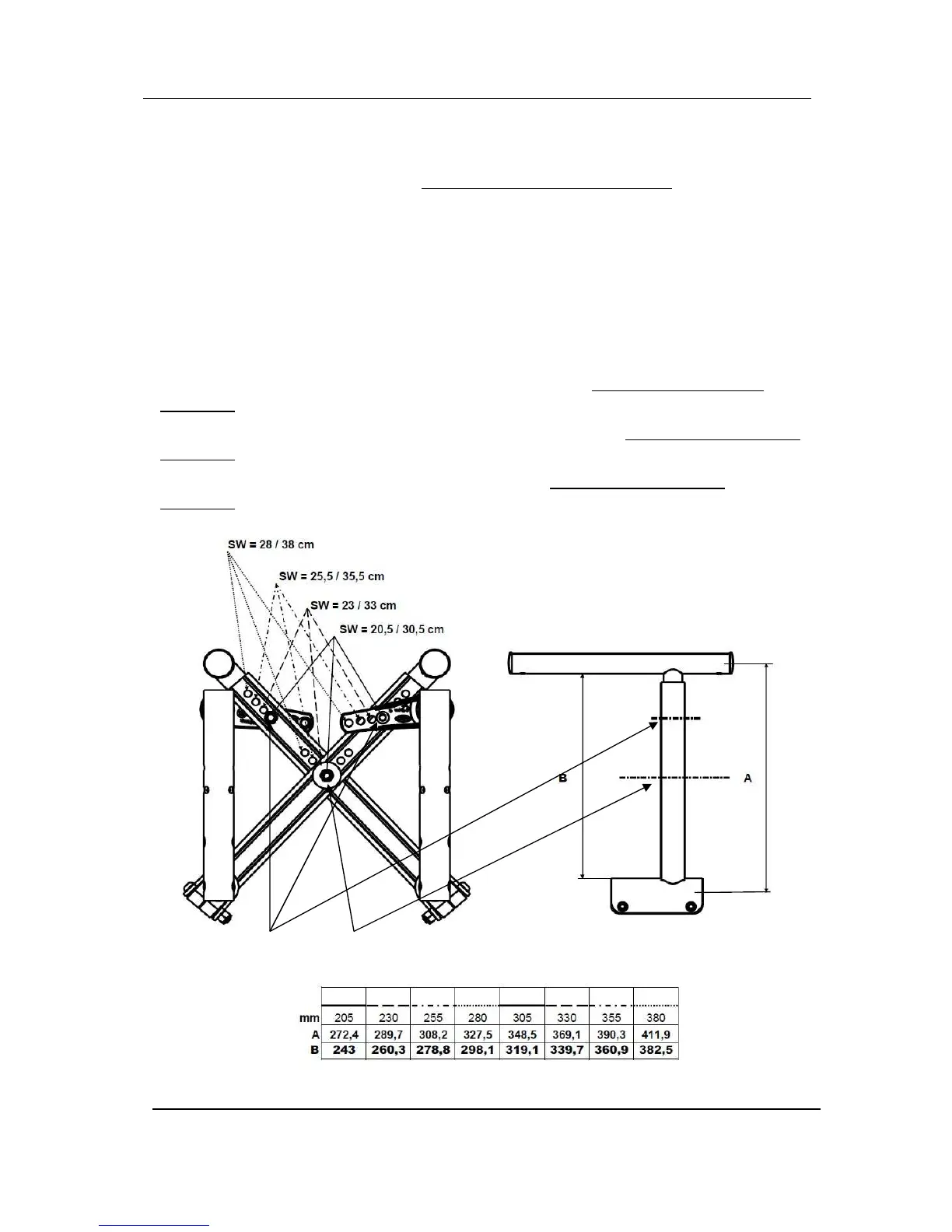
Adjusting Cross Brace Width
NOTE: For this procedure, refer to FIGURE 4.3.
1. Remove the seat upholstery. Refer to Removing/Installing Seat Upholstery paragraph.
2. Remove the two mounting screw (M6) that secures the upper part of the cross brace and the
central mounting bolt (M8).
3. Slide upper parts equally on both side to the desired width using the pre-set width positions.
(refer to the FIGURE 4.6, see Width Table).
4. Securely tighten with the existing mounting screw (M6) and the central mounting bolt
(M8).
5. Repeat STEPS 1
-
4 for the opposite side.
6. Install the appropriate seat upholstery, if necessary. Refer to Removing/Installing Seat
Upholstery paragraph.
7. Installing the appropriate backrest upholstery, if necessary. Refer to Removing/Installing Back
Upholstery paragraph.
8. Installing the appropriate footplate, if necessary. Refer to Removing/Installing Back
Upholstery paragraph



 To Next Page