ServiceProcedures
InstallingtheFork
1.Setthefrontoftheframeonastablesurfacethatelevatesthe
frameslightlyofftheground.
2.Slidelowerforkclampovertheforkstem.Pushtheforkuntil
theupperforkclampengagestheupperportionoftheforkstem.
3.Installandlooselyattachthecompensatorbolt.
4.Looselyattachupperforkclamp/boltswiththelock-nutsfacing
upwards.DONOTfullytighten.
5.Installandtightenlowercapandbolt.
6.Tightenthelowerforkclampbolts.
7.Tightenthetopcapbolttoremoveplayfromtheassembly.
8.Tightentheupperforkclamp.
9.Tightenthecompensatorbolt.
10.Tightencompensatorsetscrews.
11.Installfrontwheel.Referto6.5Removing/InstallingtheFront
Wheel,page57.
6.5Removing/InstallingtheFrontWheel
WARNING!
–Afteranyadjustments,repairorserviceandbefore
use,makesureallattachinghardwareistightened
securely.Otherwiseinjuryordamagemayoccur.
Removing
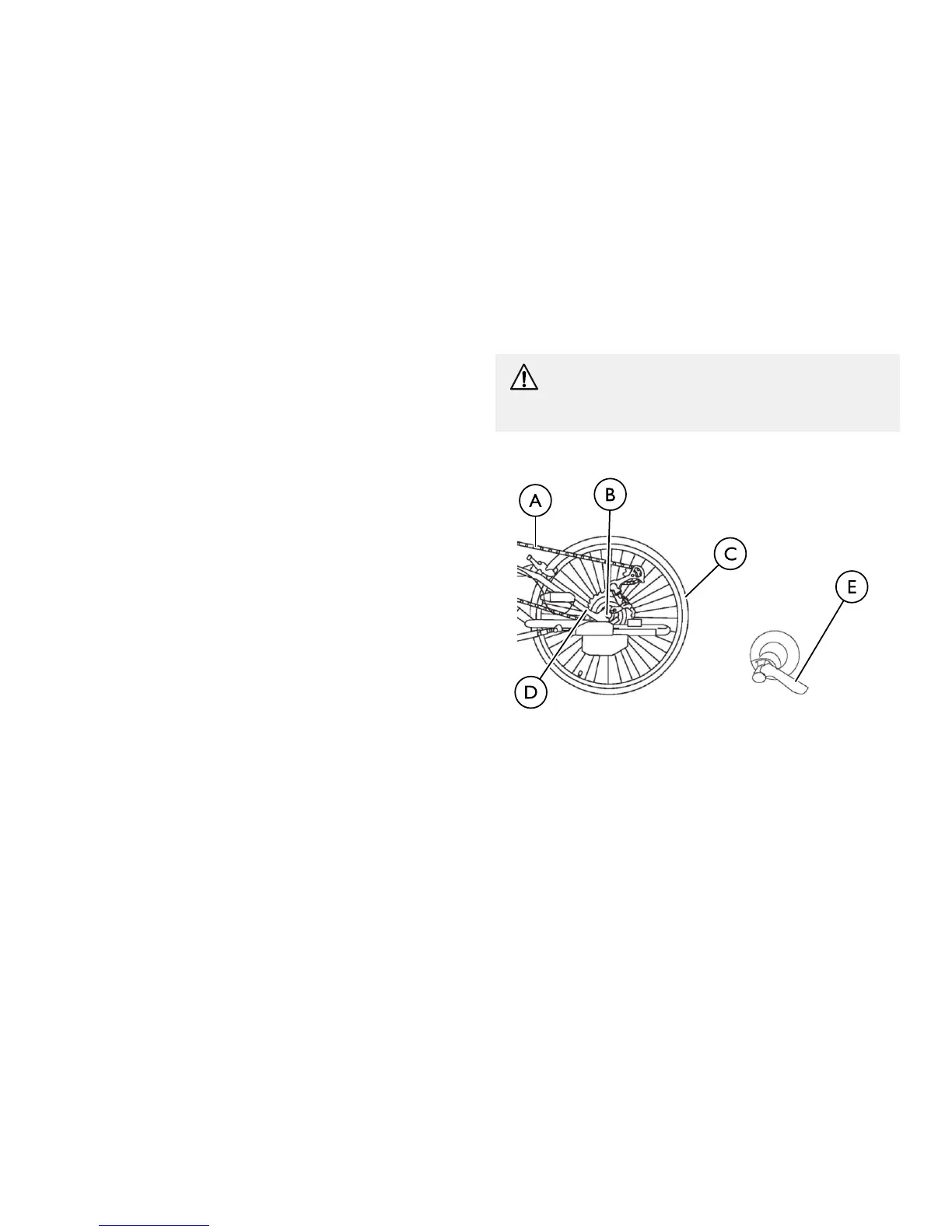
1.Openthequick-releaseleverEsecuringthefrontwheelCto
theforkDandloosentheknobontheoppositesideofthe
quick-releaselever.
2.RemovethewheelCfromtheforkD.
3.RemovethechainAfromthefrontwheelC.
1171790-B57


 To Next Page