ServiceProcedures
BrakePadReplacement
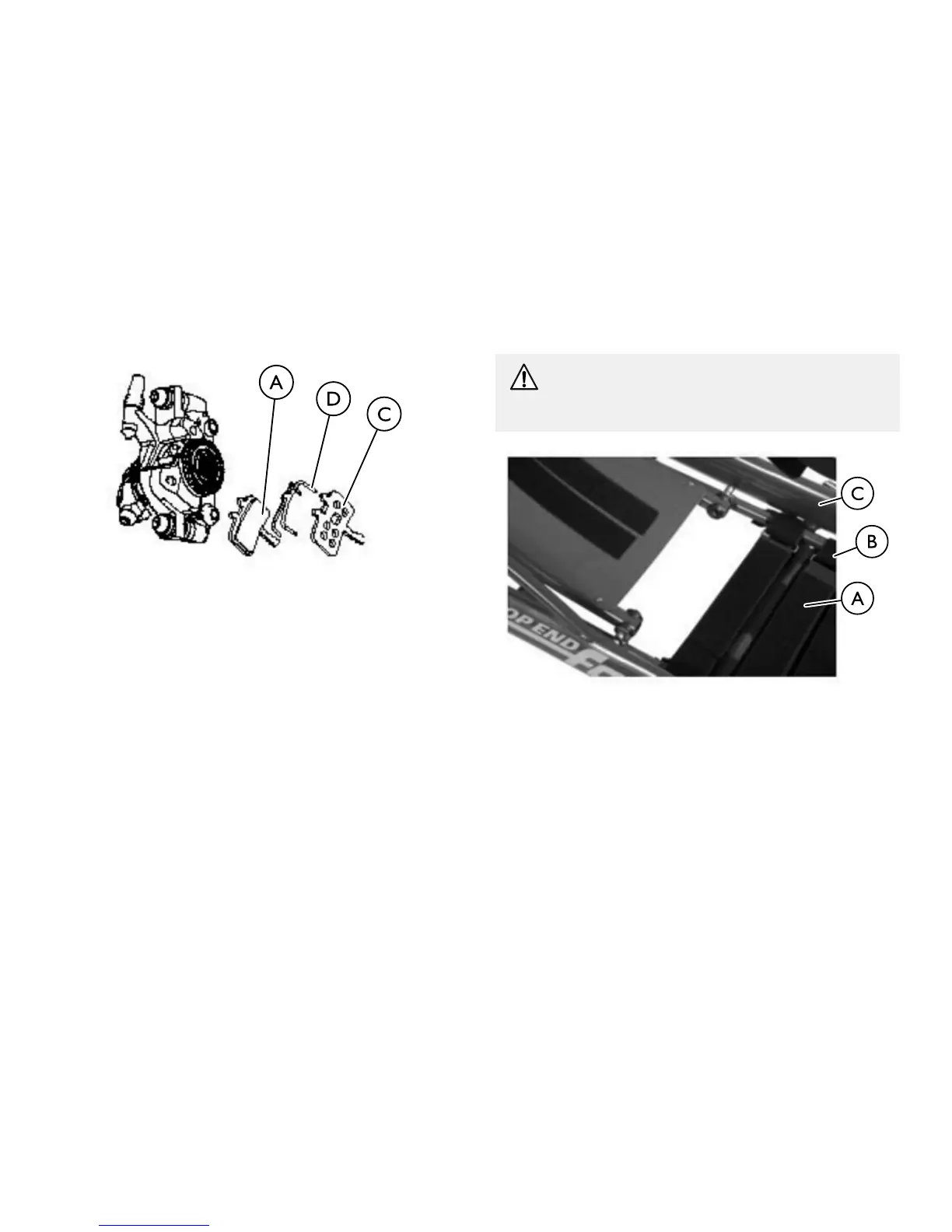
InspectthebrakepadAforthicknessandwear.Toreplacebrake
padA:
1.RemovetheexistingpadA.
a.BackbothadjusterknobsBallthewayout
(counterclockwise).
b.SqueezethepadtabstogetherandpullbothpadsAstraight
outofthecaliperC.
2.InstallreplacementpadAandspringsD.
a.AssemblethespringDbetweenthenewleftandrightpads
A.Thepadmarked“R”goesonthespokesideofthebrake.
b.AlignthespringDtothepadAasshown.
c.SqueezethebrakepadAandspringclipassemblytogether
thenpressfirmlyintothecaliperCuntilitclicksintoplace.
6.14ReplacingSeatUpholstery
WARNING!
–Afteranyadjustments,repairorserviceandbefore
use,makesureallattachinghardwareistightened
securely.Otherwiseinjuryordamagemayoccur.
1.Removeseatcushion.
2.UnlatchthefasteningflapsAthatsecuretheseatupholstery
BtotheseatframeC.
3.RemovetheexistingseatupholsteryB.
4.InstallthenewseatupholsteryBmakingsurethatthefastening
flapsAthatareincloseproximitytooneanotheraretothe
rearoftheseatframeC.
5.SecurethefasteningflapsAtogether.
6.Reinstallseatcushionontochair.
1171790-B65


 To Next Page