27
OPERATION AND SET-UP ON THE CONTROLLER
inVENTer Connect controller platform | Operating instructions
Pairing sensors
Requirements:
• The CS2-Connect CO
2
sensor and the SK19-Connect switching contact are connected to the
power supply, the FTS19-Connect Indoor/Outdoor humidity/temperature sensors are equipped
with batteries (2xAAA each).
• The mode key on the controller was pressed, held down for 3 seconds and the
LED is ashing WHITE.
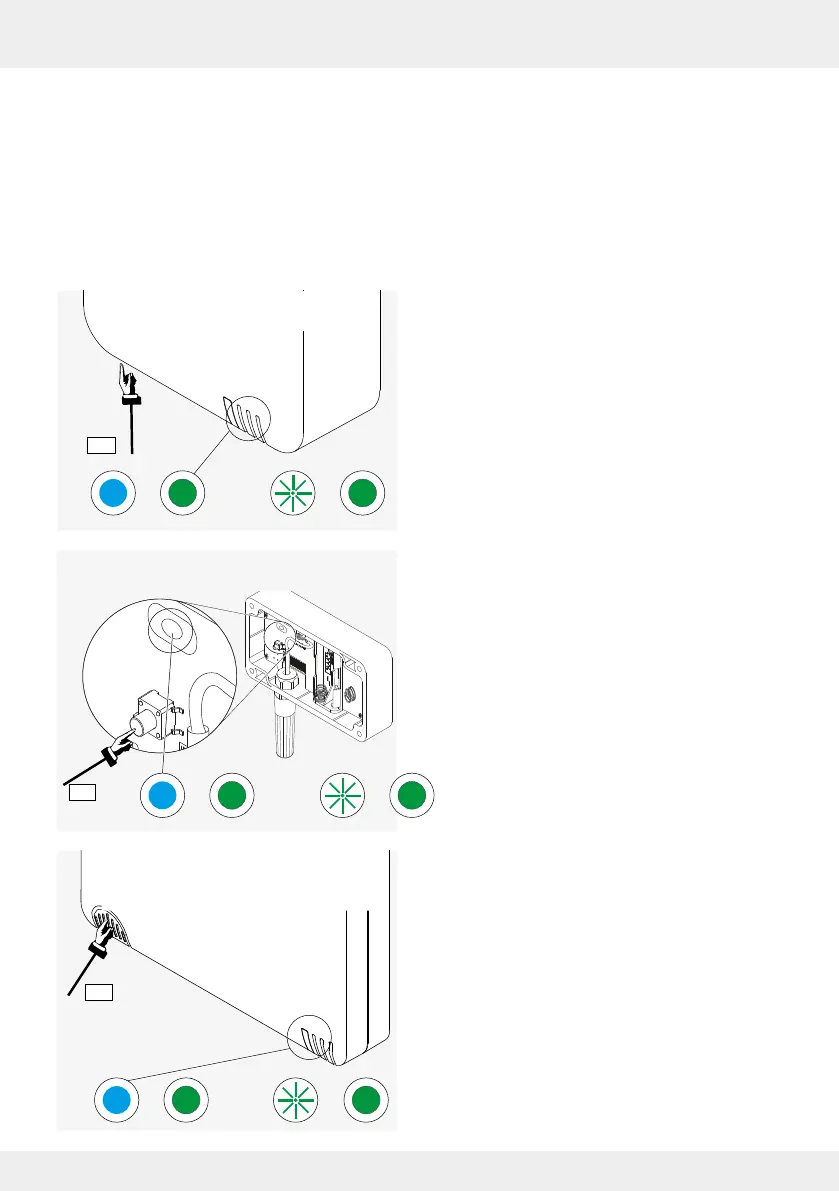
► Press the corresponding button to activate the
sensor.
(FTS19-Connect Inside: on the underside of the
housing).
The LED lights up TURQUOISE (1).
► Press and hold the button again until the LED lights
up permanently GREEN (approx. 3 s).
The sensor is ready, is automatically recognised
and paired by the controller (LED ashing green, 2).
On the controller's display screen, after successful
pairing, the displayed number of paired components
increases. The LED on the sensor lights up
permanently GREEN. (2)
► Continue numbering the paired components.
• FTS19-Connect Indoor humidi-
ty/temperature sensor
• FTS19-Connect Outdoor
humidity/temperature sensor
• CS2-Connect CO2 sensor/
SK19-Connect switching
contact



 To Next Page