- 36 -
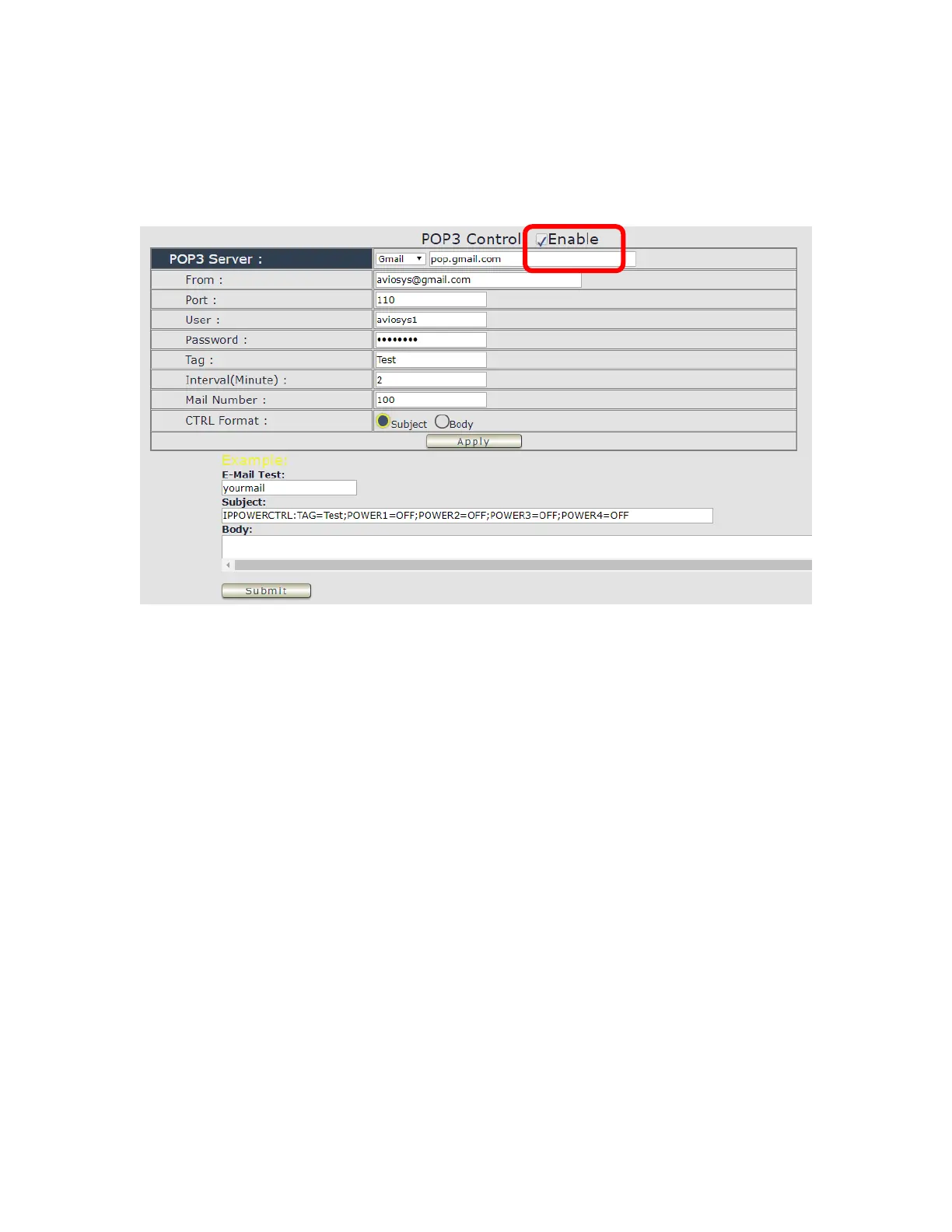
⚫ POP3 Control
User can control each port turn ON or turn OFF by e-mail. The command format is limited .
Please enable the function first .
Settings Section :
To set up 9828 be controlled by e-mail , user need to know the both sender`s e-mail address
and receiver`s e-mail account Name and Password.
⚫ POP3 Server: This is receiver’s mail server
⚫ From : Sender’s email address . Ex.: aviosys@gmail.com
⚫ Port : This is the port of POP3 Server.
If user select @gmail or @hotmail account as SMTP Server , 9828 will fill the SSL & Port
automatically.
⚫ User : Username to login the receiver’s e-mail Ex.: aviosys1 or aviosys1@gmail.com
⚫ Password: Password for the e-mail address. EX. : 12345678
⚫ Tag : User can use any message for 9828 to recognize this mail as 9828 command mail .
EX.:
As type “ Test “ in TAG area, the command contents is as following:
IPPOWERCTRL:TAG=Test;POWER1=OFF;POWER2=OFF;POWER3=OFF;POWER4=OFF
⚫ Interval ( minutes ) : The period of time between Send and Receive the command e-mail.



 To Next Page