iPECS eMG80
Hardware Description and Installation Manual Issue 1.0
21
4. BOARD INSTALLATION AND DESCRIPTION
4.1 General information
The eMG80 KSU houses the Main Board with processor, memory and interface circuitry.
Optional Interface boards are installed on the MBU to expand the external network interfaces
as well as terminals available. Both the KSU and Expansion KSUs can be equipped with two
(2) optional Interface boards. In addition, optional Function boards can be installed on the
KSU MBU to enhance various system functions. This section provides descriptions of the
various components and step by step instructions to mount the option boards.
4.2 Closing and Opening the front cover
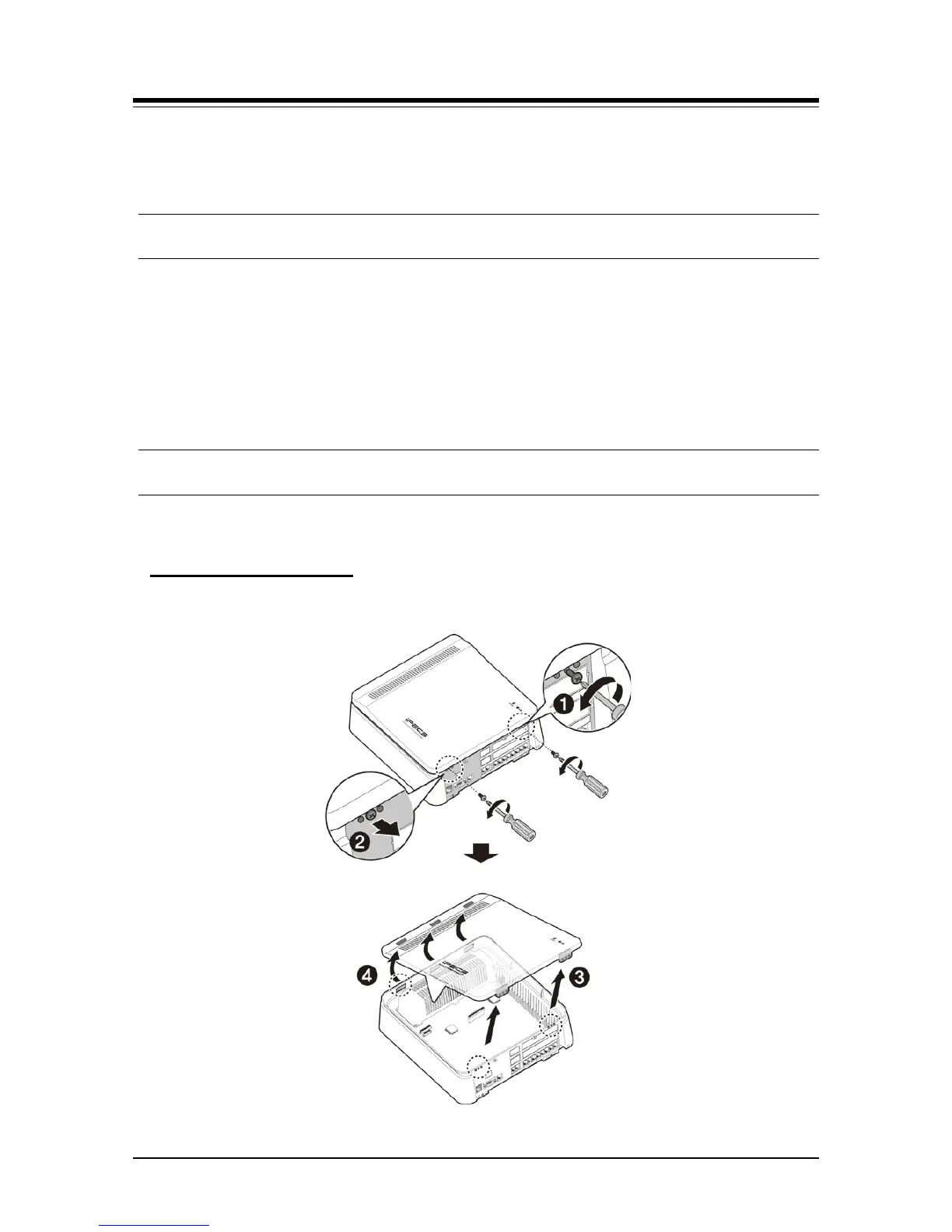
Before closing and opening the front cover, you need to prepare the screwdriver.
1. Loosen screws on both sides with screwdriver.
Opening the Front Cover
2. Lift the front cover in the direction of the arrow.
Figure 4.1 Opening the Front Cover



 To Next Page