MIG-185CMT
10
CONNECTION & SETTINGS
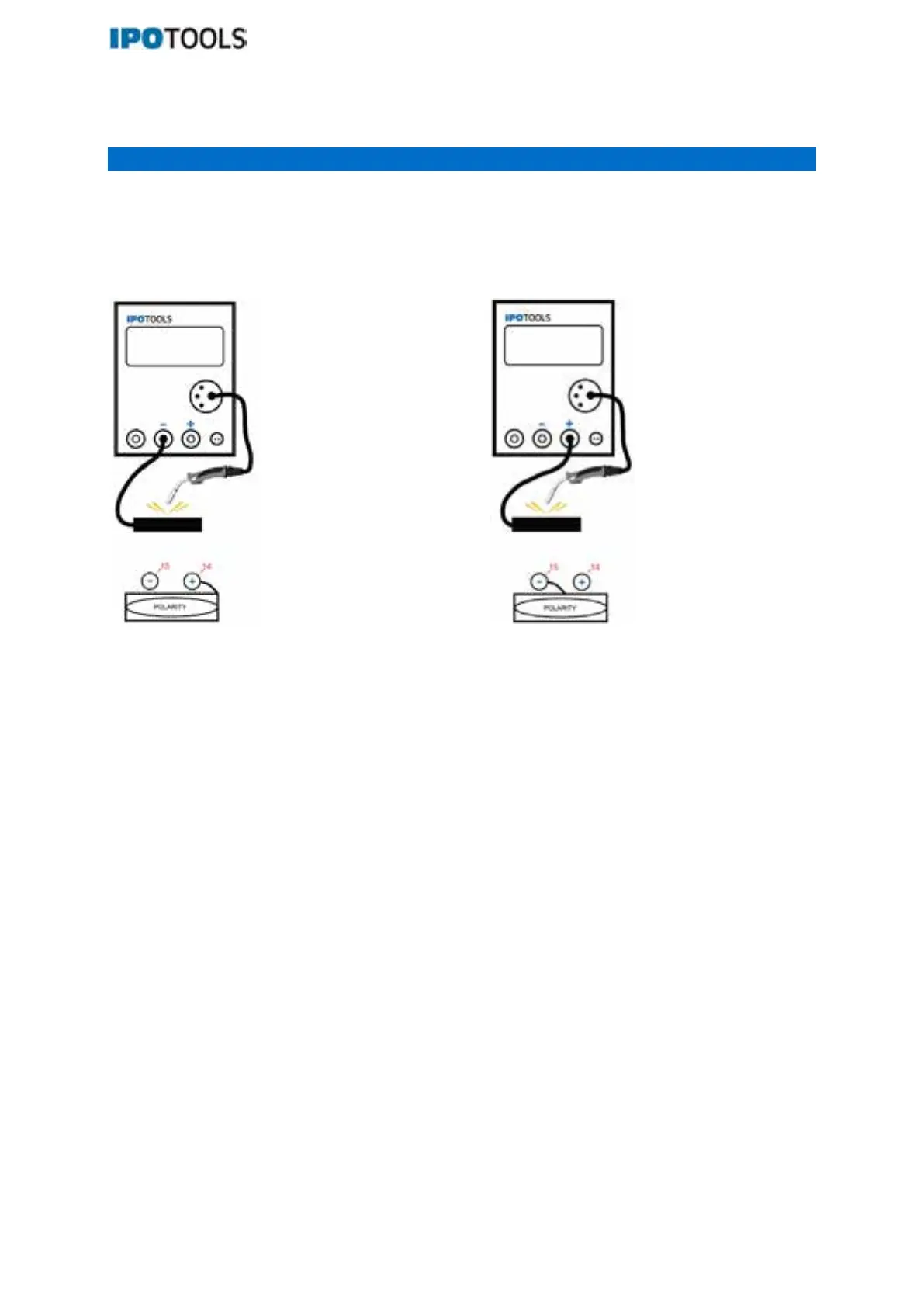
MIG/MAG welding with/without gas:
Connect the torch and the earth cable correctly, depending on whether you want to weld with or
without gas (filler wire).
With gas: Without gas:
Filled wire welding (without gas)
Press button (1) to set the device to “MAN” or “SYN MIG” mode, then press button (4) to select “FLUX”
mode and flux wire thickness.
In this welding process, a filled wire is used for welding, which already contains particles that form a
protective atmosphere during welding and thus prevent air from entering. You do not need shielding
gas for this welding process.
When you select FLUX, the welding machine automatically adjusts some parameters to help you
achieve the best results during welding.
In the MIG SYN mode, use the control knob (3) to set the appropriate welding current, which is usually
set in the range of about 80A when welding with a flux-cored wire. You can also adjust the voltage +/-
3V by turning the knob (2).
Shielding gas welding
By pressing button (1) set the machine to "MAN" or "SYN MIG" mode, then by pressing button (4)
select the desired gas and material to be welded with, for welding with iron you can choose between
"Fe+CO2 ” and “Fe+MIX”, and for welding with aluminum “Al+Ar”.
In the MAN MIG, use the control knob (2) to set the appropriate voltage and the appropriate wire feed
(3) according to the type and diameter of the welding wire.
In MIG SYN mode, use the control knob (4) to select the appropriate gas and material to be welded
with. With the button (5) you can select the thickness of the wire with which you will weld. Use button
(3) to set the appropriate welding current and use button (2) to adjust the voltage (+/- 3).



 To Next Page