ISLA Instruments S2400 User Manual
– 20 –
PPaatttteerrnn MMooddee
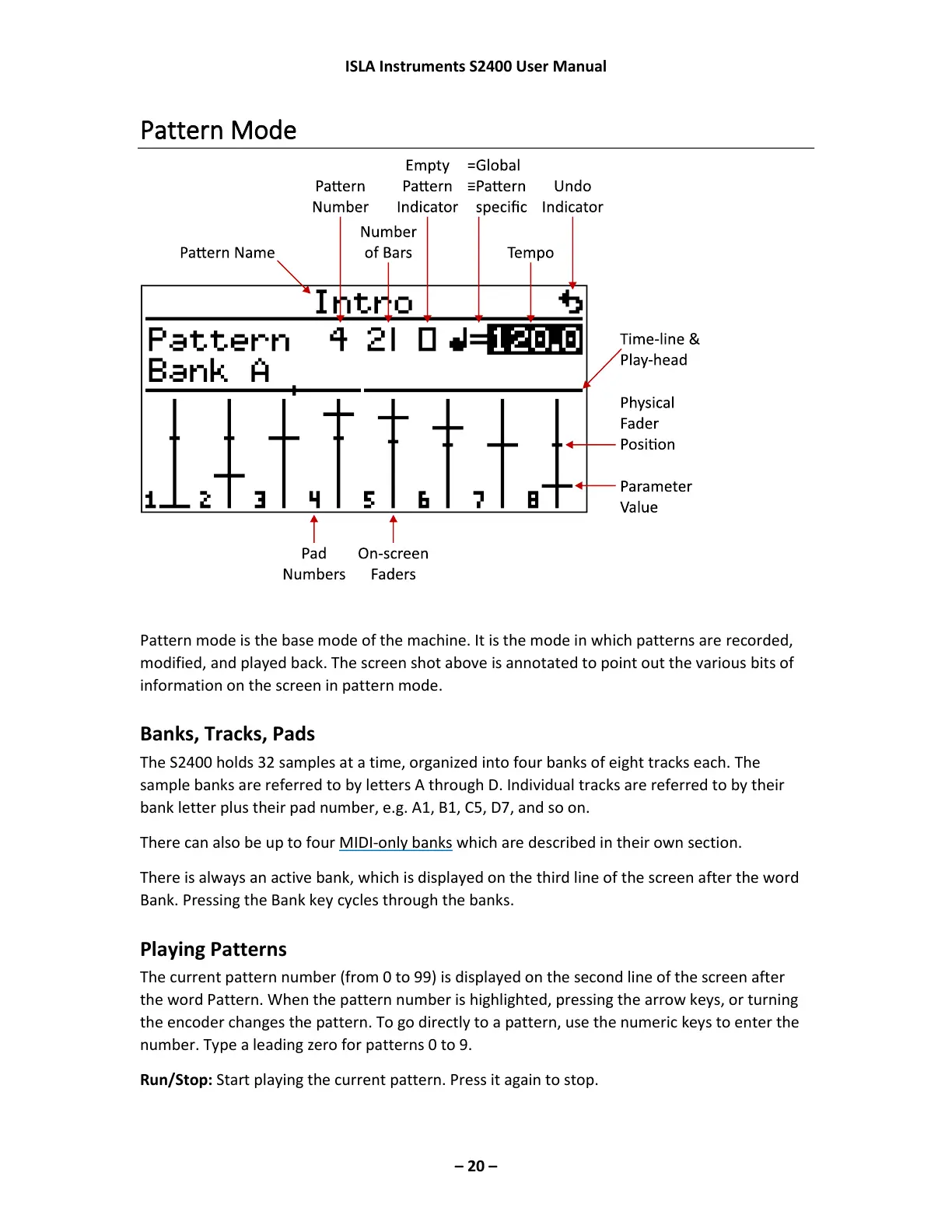
Pattern mode is the base mode of the machine. It is the mode in which patterns are recorded,
modified, and played back. The screen shot above is annotated to point out the various bits of
information on the screen in pattern mode.
Banks, Tracks, Pads
The S2400 holds 32 samples at a time, organized into four banks of eight tracks each. The
sample banks are referred to by letters A through D. Individual tracks are referred to by their
bank letter plus their pad number, e.g. A1, B1, C5, D7, and so on.
There can also be up to four MIDI-only banks which are described in their own section.
There is always an active bank, which is displayed on the third line of the screen after the word
Bank. Pressing the Bank key cycles through the banks.
Playing Patterns
The current pattern number (from 0 to 99) is displayed on the second line of the screen after
the word Pattern. When the pattern number is highlighted, pressing the arrow keys, or turning
the encoder changes the pattern. To go directly to a pattern, use the numeric keys to enter the
number. Type a leading zero for patterns 0 to 9.
Run/Stop: Start playing the current pattern. Press it again to stop.



 To Next Page