ISLA Instruments S2400 User Manual
– 73 –
SSaammppllee MMooddee
Enter Sample Mode by pressing Shift+Sample (the fourth key from the left in the top row).
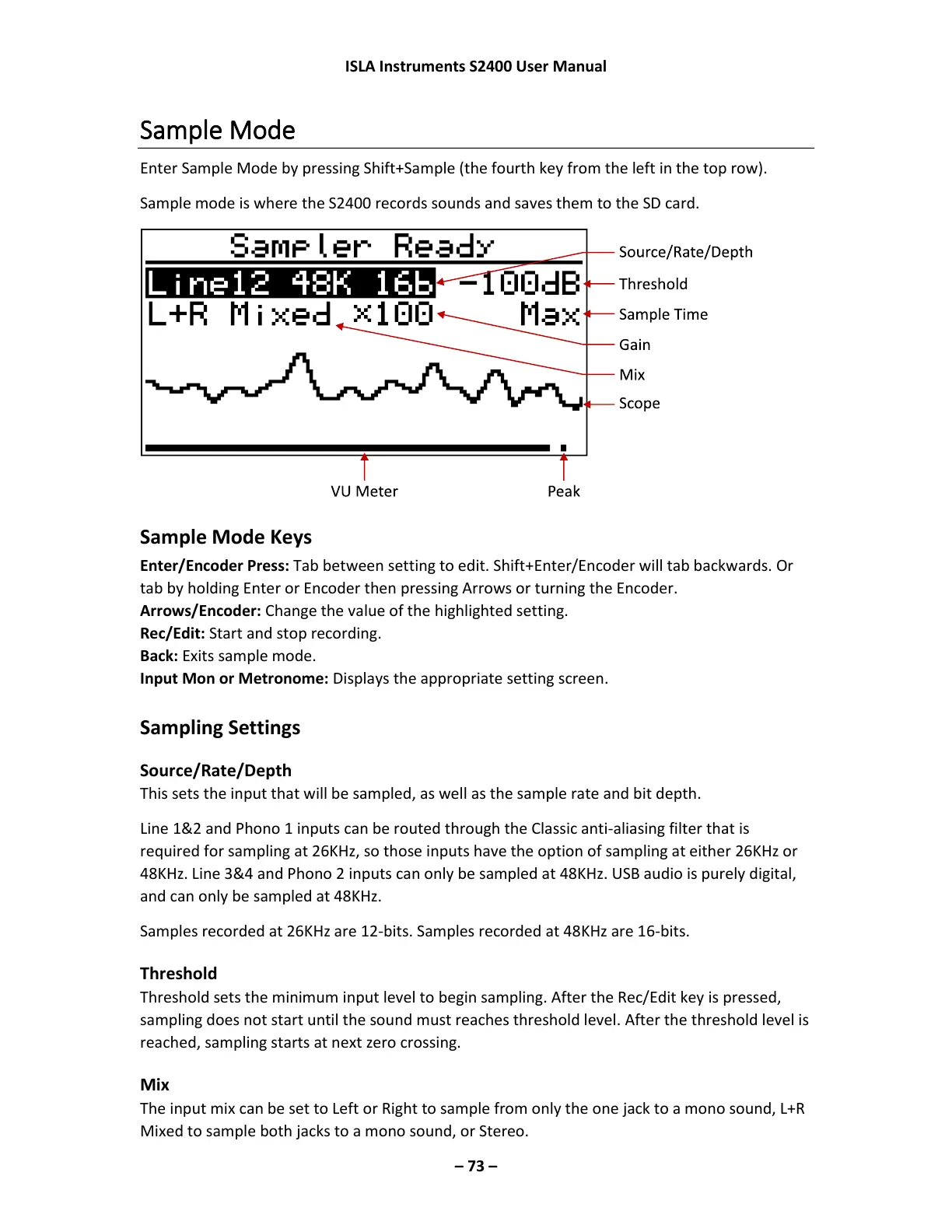
Sample mode is where the S2400 records sounds and saves them to the SD card.
Sample Mode Keys
Enter/Encoder Press: Tab between setting to edit. Shift+Enter/Encoder will tab backwards. Or
tab by holding Enter or Encoder then pressing Arrows or turning the Encoder.
Arrows/Encoder: Change the value of the highlighted setting.
Rec/Edit: Start and stop recording.
Back: Exits sample mode.
Input Mon or Metronome: Displays the appropriate setting screen.
Sampling Settings
Source/Rate/Depth
This sets the input that will be sampled, as well as the sample rate and bit depth.
Line 1&2 and Phono 1 inputs can be routed through the Classic anti-aliasing filter that is
required for sampling at 26KHz, so those inputs have the option of sampling at either 26KHz or
48KHz. Line 3&4 and Phono 2 inputs can only be sampled at 48KHz. USB audio is purely digital,
and can only be sampled at 48KHz.
Samples recorded at 26KHz are 12-bits. Samples recorded at 48KHz are 16-bits.
Threshold
Threshold sets the minimum input level to begin sampling. After the Rec/Edit key is pressed,
sampling does not start until the sound must reaches threshold level. After the threshold level is
reached, sampling starts at next zero crossing.
Mix
The input mix can be set to Left or Right to sample from only the one jack to a mono sound, L+R
Mixed to sample both jacks to a mono sound, or Stereo.



 To Next Page