ISLA Instruments S2400 User Manual
– 6 –
FFrroonntt PPaanneell
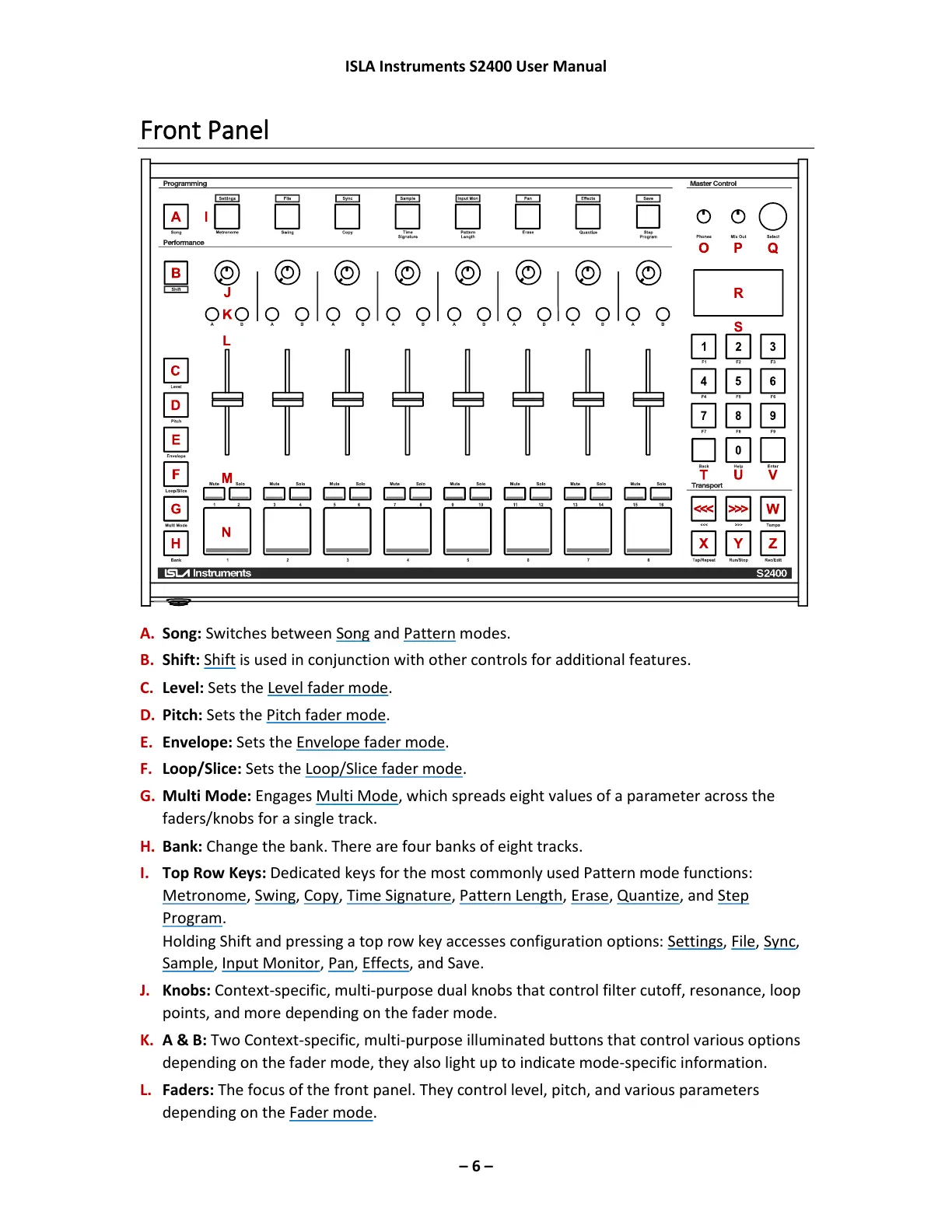
A. Song: Switches between Song and Pattern modes.
B. Shift: Shift is used in conjunction with other controls for additional features.
C. Level: Sets the Level fader mode.
D. Pitch: Sets the Pitch fader mode.
E. Envelope: Sets the Envelope fader mode.
F. Loop/Slice: Sets the Loop/Slice fader mode.
G. Multi Mode: Engages Multi Mode, which spreads eight values of a parameter across the
faders/knobs for a single track.
H. Bank: Change the bank. There are four banks of eight tracks.
I. Top Row Keys: Dedicated keys for the most commonly used Pattern mode functions:
Metronome, Swing, Copy, Time Signature, Pattern Length, Erase, Quantize, and Step
Program.
Holding Shift and pressing a top row key accesses configuration options: Settings, File, Sync,
Sample, Input Monitor, Pan, Effects, and Save.
J. Knobs: Context-specific, multi-purpose dual knobs that control filter cutoff, resonance, loop
points, and more depending on the fader mode.
K. A & B: Two Context-specific, multi-purpose illuminated buttons that control various options
depending on the fader mode, they also light up to indicate mode-specific information.
L. Faders: The focus of the front panel. They control level, pitch, and various parameters
depending on the Fader mode.



 To Next Page