ISLA Instruments S2400 User Manual
– 39 –
SStteepp PPrrooggrraamm
The Step Program key is the far-right key on the top row.
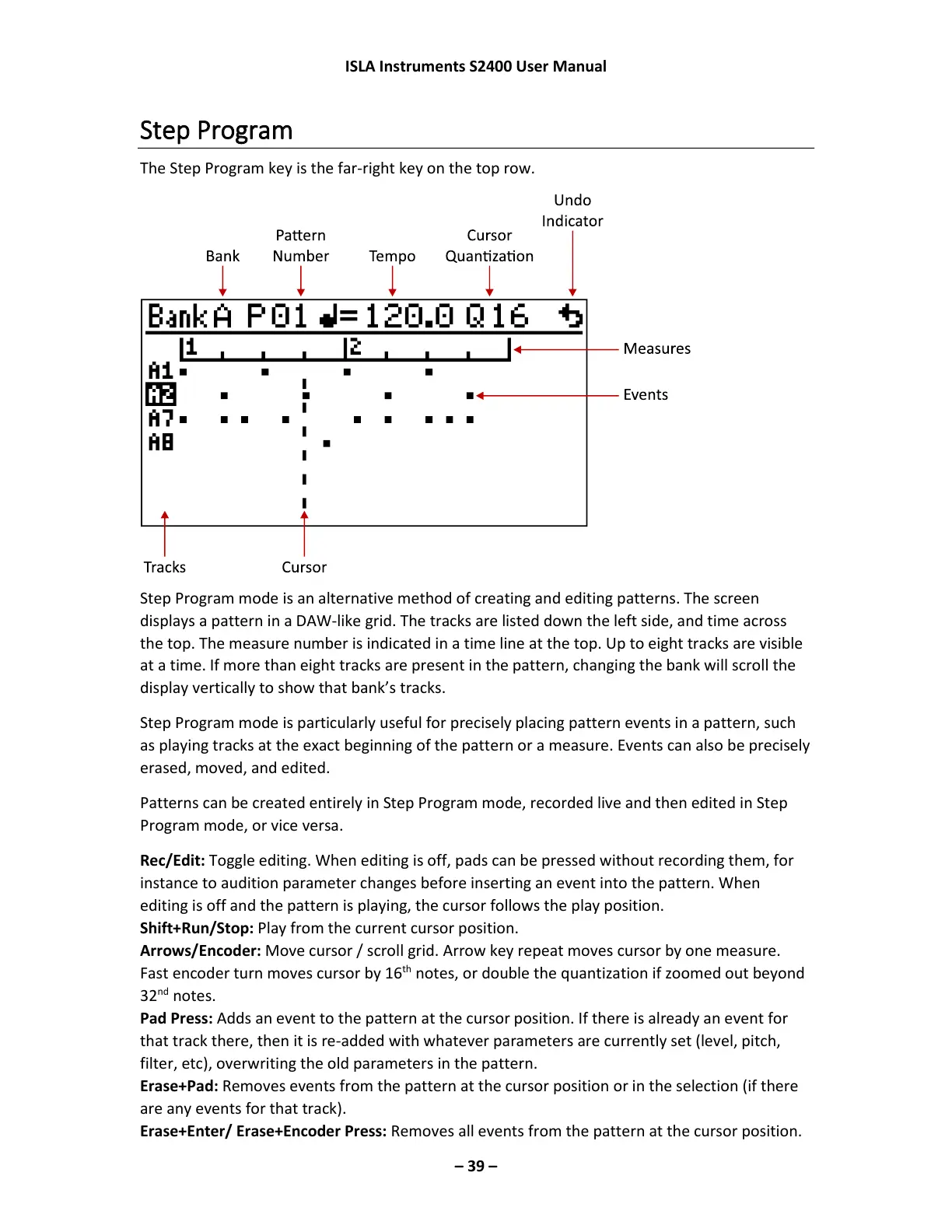
Step Program mode is an alternative method of creating and editing patterns. The screen
displays a pattern in a DAW-like grid. The tracks are listed down the left side, and time across
the top. The measure number is indicated in a time line at the top. Up to eight tracks are visible
at a time. If more than eight tracks are present in the pattern, changing the bank will scroll the
display vertically to show that bank’s tracks.
Step Program mode is particularly useful for precisely placing pattern events in a pattern, such
as playing tracks at the exact beginning of the pattern or a measure. Events can also be precisely
erased, moved, and edited.
Patterns can be created entirely in Step Program mode, recorded live and then edited in Step
Program mode, or vice versa.
Rec/Edit: Toggle editing. When editing is off, pads can be pressed without recording them, for
instance to audition parameter changes before inserting an event into the pattern. When
editing is off and the pattern is playing, the cursor follows the play position.
Shift+Run/Stop: Play from the current cursor position.
Arrows/Encoder: Move cursor / scroll grid. Arrow key repeat moves cursor by one measure.
Fast encoder turn moves cursor by 16
th
notes, or double the quantization if zoomed out beyond
32
nd
notes.
Pad Press: Adds an event to the pattern at the cursor position. If there is already an event for
that track there, then it is re-added with whatever parameters are currently set (level, pitch,
filter, etc), overwriting the old parameters in the pattern.
Erase+Pad: Removes events from the pattern at the cursor position or in the selection (if there
are any events for that track).
Erase+Enter/ Erase+Encoder Press: Removes all events from the pattern at the cursor position.



 To Next Page