ISLA Instruments S2400 User Manual
– 32 –
Name: The name of the file. Defaults to Sample plus a sequential three-digit number which is
automatically set. Select the name to edit the file name.
Assign to Track: After saving, the new file can be assigned to a track. Select the desired track
from the list, or press a pad to fill in the track.
Waveform Memory
Normally, the 64 MB sample RAM is divided into 32 play buffers. Sounds smaller than 2 MB can
be edited in the play buffer. Sounds larger than 2 MB but less than 64 MB can be edited by using
the whole sample RAM as the edit buffer. A pattern or song cannot be playing while editing a
sound larger than 2 MB. Sounds larger than 64 MB cannot be edited in the waveform editor.
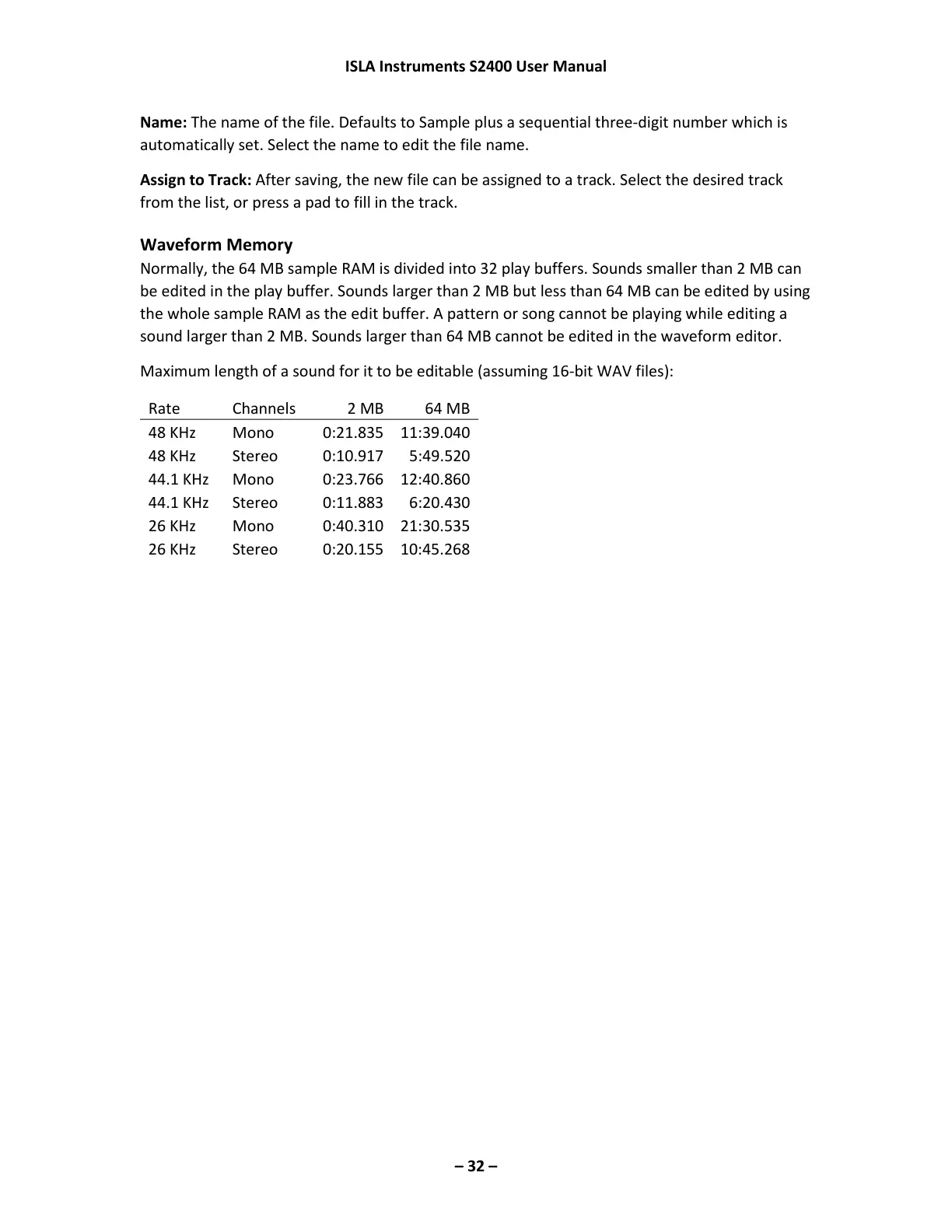
Maximum length of a sound for it to be editable (assuming 16-bit WAV files):



 To Next Page