i-ALERT2 Application Guide 27 of 64
MOUNTING METHODS
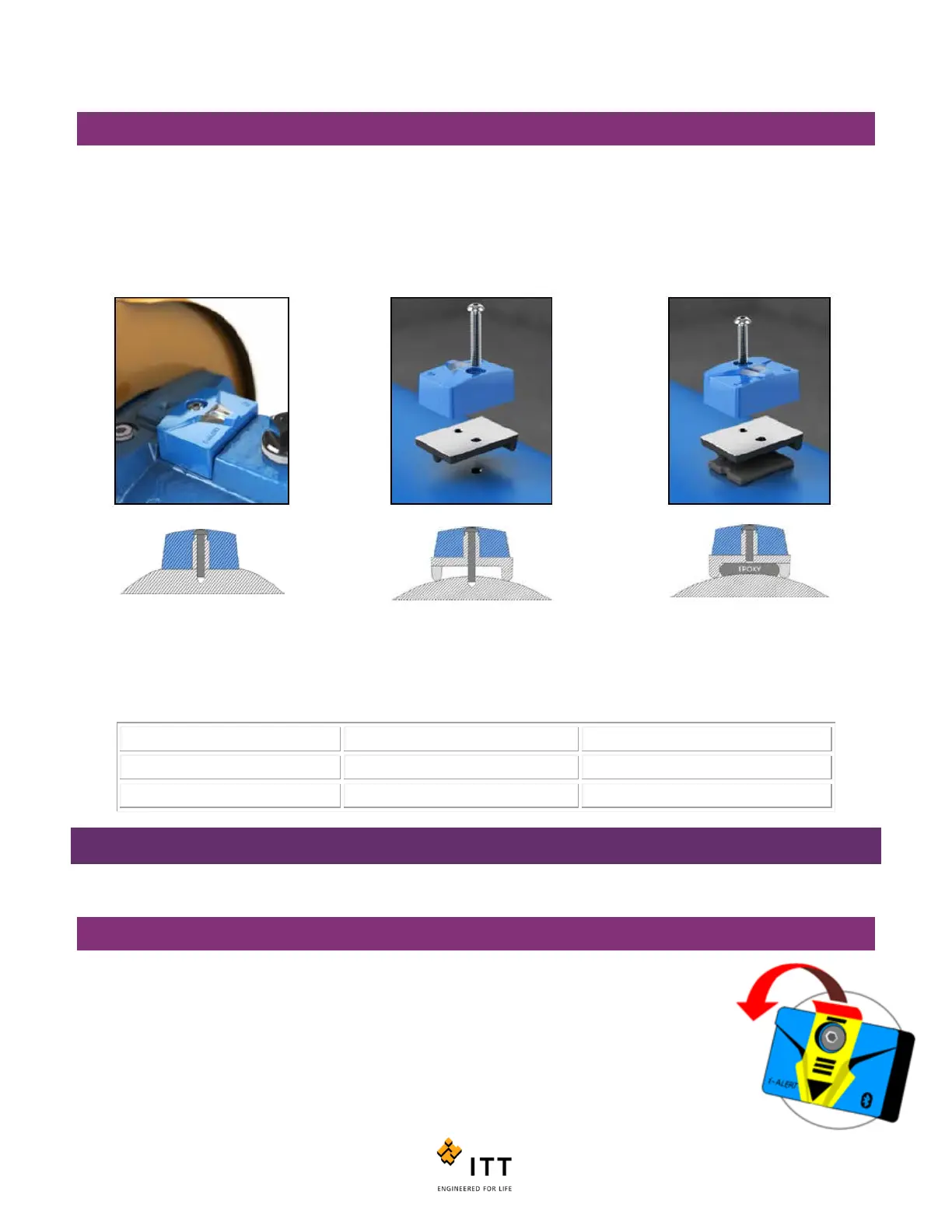
There are three methods that can be used to mount the i-ALERT2 device to a machine. They are shown in the figure below.
On new pumps and pumps repaired through ITT PRO Services, a slot will be milled into an appropriate location on the
bearing housing and the device will be secured with a screw. Alternatively, a hole can be drilled and tapped and a small
adapter plate can then be used to secure the device. Lastly, the device can be epoxied directly the machine via the
mounting plate. Make sure to use a good quality, rigid epoxy. Do not use RTV or Silicon to mount the device.
CAUTION:
Always wear protective gloves. The equipment and the i-ALERT2 device can be hot.
Epoxy: application specific
COMMISSIONING
STEPS TO ACTIVATE THE I-ALERT2 EQUIPMENT HEALTH MONITOR:
1. Remove the sticker.
2. The i-ALERT2 device will look for light. Note: If in a dark environment use light source to activate.
3. When activated a sequence of flashing LEDs will start to indicate that the unit is powered on.
4. When sequence is completed the green LED will flash every 5 sec under normal operating conditions
Figure 23: Mounting Methods



 To Next Page