54
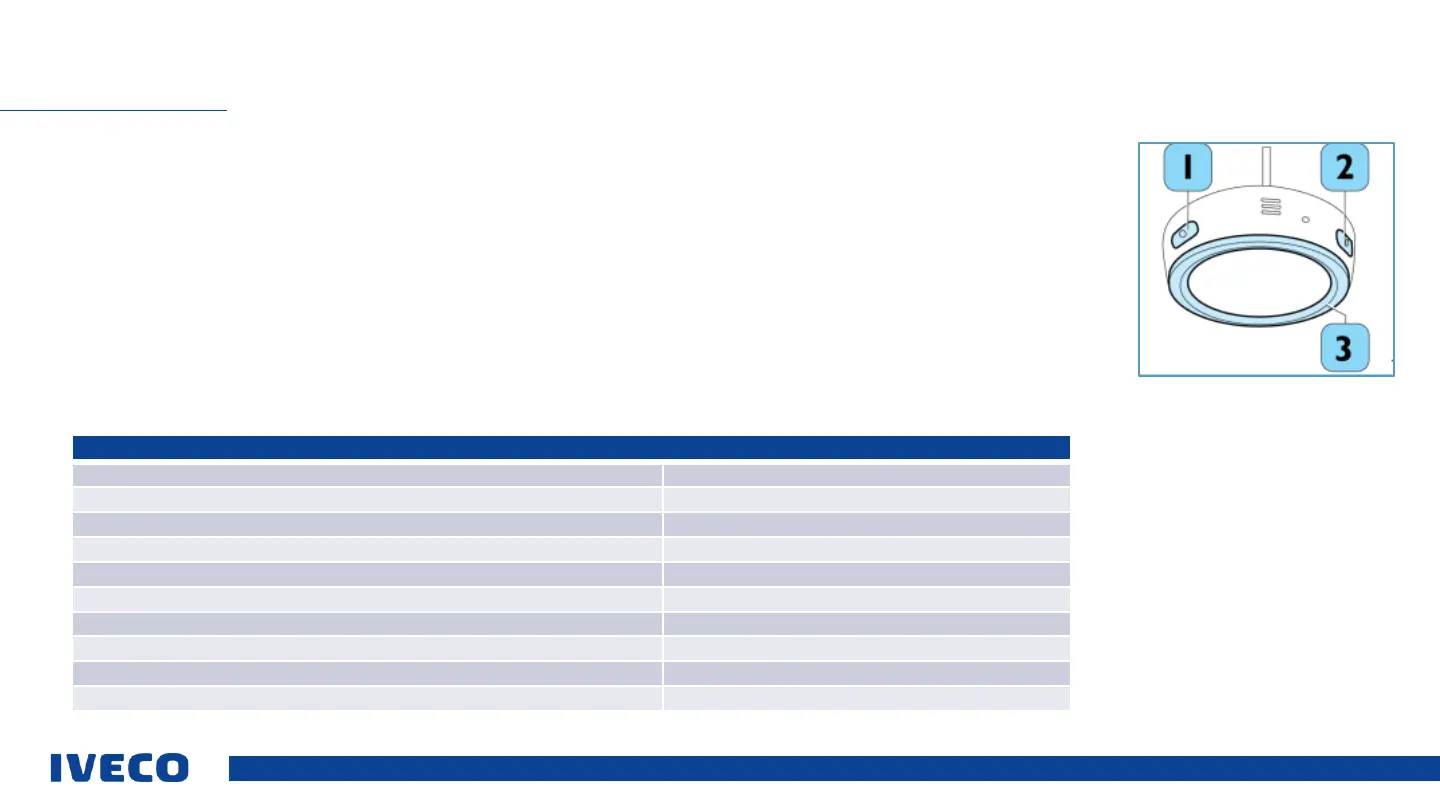
Driver Pal microphone
The microphone function of the IVECO Driver PAL is activated using the word “Alexa” and/or pressing the (2) "wakeup”
button. After activation, the microphone will remain ready to listen for 8 s, and wait to receive instructions.
The microphone is equipped with two buttons to execute several functions:
▪ Press the (1) “Mute / Unmute” button one time: switches the voice recognition off/on.
▪ Press the (2) “Search / Setup” button one time. The microphone will remain ready to listen if a connected device is
available.
▪ Long press of the (2) “Search / Setup” button for 3 s: the device will go into search mode to connect a new device.
▪ Long press of the (1) “Mute / Unmute” button for 7 s: the microphone will restart.
▪ Long press of both buttons for 7 s: resets the microphone to the default settings, and deletes the previously configured
and saved smartphone Bluetooth
SET UP VOICE CONTROLS (DRIVER PAL)
Microphone LED displays


 To Next Page