EasyManua.ls Logo

Ivy Biomedical Systems 3000 Series - User Manual

Ivy Biomedical Systems 3000 Series
44 pages
Print Icon
To Next Page IconTo Next Page
Loading...
Part No. 2718-55-16
OPERATION MANUAL
© 2010 IVY Biomedical Systems Inc. All Rights Reserved.
Part No. 2718-04-16
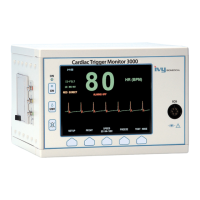
Cardiac Trigger Monitor
Model 3000 Series

Other manuals for Ivy Biomedical Systems 3000 Series

Questions and Answers

  • R
    Richard ClaytonAug 2, 2025
    What to do if Ivy Biomedical Systems Monitor does not indicate “ARMED?”
    • J
      jacksonalanAug 3, 2025
      If your Ivy Biomedical Systems Monitor doesn't indicate “ARMED” (models 3100, 3150, and 3200 only), ensure that the system interlock is connected via the auxiliary port, the patient ID is entered, and the X-ray function is turned off.
  • B
    Brian CarterAug 8, 2025
    How to fix System Interlock symbol not showing connection on Ivy Biomedical Systems Monitor?
    • B
      blankenshipkristineAug 8, 2025
      If the System Interlock symbol isn't showing a connection on your Ivy Biomedical Systems Monitor (models 3050, 3100, 3150, and 3200 only), ensure the auxiliary port is properly connected.
  • R
    Randall JosephAug 14, 2025
    What to do if “DISK WRITE FAILED” message appeared on Ivy Biomedical Systems 3000?
    • P
      patrickgrimesAug 14, 2025
      If your Ivy Biomedical Systems Monitor displays a “DISK WRITE FAILED” message (models 3100 and 3150 only), verify that a 3.5” floppy disk is inserted into the floppy drive and that the floppy disk is not full.
  • J
    Joel DavisAug 20, 2025
    How to make the trigger pulse functional on Ivy Biomedical Systems Monitor?
    • J
      Jennifer CunninghamAug 20, 2025
      If the trigger pulse is not functional on your Ivy Biomedical Systems Monitor, check that the trigger pulse is turned on (look for a red mark over the ECG waveform), ensure the auxiliary port connector is plugged into the monitor, and verify the ECG size is optimal by selecting Lead II.
  • G
    Greg SnyderAug 27, 2025
    How to troubleshoot Ivy Biomedical Systems 3000 Monitor that does not turn on?
    • R
      rmaldonadoAug 27, 2025
      To troubleshoot why your Ivy Biomedical Systems Monitor isn't turning on, ensure the power cord is correctly plugged into both the monitor and the AC outlet. Verify that the line voltage selector is in the correct position and that the fuses are not blown. Finally, confirm that the ON switch is pressed.

Summary

Safety Precautions and Guidelines

Electrical Safety

Details electrical safety precautions, power source requirements, and grounding.

Explosion Hazard Warning

Warns against using the equipment in the presence of flammable anesthetics.

Patient Connection Safety

Discusses isolated probes, cable routing, and leakage current for patient connections.

Electrosurgery Protection

Explains protection against electrosurgery potentials and burn risks.

Defibrillation Protection

Details protection against defibrillator discharge and current limits.

Electromagnetic Compatibility (EMC)

States certification for emissions and immunity according to IEC-60601-1-2.

IEC 60601-1-2 EMC Precautions

Highlights special precautions for EMC installation and service.

Electromagnetic Emissions Guidance

Provides guidance on electromagnetic emissions and compliance for the Model 3000.

Electromagnetic Immunity Guidance

Details electromagnetic immunity tests and compliance levels for the Model 3000.

Monitor Description and Features

Controls and Indicators Overview

Describes the front panel controls and indicators, including basic and programmable keys.

Alarm System

Details various alarm messages, their indications, and how to manage them.

Monitor Setup Procedures

Initial Instrument Setup

Guides on initial setup, connecting power, and attaching the patient cable.

Alarm Messages and Handling

Understanding Alarm Indications

Details common alarm messages such as HR HIGH, HR LOW, Asystole, and Lead Off.

ECG Monitoring Procedures

ECG Safety Considerations

Outlines safety precautions for ECG monitoring, including disposable products and lead connections.

ECG Patient Connection

Provides instructions for proper ECG patient connections using specific cables and electrodes.

Setting ECG Alarm Limits

Describes how to set and adjust the high and low heart rate alarm limits.

Monitor Testing Procedures

Technical Specifications

ECG Monitoring Specifications

Details technical specifications for ECG monitoring, including lead selection, isolation, and frequency response.

Ivy Biomedical Systems 3000 Series Specifications

General IconGeneral
Screen Size10.4 inches
Resolution800 x 600 pixels
SpO2 Range0-100%
NIBP MethodOscillometric
Battery TypeRechargeable Lithium-ion
Weight4.5 kg
Parameters MonitoredECG, SpO2, NIBP, Temperature, Respiration
ECG Channels3 or 5 lead
Temperature TypeRectal, Axillary
Respiration Rate Range0-120 bpm
Respiration MethodImpedance
AlarmsAudible and Visual
Power SupplyAC 100-240V, 50/60Hz
ConnectivityRS-232, Ethernet
Operating Temperature10-40°C
Storage Temperature-20-60°C
RecorderOptional
NetworkingOptional
Humidity Range15-95% (non-condensing)

Related product manuals