11
To set the entire premises in which partial setting is enabled, hold down the button to set the control
panel for 2 seconds or press it twice. After the button is pressed once it shows continuous yellow light, after
it is pressed a second time it shows continuous red light.
If the system is partially set already – the function button shows a continuous yellow light – the entire
system can be fully set by authorization and pressing the yellow button for a longer time. Once the button is
pressed, the system will be fully set and the button turns red.
Partial setting can be confi gured in a way that authorization is not required. In order to unset the control
panel when it is partially set, press the yellow button. The control panel will unset and the button turns
green.
2.2.4 DURESS ACCESS CONTROL
Provides unsetting of the control panel in a special mode. The system seemingly unsets, however it
triggers a silent panic alarm, which is reported to selected users (including ARC).
Unsetting under duress is executed by adding 1 to the last number in a valid code. Contact your service
technician if you want to use this feature.
Example:
Valid code: 9999 Code for unsetting under duress: 9990
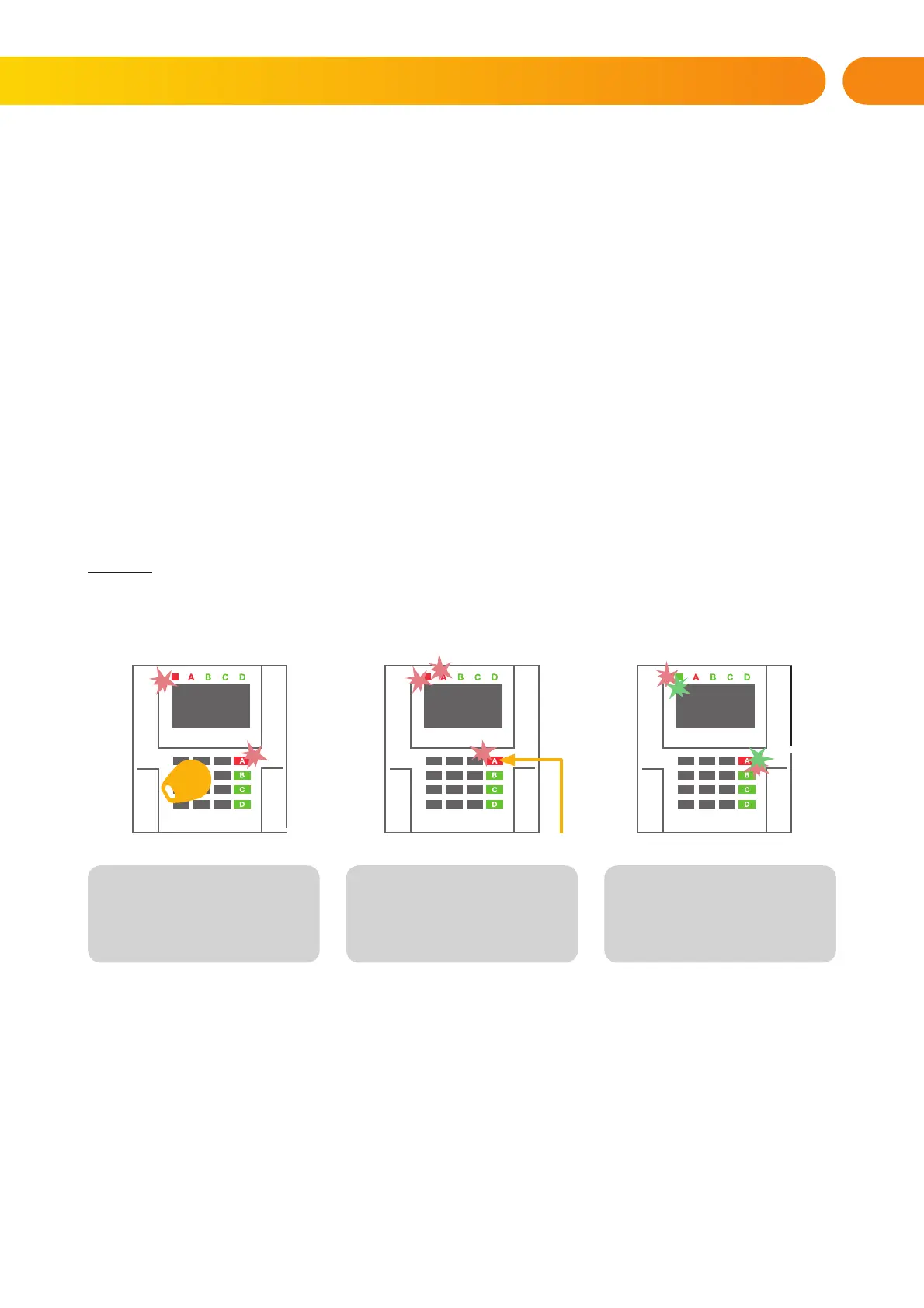
2.2.5 TERMINATING A TRIGGERED ALARM
A triggered alarm in progress is indicated by the status indicator and the function button rapidly fl ashing
red. You need to authorize yourself using the keypad in order to terminate the alarm. The section remains
set, a rapidly fl ashing red function button indicates the alarm memory. Indication will continue fl ashing even
after the system has been unset.
WARNING: If the alarm memory indication was activated during your absence, always enter the building
with caution, search for the cause of the alarm in the event history and be very careful when checking the
premises or wait until the security agency arrives (provided your system is connected to an Alarm Receiving
Centre).
The alarm memory indication remains on until the system is set once again. Alternatively, it can be also
cancelled from the keypad menu: Main menu – Cancel warning indication.
1. Authorize yourself using the
keypad (enter a code or hold a
tag up to the reader).
2. Press the function button
of the section in which the alarm
has been triggered.
3. Unsetting is fi nished and sirens
are silenced. Rapidly alternately
fl ashing function buttons (green/
red) and the status indicators
indicate the alarm memory.
2. OPERATING THE JA-10 SYSTEM







 To Next Page