48
GridVis
®
Collector www.janitza.de www.janitza.de GridVis
®
Collector
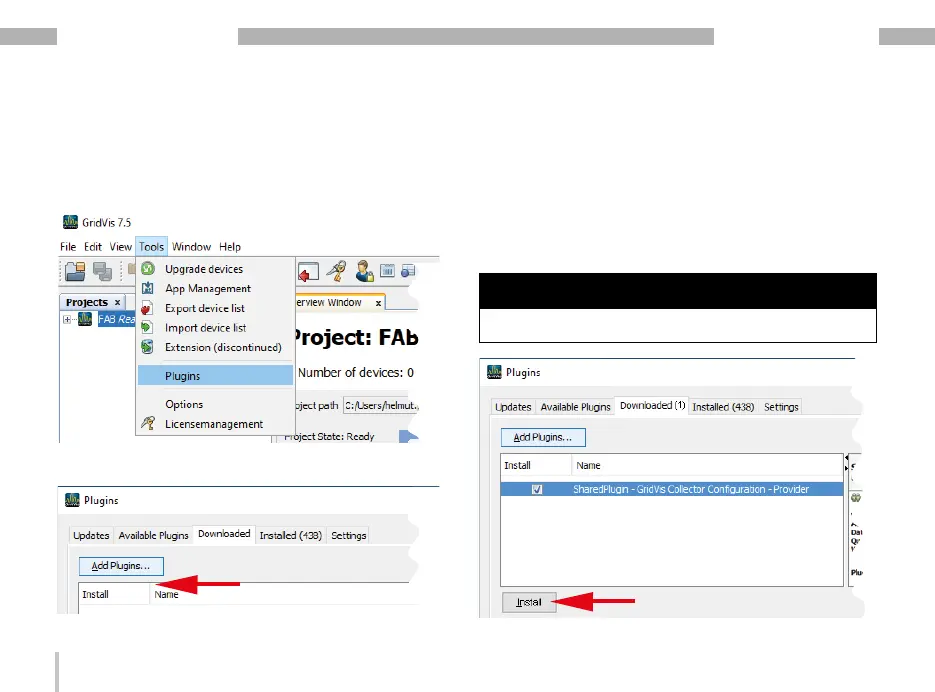
· On the "Downloaded" tab, click the "Add plug-ins"
button.
· In the dialog box that appears, select your plug-in
(USB flash drive) and click "Open."
· Your plug-in now appears on the "Downloaded"
tab.
· Select the checkbox of your plug-in and click the
"Install" button.
NOTE
Install plug-ins one after the other!
Step - Install plug-ins
· Click on the "Extras" drop-down menu in the menu
bar of the GridVis software.
· Then click on the menu item "Plug-ins".
· The "Plug-ins" window appears.


 To Next Page