85
GridVis
®
Collector www.janitza.de www.janitza.de GridVis
®
Collector
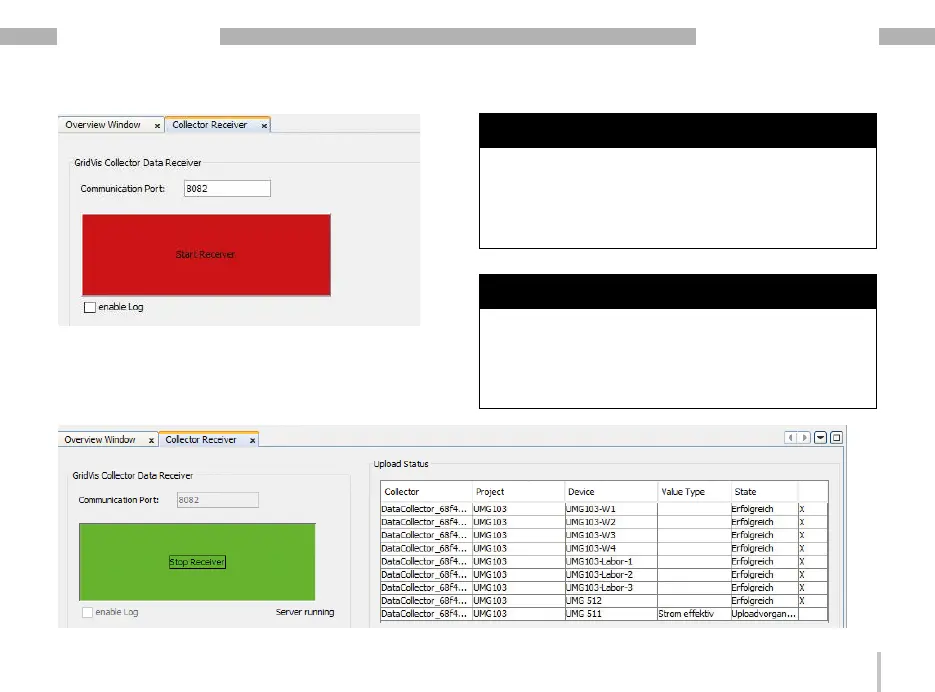
Display for "Communication channel (service) for data
exchange":
· Red = service disabled.
· Green = service enabled.
NOTE
· Data is transferred from the GridVis
®
Collector to the
GridVis server via the communication port.
· All GridVis
®
Collectors share one communication port.
· Please ensure that the communication port set in the
GridVis software matches the GridVis
®
Collector confi-
guration.
NOTE
Since the GridVis
®
Collector actively sends data to the
PC/server using the GridVis installation software, the
communication port (e.g. 8082) must be enabled in the
Windows firewall under "incoming rules". Otherwise,
Windows blocks the sending of data.
Contact your system administrator if necessary.


 To Next Page